<?xml version="1.0" encoding="utf-8"?><feed xmlns="http://www.w3.org/2005/Atom" ><generator uri="https://jekyllrb.com/" version="4.4.1">Jekyll</generator><link href="https://www.dotenv.org/feed.xml" rel="self" type="application/atom+xml" /><link href="https://www.dotenv.org/" rel="alternate" type="text/html" /><updated>2025-08-18T21:24:32+00:00</updated><id>https://www.dotenv.org/feed.xml</id><title type="html">Dotenv</title><subtitle>Secrets for developers</subtitle><author><name>dotenv</name></author><entry><title type="html">Changes to Dotenv.org Pricing</title><link href="https://www.dotenv.org/blog/2025/05/19/pricing-changes.html" rel="alternate" type="text/html" title="Changes to Dotenv.org Pricing" /><published>2025-05-19T00:00:00+00:00</published><updated>2025-05-19T00:00:00+00:00</updated><id>https://www.dotenv.org/blog/2025/05/19/pricing-changes</id><content type="html" xml:base="https://www.dotenv.org/blog/2025/05/19/pricing-changes.html"><![CDATA[<p><img src="/assets/img/blog/pricing-changes.png" /></p>

<p>Starting <strong>July 1st</strong> (for your June bill), we’re making changes to Dotenv.org’s pricing. These updates reflect the real cost of maintaining a reliable, secure, and developer-friendly platform — and will help us continue supporting the ecosystem long-term.</p>

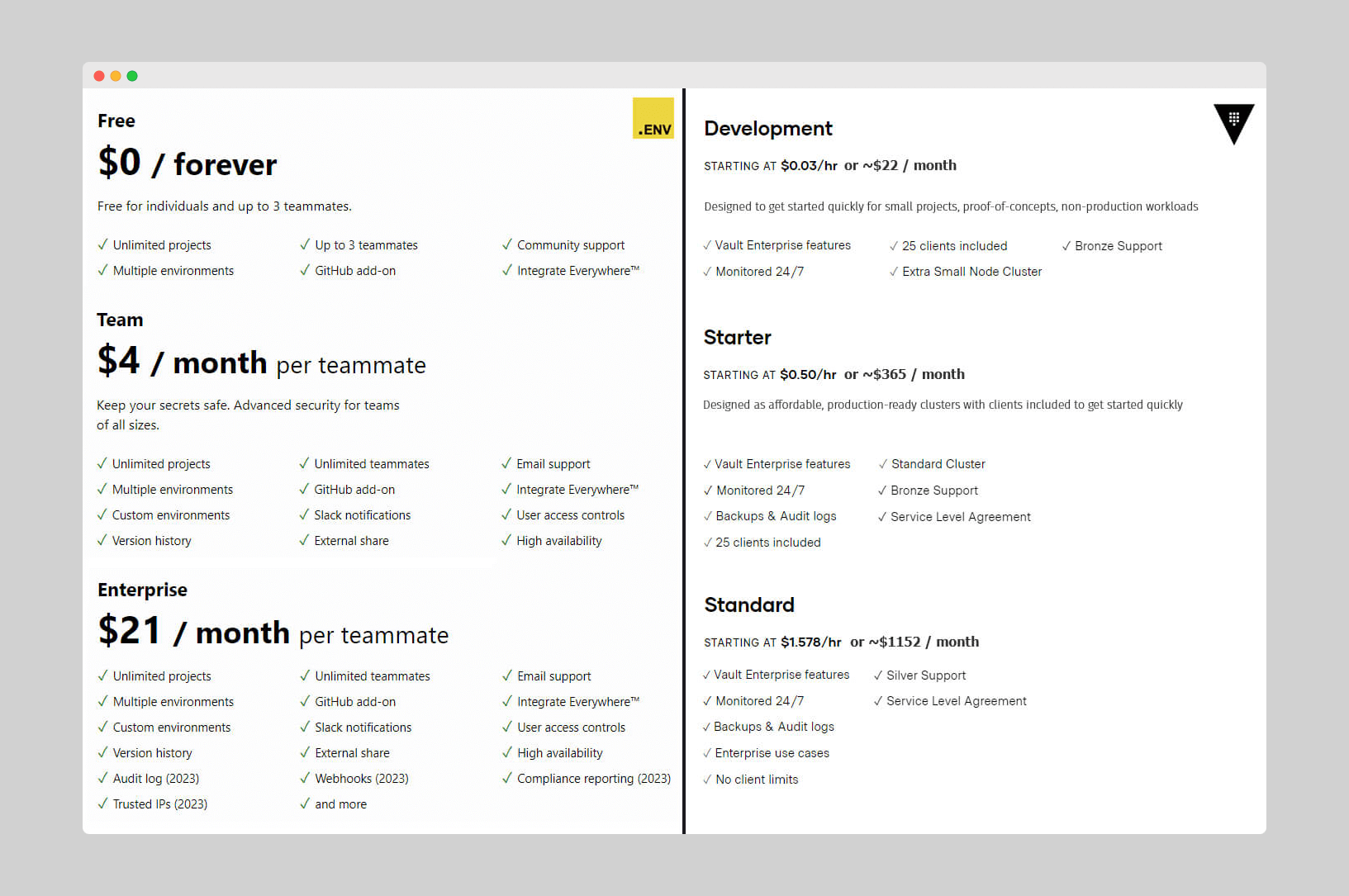
<h2 id="-solo-plan-5month">📦 Solo Plan: $5/month</h2>

<p>The <strong>free plan is going away</strong>. If you’re on a free Dotenv.org account, you’ll need to either:</p>

<ul>
  <li>Upgrade to the new <strong>Solo Plan</strong> for <strong>$5/month</strong>, or</li>
  <li>Migrate to <a href="https://github.com/dotenvx/dotenvx">Dotenvx</a> — a free and open-source alternative that supports encrypted .env files, git sync, and more.</li>
</ul>

<h2 id="-team-plan-8seatmonth">👥 Team Plan: $8/seat/month</h2>

<p>For organizations, the <strong>Team Plan</strong> is increasing from <strong>$4 to $8 per seat</strong>. This applies to all existing orgs starting <strong>August 1st</strong> (for your July bill). If your team relies on Dotenv.org, this helps us scale support, security, and reliability.</p>

<h2 id="-why-the-change">💡 Why the Change?</h2>

<p>Dotenv.org has been free or inexpensive for years, but infrastructure and support costs have grown. This change allows us to:</p>

<ul>
  <li>Keep Dotenv.org stable and secure</li>
  <li>Fund ongoing maintenance</li>
  <li>Support modern use cases with new tooling like Dotenvx</li>
</ul>

<h2 id="-questions">💬 Questions?</h2>

<p>We know pricing changes are disruptive. We even considered open sourcing Dotenv.org, but felt it would split the community between two overlapping tools. <a href="https://github.com/dotenvx/dotenvx">Dotenvx</a> is better positioned to serve developers long-term — it’s open-source, doesn’t require any backend infrastructure, and works anywhere.</p>

<p>If you have questions or need help transitioning to Dotenvx, reach out — we’re happy to help. Migrating is straightforward.</p>

<p><a href="https://github.com/dotenv-org/dotenv-vault?tab=readme-ov-file#migrating-to-dotenvx">Read migration steps →</a>.</p>

<p>Thanks for using Dotenv all these years. We’re excited about what comes next.</p>

<p>— The Dotenv Team</p>]]></content><author><name>mot</name></author><category term="blog" /><summary type="html"><![CDATA[Starting July 1st, Dotenv.org is removing its free plan and updating pricing.]]></summary><media:thumbnail xmlns:media="http://search.yahoo.com/mrss/" url="https://www.dotenv.org/assets/img/blog/pricing-changes.png" /><media:content medium="image" url="https://www.dotenv.org/assets/img/blog/pricing-changes.png" xmlns:media="http://search.yahoo.com/mrss/" /></entry><entry><title type="html">Community Spotlight: David Cochrum</title><link href="https://www.dotenv.org/blog/2023/11/13/community-spotlight-david-cochrum.html" rel="alternate" type="text/html" title="Community Spotlight: David Cochrum" /><published>2023-11-13T00:00:00+00:00</published><updated>2023-11-13T00:00:00+00:00</updated><id>https://www.dotenv.org/blog/2023/11/13/community-spotlight-david-cochrum</id><content type="html" xml:base="https://www.dotenv.org/blog/2023/11/13/community-spotlight-david-cochrum.html"><![CDATA[<p><img src="/assets/img/blog/community-spotlight-david-cochrum.png" /></p>

<p>Meet <a href="https://chrum.me/">David Cochrum</a>, the creator of <a href="https://github.com/davidcochrum/dotenv-vault-laravel">dotenv-vault-laravel</a>. He’s a full stack software engineer that specializes in PHP and JavaScript.</p>

<p>In this spotlight post, I ask him some questions about Laravel, as well as the <code>.env.vault</code> file format.</p>

<h2 id="question-1-laravel-ecosystem">Question 1: Laravel Ecosystem</h2>

<blockquote>
  <p>Having worked with Laravel for some time, what significant changes have you observed in the framework and its ecosystem? How have these changes influenced your development approach?</p>
</blockquote>

<p>Over the years of working with Laravel, I have seen the level of convenience grow while the learning curve shrunk. Obviously, Laravel is quite opinionated in its approach, but those opinions cover the vast majority of use cases and generally make the framework a breeze to work with.</p>

<p>Take create, read, update, and delete (CRUD) operations, for example. So much of web apps are CRUD operations against resource models. Laravel added a great convenience when it <a href="https://laravel.com/docs/5.5/releases">introduced resource controllers</a> and <a href="https://laravel.com/docs/5.4/releases">route model binding</a> to go with it. So long as you’re following the Laravel conventions, much of the boilerplate work is handled for you. That in turn empowers developers to crank out more functionality without dying of boredom along the way.</p>

<p>I believe the popularity of Laravel has grown largely due to of these opinionated conveniences. As such, there’s a package to add on just about any common functionality these days directly through Packagist and GitHub. Third-party packages also benefit from auto discovery to the point where most can be added just by including the Composer dependency. The integration and configuration of these auto-discovered packages within your app is effortless and often requires no further modification than the installation.</p>

<p>Now, the Computer Science purists will also tell you that some of Laravel’s conventions and conveniences come at the cost of breaking certain programming paradigms and principles. While this is undeniably true, in my humble opinion, Laravel does a pretty decent job of balancing principles with practicality. Sure, Facades are an example of an anti-pattern, but I think, when used responsibly, the benefits can outweigh the penalty of broken rules.</p>

<p>Early on when I first started real app development, the seniors above me decided to base our re-build on Symfony. While this allowed for some low-level convenience, the decision was also made that the Symfony validation package wasn’t good enough for our purposes and instead, each CRUD module would require complex validator classes for each of the forms within. I believe we wasted quite a bit of developer time/resources in re-inventing a pretty decent wheel. Reflecting on that time now, I believe that was a huge mistake. Yes, it was the more principled approach, but I don’t think we gained much, if anything, by writing our own validation instead of leveraging the widely used package.</p>

<h2 id="question-2-laravel-benefits">Question 2: Laravel Benefits</h2>

<blockquote>
  <p>Laravel is known for its elegant syntax and robust features. Can you share an example from your experience where Laravel uniquely benefited a project you worked on, perhaps in ways other PHP frameworks might not have?</p>
</blockquote>

<p>In my opinion, Laravel’s most valuable feature is how it allows you to go from nothing to a minimum viable product (MVP) faster than any other framework. Because of its popularity, so many community packages are available to be quickly integrated into your project as well. Say you need to add OAuth to your project, for example. With other frameworks or languages, that typically requires a significant amount of work. Whereas with Laravel, the OAuth package offered, <a href="https://laravel.com/docs/10.x/fortify">Fortify</a>, does the overwhelming majority of the work for you and requires minimal effort to integrate.</p>

<h2 id="question-3-your-experience-with-laravel">Question 3: Your Experience with Laravel</h2>

<blockquote>
  <p>What drew you to specialize in Laravel, and how has it shaped your journey as a developer? Are there any projects or achievements within the Laravel community that you’re particularly proud of?</p>
</blockquote>

<p>I wouldn’t say I necessarily specialize in Laravel, but it is definitely my framework of choice when I’m offered a choice. I’ve worked on projects using Symfony, CodeIgniter v3, Zend v1, and even a homegrown framework that predates all of the others.</p>

<p>Many moons ago I was tasked with extending and maintaining APIs for various mobile apps which were all bundled into a single WordPress XMLRPC plugin. I was given more freedom on one project and I presented the case that I should be given the time to learn and build this next API using a concept I had just heard of: Object Oriented Programming (OOP). I was successful in convincing the stakeholders that allowing me the time to learn and build in this way would be worthwhile. I tried out numerous frameworks, but with the help of <a href="https://laracasts.com/">Jeffrey Way’s Laracasts</a>, Laravel just seemed to come so naturally and truly helped me learn and adopt programming principles that I hadn’t known before.</p>

<p>Speaking of Laracasts, I would consider that project and community one of the best things to come from Laravel. I’m sure many other developers like myself got their start from working through those videos and tutorials. I certainly wouldn’t be where I am today without Laracasts. Nor would I be as efficient as I am within my IDE.</p>

<h2 id="question-4-laraval-with-envvault">Question 4: Laraval with .env.vault</h2>

<blockquote>
  <p>What drew you to the .env.vault mechanism? How do you think it will affect the Laravel ecosystem? Is it useful to it? Laravel has its own encryption mechanism for .env files, how is .env.vault different and or more useful in your mind?</p>
</blockquote>

<p>I’m currently working on a Zend Framework v1 monolith project that my team and I are attempting to modernize. These apps use Zend’s ini files for configuration which also can be overridden via .env values. I’m working on protecting these secrets and making them more portable while simultaneously starting the process of migrating the apps from Zend to Laravel. During my search for solutions, I came across <a href="https://www.dotenv.org/">dotenv.org</a> and its vault for secure secret storage that seemed to fit my needs. I did, however, see an opportunity to author <a href="https://github.com/davidcochrum/dotenv-vault-laravel">my first Laravel package</a> which simply wrapped the <a href="https://github.com/dotenv-org/phpdotenv-vault">PHP Dotenv library</a> for dead-simple integration with the framework.</p>

<p>I think the vault mechanism can be useful for those who are looking for a storage solution for their secrets which may not be available or is costly with their hosting provider. Additionally, the remote sync feature offered on <a href="https://www.dotenv.org">dotenv.org</a> with the potential for granular access control across user accounts adds a great value that is missing from Laravel’s encryption mechanism.</p>

<hr />

<p>Thank you David for the thoughts and for your <a href="https://github.com/davidcochrum/dotenv-vault-laravel">dotenv-vault-laravel</a> contribution to the Laravel community.</p>

<p><img src="/assets/img/blog/community-spotlight-david-cochrum-1.png" /></p>

<p><img src="/assets/img/blog/community-spotlight-david-cochrum-2.png" /></p>]]></content><author><name>mot</name></author><category term="blog" /><summary type="html"><![CDATA[Meet David Cochrum, the creator of dotenv-vault-laravel.]]></summary><media:thumbnail xmlns:media="http://search.yahoo.com/mrss/" url="https://www.dotenv.org/assets/img/blog/community-spotlight-david-cochrum.png" /><media:content medium="image" url="https://www.dotenv.org/assets/img/blog/community-spotlight-david-cochrum.png" xmlns:media="http://search.yahoo.com/mrss/" /></entry><entry><title type="html">PHP dotenv is inconsistent across development and production</title><link href="https://www.dotenv.org/blog/2023/11/07/phpdotenv-is-inconsistent-across-development-and-production.html" rel="alternate" type="text/html" title="PHP dotenv is inconsistent across development and production" /><published>2023-11-07T00:00:00+00:00</published><updated>2023-11-07T00:00:00+00:00</updated><id>https://www.dotenv.org/blog/2023/11/07/phpdotenv-is-inconsistent-across-development-and-production</id><content type="html" xml:base="https://www.dotenv.org/blog/2023/11/07/phpdotenv-is-inconsistent-across-development-and-production.html"><![CDATA[<p><img src="/assets/img/blog/phpdotenv-is-inconsistent.png" /></p>

<p>I recently added <a href="https://github.com/dotenv-org/phpdotenv-vault"><code>.env.vault</code> support for PHP</a>, and I came across serious inconsistencies across development and production using <a href="https://github.com/vlucas/phpdotenv">phpdotenv</a>.</p>

<p>Values can come up blank (yikes!) and <code>load</code> works differently than the <a href="https://github.com/theskumar/python-dotenv">other</a> <a href="https://github.com/bkeepers/dotenv">major</a> <a href="https://github.com/motdotla/dotenv">dotenv</a> libraries.</p>

<p>Luckily, the fix is straightforward.</p>

<ul>
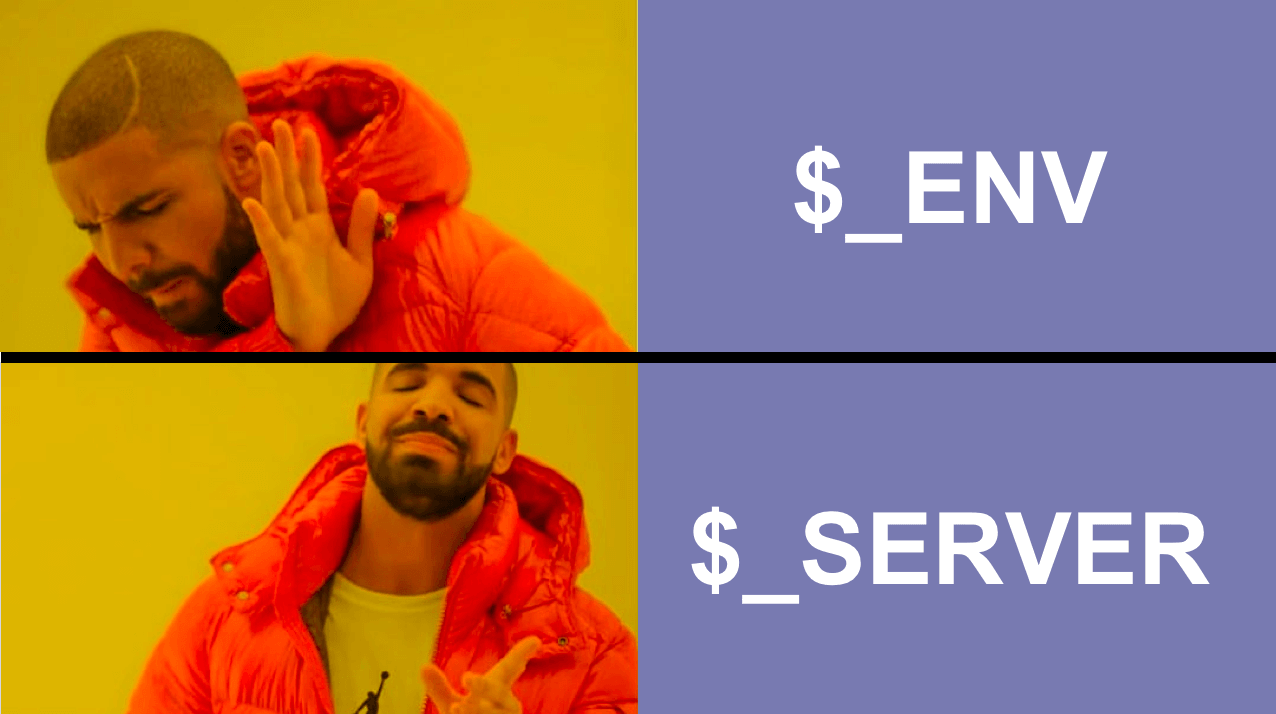
  <li>Use <code>$_SERVER</code>  - don’t use <code>$_ENV</code> or <code>getenv</code></li>
  <li>Use <code>safeLoad()</code> - don’t use <code>.load()</code></li>
</ul>

<p>Let’s dive in.</p>

<blockquote>
  <p>Also, let me say that I know how difficult it is to maintain a widely-embedded library like <a href="https://github.com/vlucas/phpdotenv">phpdotenv</a>. There are good historical reasons a library might have inconsistencies. Sometimes changing the inconsistencies leads to worse cascading effects.</p>
</blockquote>

<h2 id="setup">Setup</h2>

<p>Install <a href="https://github.com/vlucas/phpdotenv">phpdotenv</a>.</p>

<pre><code>composer require vlucas/phpdotenv
</code></pre>

<p>Create a <code>.env</code> file.</p>

<pre><code>HELLO="File"
</code></pre>

<p>Then load your <code>.env</code> file in a way that will output <code>Hello File</code> using each available accessor.</p>

<ol>
  <li><code>$_ENV</code></li>
  <li><code>$_SERVER</code></li>
  <li><code>getenv</code></li>
</ol>

<pre><code class="language-php">&lt;?php
// example1.php
require 'vendor/autoload.php';

$dotenv = Dotenv\Dotenv::createImmutable(__DIR__);
$dotenv-&gt;load();

$env_hello = $_ENV['HELLO'];
$server_hello = $_SERVER['HELLO'];
$getenv_hello = getenv('HELLO');

echo "ENV:    Hello {$env_hello}";
echo "\n";
echo "SERVER: Hello {$server_hello}";
echo "\n";
echo "getenv: Hello {$getenv_hello}";
</code></pre>

<p>Ok, let’s run some scenarios demonstrating the inconsistencies.</p>

<h2 id="scenarios">Scenarios</h2>

<h3 id="scenario-1---getenv-missing-value">Scenario 1 - <code>getenv</code> missing value</h3>

<p>In the first scenario, the <code>getenv</code> value comes back blank.</p>

<pre><code class="language-php">&lt;?php
// example1.php
require 'vendor/autoload.php';

$dotenv = Dotenv\Dotenv::createImmutable(__DIR__);
$dotenv-&gt;load();

$env_hello = $_ENV['HELLO'];
$server_hello = $_SERVER['HELLO'];
$getenv_hello = getenv('HELLO');

echo "ENV:    Hello {$env_hello}";
echo "\n";
echo "SERVER: Hello {$server_hello}";
echo "\n";
echo "getenv: Hello {$getenv_hello}";
</code></pre>
<pre><code>$ php example1.php
ENV:    Hello File
SERVER: Hello File
getenv: Hello
</code></pre>

<p><code>getenv</code> returns <code>Hello [blank]</code>.</p>

<h3 id="scenario-2---createunsafeimmutable-not-thread-safe">Scenario 2 - <code>createUnsafeImmutable</code> not thread-safe</h3>

<p>In the second scenario, we remove thread-safety.</p>

<p>Change <code>createImmutable</code> to <code>createUnsafeImmutable</code> in order to populate data to <code>getenv</code>.</p>

<pre><code class="language-php">&lt;?php
// example2
require 'vendor/autoload.php';

$dotenv = Dotenv\Dotenv::createUnsafeImmutable(__DIR__);
$dotenv-&gt;load();

$env_hello = $_ENV['HELLO'];
$server_hello = $_SERVER['HELLO'];
$getenv_hello = getenv('HELLO');

echo "ENV:    Hello {$env_hello}";
echo "\n";
echo "SERVER: Hello {$server_hello}";
echo "\n";
echo "getenv: Hello {$getenv_hello}";
</code></pre>

<pre><code>$ php example2.php
ENV:    Hello File
SERVER: Hello File
getenv: Hello File
</code></pre>

<p>That works. <code>getenv</code> now correctly returns <code>Hello File</code>, but it is <a href="https://github.com/vlucas/phpdotenv#putenv-and-getenv">not thread safe</a> - super dangerous for any production application!</p>

<p>So, let’s switch it back to <code>createImmutable</code> and try something else.</p>

<h3 id="scenario-3---_env-missing-value">Scenario 3 - <code>$_ENV</code> missing value</h3>

<p>In the third scenario, <code>$_ENV</code> comes back blank.</p>

<p>Mimic the behavior of an already set environment variable on the server by pre-setting <code>HELLO=Server</code>.</p>

<pre><code class="language-php">&lt;?php
// example1.php
require 'vendor/autoload.php';

$dotenv = Dotenv\Dotenv::createImmutable(__DIR__);
$dotenv-&gt;load();

$env_hello = $_ENV['HELLO'];
$server_hello = $_SERVER['HELLO'];
$getenv_hello = getenv('HELLO');

echo "ENV:    Hello {$env_hello}";
echo "\n";
echo "SERVER: Hello {$server_hello}";
echo "\n";
echo "getenv: Hello {$getenv_hello}";
</code></pre>

<pre><code>$ HELLO="Server" php example1.php
PHP Warning:  Undefined array key "HELLO" in /Users/scottmotte/Code/dotenv-org/examples/dotenv-blog/2023-11-07/example1.php on line 8
Warning: Undefined array key "HELLO" in /Users/scottmotte/Code/dotenv-org/examples/dotenv-blog/2023-11-07/example1.php on line 8

ENV:    Hello
SERVER: Hello Server
getenv: Hello Server
</code></pre>

<p><code>$_ENV</code> is blank (and we get a warning)! This is inconsistent behavior between development and production.</p>

<p>But <code>$_SERVER</code> is consistent in all three scenarios. Use that going forward. Easy enough.</p>

<h2 id="load-vs-safeload"><code>load()</code> vs <code>safeLoad()</code></h2>

<p>In the other 3 major dotenv libraries (<a href="https://github.com/motdotla/dotenv">node</a>, <a href="https://github.com/bkeepers/dotenv">ruby</a>, <a href="https://github.com/theskumar/python-dotenv">python</a>), the <code>load</code> method quietly does nothing when a <code>.env</code> file is not present.</p>

<blockquote>
  <p>This is for good reason. Your <code>.env</code> file is not committed to code. So when you deploy your code to production (or ci) there is no <code>.env</code> file present. The expecation is the server already has your environment variables in memory.</p>
</blockquote>

<p>Let’s see what <a href="https://github.com/vlucas/phpdotenv">phpdotenv</a> does in this scenario.</p>

<p>Remove your <code>.env</code> file and run the script again.</p>

<pre><code>rm .env
</code></pre>

<pre><code>$ php example1.php
PHP Fatal error:  Uncaught Dotenv\Exception\InvalidPathException: Unable to read any of the environment file(s) at [../.env]. in /../vendor/vlucas/phpdotenv/src/Store/FileStore.php:68
Stack trace:
...
</code></pre>

<p>It issues a stacktrace error, killing your app!</p>

<p>This really surprised me because this is a really dangerous default. It encourages the developer to commit their <code>.env</code> file to code to fix the problem.</p>

<p>Luckily, the fix is easy again. Use <code>safeLoad</code> instead of <code>load</code>.</p>

<p>But in my experience, a developer new to <code>.env</code> files won’t have the experience to correctly reach for <code>safeLoad</code> here. They are too likely to commit their <code>.env</code> file to code and move on with their day. I’ll admit I don’t have the historical context for this decision here, but currently I think this naming pattern should be reversed. <code>load</code> should be become something like <code>loadAndHaltIfMissingEnv</code>, and <code>safeLoad</code> should become <code>load</code>.</p>

<p>Anyways, let’s see the fix.</p>

<pre><code>&lt;?php
// example3
require 'vendor/autoload.php';

$dotenv = Dotenv\Dotenv::createImmutable(__DIR__);
$dotenv-&gt;safeLoad(); // &lt;--- use safeLoad

$env_hello = $_ENV['HELLO'];
$server_hello = $_SERVER['HELLO'];
$getenv_hello = getenv('HELLO');

echo "ENV:    Hello {$env_hello}";
echo "\n";
echo "SERVER: Hello {$server_hello}";
echo "\n";
echo "getenv: Hello {$getenv_hello}";

</code></pre>

<pre><code>$ php example3.php
ENV:    Hello
SERVER: Hello
getenv: Hello
</code></pre>

<p>All blank values and no stacktrace, as it should be.</p>

<p>Let’s simulate production again.</p>

<pre><code>$ HELLO="Server" php example3.php
ENV:    Hello
SERVER: Hello Server
getenv: Hello Server
</code></pre>

<p><code>$_SERVER</code> correctly returns <code>Hello Server</code>.</p>

<p>Phew 💛🌴, I’m feeling better.</p>

<h2 id="conclusion">Conclusion</h2>

<p>In conclusion, use <code>$_SERVER</code>, and use <code>safeLoad</code> instead of <code>load</code>. Do the same when using <a href="https://github.com/dotenv-org/phpdotenv-vault">phpdotenv-vault</a> with encrypted <code>.env.vault</code> files.</p>

<p>Happy PHPing!</p>]]></content><author><name>mot</name></author><category term="blog" /><summary type="html"><![CDATA[Avoid phpdotenv's inconsistencies by following these best practices.]]></summary><media:thumbnail xmlns:media="http://search.yahoo.com/mrss/" url="https://www.dotenv.org/assets/img/blog/phpdotenv-is-inconsistent.png" /><media:content medium="image" url="https://www.dotenv.org/assets/img/blog/phpdotenv-is-inconsistent.png" xmlns:media="http://search.yahoo.com/mrss/" /></entry><entry><title type="html">Node.js 20.6.0 includes built-in support for .env files</title><link href="https://www.dotenv.org/blog/2023/10/28/node-20-6-0-includes-built-in-support-for-env-files.html" rel="alternate" type="text/html" title="Node.js 20.6.0 includes built-in support for .env files" /><published>2023-10-28T00:00:00+00:00</published><updated>2023-10-28T00:00:00+00:00</updated><id>https://www.dotenv.org/blog/2023/10/28/node-20-6-0-includes-built-in-support-for-env-files</id><content type="html" xml:base="https://www.dotenv.org/blog/2023/10/28/node-20-6-0-includes-built-in-support-for-env-files.html"><![CDATA[<p>Node v20.6.0+ adds native support for loading <code>.env</code> files.</p>

<pre><code>node --env-file=.env index.js
</code></pre>

<p>Wow, cool!</p>

<p>Is <a href="https://github.com/motdotla/dotenv">dotenv</a> <a href="https://francoisbest.com/posts/2023/dotenv-is-dead?ref=dailydev">dead</a>? <a href="https://medium.com/@tony.infisical/stop-using-dotenv-in-node-js-v20-6-0-8febf98f6314">Stop using it</a>? Not so fast. <strong>Don’t drop dotenv</strong> just yet. There are some caveats you should know first.</p>

<p>First, let me say, it is great to see the NodeJS team adopt first-class <code>.env</code> support for developers. As <a href="https://github.com/motdotla/dotenv/graphs/contributors">one of the pioneers of dotenv</a>, it’s an honor. <strong>dotenv</strong> is depended on by more than <a href="https://github.com/motdotla/dotenv/network/dependents">14 Million</a> open source repos on GitHub alone and downloaded more than <a href="https://www.npmjs.com/package/dotenv">35 Million</a> times per week. <a href="https://github.com/motdotla/dotenv">dotenv</a> has proven itself as a trusty friend to millions of developers worldwide.</p>

<p>Anyways, let’s see how this built-in support works (or <a href="#caveats">skip to the caveats</a> section).</p>

<div class="flex justify-center rounded-2xl border border-emerald-500/20 bg-emerald-50/50 text-emerald-900 dark:border-emerald-500/30 dark:bg-emerald-500/5 dark:text-emerald-200 p-4 gap-2.5">
  <div class="flex-none mt-0.5 h-4 w-4">
    <svg viewBox="0 0 16 16" aria-hidden="true" class="h-4 w-4 fill-emerald-500 stroke-white dark:fill-emerald-200/20 dark:stroke-emerald-200"><circle cx="8" cy="8" r="8" stroke-width="0"></circle><path fill="none" stroke-linecap="round" stroke-linejoin="round" stroke-width="1.5" d="M6.75 7.75h1.5v3.5"></path><circle cx="8" cy="4" r=".5" fill="none"></circle></svg>
  </div>
  <div class="flex-1 text-sm">
    Find a complete <a href="https://github.com/dotenv-org/examples/tree/master/dotenv-blog/2023-10-28">code example on GitHub</a> for this blog post.
  </div>
</div>

<h2 id="how-it-works">How it works</h2>

<p>Install Node v20.6.0 or greater using <a href="https://github.com/nvm-sh/nvm">nvm</a>.</p>

<pre><code>nvm install 20.6.0
nvm use 20.6.0
node -v
v20.6.0
</code></pre>

<p>Create your <code>.env</code> file.</p>

<pre><code>HELLO="World"
</code></pre>

<p>Create your node script to make use of it.</p>

<pre><code>// index.js
console.log(`Hello ${process.env.HELLO}`)
</code></pre>

<p>Run it with the <code>--env-file</code> flag.</p>

<pre><code>node --env-file=.env index.js
Hello World
</code></pre>

<p>That’s it!</p>

<p>Want to run it in production? Just point it to a <code>.env.production</code> file.</p>

<pre><code># .env.production
HELLO="production"
</code></pre>

<pre><code>node --env-file=.env.production index.js
</code></pre>

<h2 id="caveats">Caveats</h2>

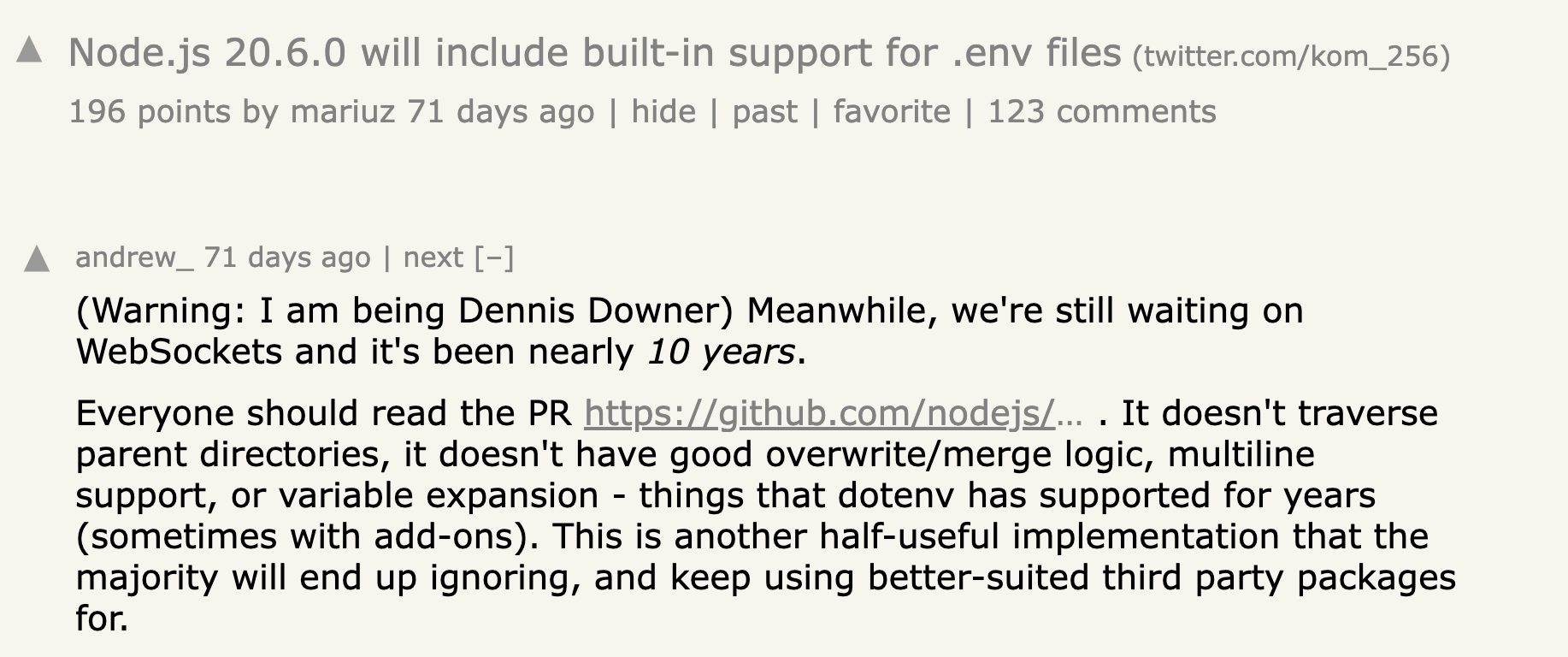
<p>The biggest <em>current</em> caveat is that this is still an experimental feature. That means it will ship with <a href="https://github.com/nodejs/node/pull/49424#issue-1876566254">bugs</a> and with <a href="https://github.com/nodejs/node/issues/49148">missing feature support</a>. The <a href="https://news.ycombinator.com/item?id=37174916">top hn comment</a> sums it up well - albeit a bit grumpily.</p>

<p><img src="/assets/img/blog/hacker-news-node-dotenv-support.png" /></p>

<p>I also want to stress the word <em>current</em> because this is all still under active development. These things take time. By the time you read this, some of these caveats might no longer be around.</p>

<h3 id="missing-multiline-support">Missing multiline support</h3>

<p>The current implementation does not support multiline environment variables. If you attempt to include a multiline environment variable it will be <code>undefined</code>. For example:</p>

<pre><code># .env.multiline
HELLO="This
is
a
multiline"
</code></pre>
<pre><code>// index.js
console.log(`Hello ${process.env.HELLO}`)
</code></pre>
<pre><code>node --env-file=.env.multiline index.js
Hello undefined
</code></pre>

<p>Note: multiline support is being actively discussed and will probably get added in the near future.</p>

<h3 id="missing-override-option">Missing override option</h3>

<p>You cannot override your system’s environment variables with your <code>.env</code> file. There is no option.</p>

<pre><code># .env
HELLO="World"
</code></pre>
<pre><code>// index.js
console.log(`Hello ${process.env.HELLO}`)
</code></pre>
<pre><code>export HELLO="System"
node --env-file=.env index.js
Hello System
</code></pre>

<p>It prints <code>Hello System</code> rather then <code>Hello World</code>. There is no option to overwrite system variables.</p>

<p>If you need to do this then continue using dotenv with <a href="https://github.com/motdotla/dotenv#override">its override option</a>.</p>

<h3 id="missing-variable-expansion">Missing variable expansion</h3>

<p>Variable expansion support for dotenv exists in a separate library <a href="https://github.com/motdotla/dotenv-expand">dotenv-expand</a>. But it is so <a href="https://www.npmjs.com/package/dotenv-expand">widely used with 13 million downloads</a> weekly that it is defacto considered part of dotenv.</p>

<p>As of this writing, Node does not support variable expansion. Instead, it will output the variable as a string.</p>

<pre><code># .env
PASSWORD="password123"
SECRET=$PASSWORD
</code></pre>
<pre><code>// index.js
console.log(`The secret is ${process.env.SECRET}`)
</code></pre>
<pre><code>node --env-file=.env index.js
The secret is $PASSWORD
</code></pre>

<p>So if you need variable expansion, you should continue using <a href="https://github.com/motdotla/dotenv">dotenv</a> and <a href="https://github.com/motdotla/dotenv-expand">dotenv-expand</a>.</p>

<h3 id="missing-envvault-support">Missing <code>.env.vault</code> support</h3>

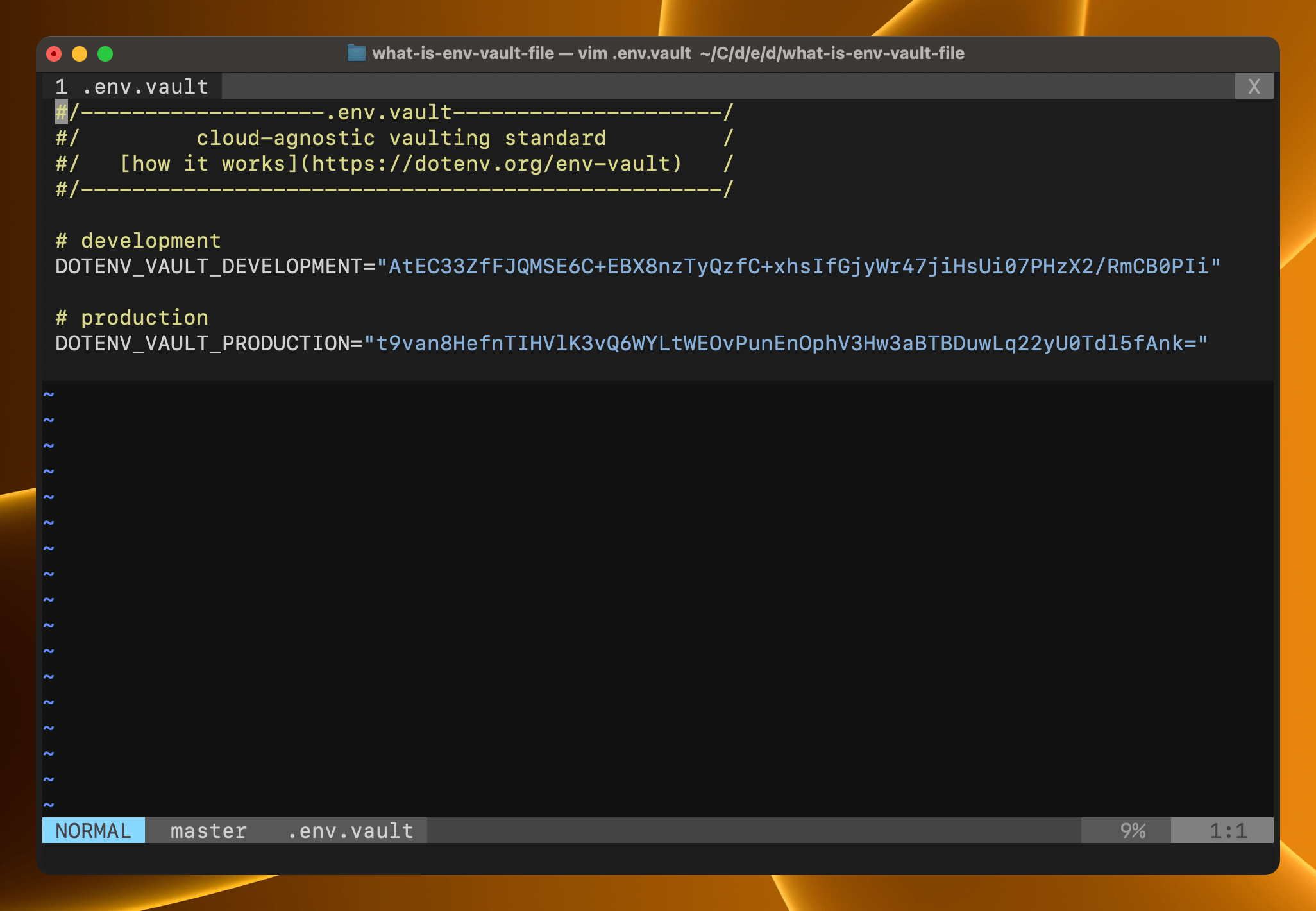
<p><code>.env.vault</code> files are the spiritual successors to <code>.env</code> files. They have multiple security advantages over <code>.env</code> files which you can <a href="https://www.dotenv.org/blog/2023/10/24/what-is-env-vault-file.html">read about here</a>.</p>

<p>They are quite <a href="https://github.com/motdotla/dotenv/pull/730">new</a>, but also quite useful for production and ci, and are gaining adoption across multiple communities like <a href="https://github.com/motdotla/dotenv">node</a>, <a href="https://github.com/dotenv-org/python-dotenv-vault">python</a>, <a href="https://docs.rs/dotenv-vault/latest/dotenv_vault/">rust</a>, and more.</p>

<p>But as a new technology, they are unlikely to be adopted natively by Node until they earn similar widespread use to <code>.env</code> files. So keep using <a href="https://github.com/motdotla/dotenv">dotenv</a> if you plan to make use of them.</p>

<pre><code>#/-------------------.env.vault---------------------/
#/         cloud-agnostic vaulting standard         /
#/   [how it works](https://dotenv.org/env-vault)   /
#/--------------------------------------------------/
# development
DOTENV_VAULT_DEVELOPMENT="AtEC33ZfFJQMSE6C+EBX8nzTyQzfC+xhsIfGjyWr47jiHsUi07PHzX2/RmCB0PIi"
# production
DOTENV_VAULT_PRODUCTION="t9van8HefnTIHVlK3vQ6WYLtWEOvPunEnOphV3Hw3aBTBDuwLq22yU0Tdl5fAnk="
</code></pre>

<h2 id="conclusion">Conclusion</h2>

<p>In conclusion, built-in support for <code>.env</code> files (even if currently experimental) is a huge and welcome step forward for Node. Big thanks to Yagiz Nizipli for making this happen. <a href="https://github.com/sponsors/anonrig">Go sponsor him on GitHub</a>. He is doing incredible work for Node.</p>

<p>But there are some current caveats, and I would recommend against npm uninstall-ing dotenv for your production apps at this time. Wait until it is non-experimental and has added support for the missing features above.</p>

<hr />

<h3 id="using-the-new---env-file-flag">Using the new <code>--env-file</code> flag?</h3>

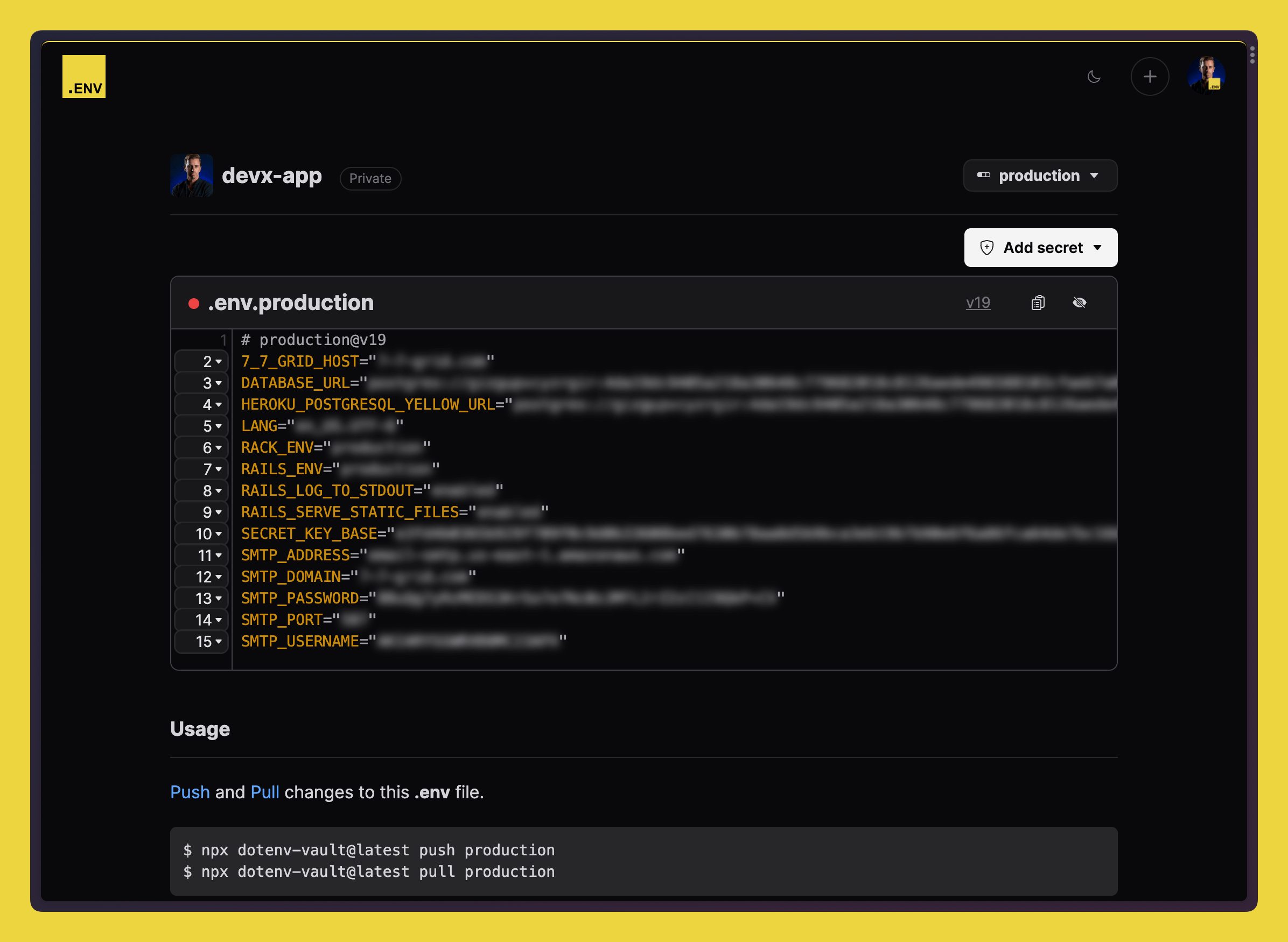
<p><a href="https://github.com/dotenv-org/dotenv-vault">dotenv-vault</a> is the perfect companion. Use it to sync your <code>.env</code> files and easily switch between environments. <a href="https://dotenv.org">Create your Dotenv Account</a> and try it today.</p>

<p><img src="/assets/img/blog/dotenv-vault-screenshot2.png" /></p>

<p><a href="https://dotenv.org/signup">https://dotenv.org/signup</a></p>]]></content><author><name>mot</name></author><category term="blog" /><summary type="html"><![CDATA[Node v20.6.0+ adds native support for loading .env files.]]></summary><media:thumbnail xmlns:media="http://search.yahoo.com/mrss/" url="https://www.dotenv.org/assets/img/blog/node-env-file-support.png" /><media:content medium="image" url="https://www.dotenv.org/assets/img/blog/node-env-file-support.png" xmlns:media="http://search.yahoo.com/mrss/" /></entry><entry><title type="html">What is a .env.vault file</title><link href="https://www.dotenv.org/blog/2023/10/24/what-is-env-vault-file.html" rel="alternate" type="text/html" title="What is a .env.vault file" /><published>2023-10-24T00:00:00+00:00</published><updated>2023-10-24T00:00:00+00:00</updated><id>https://www.dotenv.org/blog/2023/10/24/what-is-env-vault-file</id><content type="html" xml:base="https://www.dotenv.org/blog/2023/10/24/what-is-env-vault-file.html"><![CDATA[<p><img src="/assets/img/blog/what-is-env-file-example.png" /></p>

<p>It’s an encrypted copy of your <code>.env</code> files.</p>

<p>It is easiest to understand if you generate one. So let’s do that. Then I’ll show you how to use it in production. Lastly, we’ll talk about its security advantages.</p>

<div class="flex justify-center rounded-2xl border border-emerald-500/20 bg-emerald-50/50 text-emerald-900 dark:border-emerald-500/30 dark:bg-emerald-500/5 dark:text-emerald-200 p-4 gap-2.5">
  <div class="flex-none mt-0.5 h-4 w-4">
    <svg viewBox="0 0 16 16" aria-hidden="true" class="h-4 w-4 fill-emerald-500 stroke-white dark:fill-emerald-200/20 dark:stroke-emerald-200"><circle cx="8" cy="8" r="8" stroke-width="0"></circle><path fill="none" stroke-linecap="round" stroke-linejoin="round" stroke-width="1.5" d="M6.75 7.75h1.5v3.5"></path><circle cx="8" cy="4" r=".5" fill="none"></circle></svg>
  </div>
  <div class="flex-1 text-sm">
    Find a complete <a href="https://github.com/dotenv-org/examples/tree/master/dotenv-blog/2023-10-24">code example on GitHub</a> for this blog post.
  </div>
</div>

<h2 id="generating">Generating</h2>

<p>We’re going to use the command <code>npx dotenv-vault local build</code>.</p>

<h3 id="prerequisites">Prerequisites</h3>

<p>Enter a project where you already have <code>.env.*</code> file(s) and have installed <a href="https://github.com/motdotla/dotenv">dotenv</a>.</p>

<p>For example, I have a project with 3 files in it.</p>

<ul>
  <li>index.js</li>
  <li>.env</li>
  <li>.env.production</li>
</ul>

<pre><code class="language-javascript">// index.js
require('dotenv').config()
console.log(`Hello ${process.env.HELLO}`)
</code></pre>
<pre><code class="language-ino"># .env
HELLO="development"
</code></pre>
<pre><code class="language-ino"># .env.production
HELLO="production"
</code></pre>

<p>When I run <code>node index.js</code> I get the expected output <code>Hello development</code>.</p>

<pre><code class="language-bash">$ node index.js
Hello development
</code></pre>

<p>Let’s build the <code>.env.vault</code> file.</p>

<h3 id="generate-envvault">Generate .env.vault</h3>

<p>Run the <strong>local build</strong> command.</p>

<pre><code class="language-bash">$ npx dotenv-vault local build
</code></pre>

<p>You will see a <code>.env.vault</code> file that looks something like this.</p>

<pre><code>#/-------------------.env.vault---------------------/
#/         cloud-agnostic vaulting standard         /
#/   [how it works](https://dotenv.org/env-vault)   /
#/--------------------------------------------------/
# development
DOTENV_VAULT_DEVELOPMENT="AtEC33ZfFJQMSE6C+EBX8nzTyQzfC+xhsIfGjyWr47jiHsUi07PHzX2/RmCB0PIi"
# production
DOTENV_VAULT_PRODUCTION="t9van8HefnTIHVlK3vQ6WYLtWEOvPunEnOphV3Hw3aBTBDuwLq22yU0Tdl5fAnk="
</code></pre>

<p>It contains two keys.</p>

<ul>
  <li><code>DOTENV_VAULT_DEVELOPMENT</code></li>
  <li><code>DOTENV_VAULT_PRODUCTION</code></li>
</ul>

<p>These contain encrypted copies of:</p>

<ul>
  <li>your <code>.env</code> file</li>
  <li>your <code>.env.production</code> file.</li>
</ul>

<p>A <code>.env.keys</code> file was also generated. These keys decrypt the contents of <code>DOTENV_VAULT_${ENVIRONMENT}</code>.</p>

<pre><code>$ npx dotenv-vault local keys
</code></pre>
<pre><code>#/!!!!!!!!!!!!!!!!!!!.env.keys!!!!!!!!!!!!!!!!!!!!!!/
#/   DOTENV_KEYs. DO NOT commit to source control   /
#/   [how it works](https://dotenv.org/env-keys)    /
#/--------------------------------------------------/
DOTENV_KEY_DEVELOPMENT="dotenv://:key_f4516b0077d9aefad9fa7b36cec570e05dcb7cd6d5de1dac2562b6421af7d185@dotenv.local/vault/.env.vault?environment=development"
DOTENV_KEY_PRODUCTION="dotenv://:key_18a137f844e3511022dbf1de2b1bd5e3bd6d1ef4c78988e2521ce9f05abc506a@dotenv.local/vault/.env.vault?environment=production"
</code></pre>

<p><strong>See the pattern?</strong> A <code>.env.${ENVIRONMENT}</code> file corresponds to a <code>DOTENV_VAULT_${ENVIRONMENT}</code> secret and <code>DOTENV_KEY_${ENVIRONMENT}</code> decryption key.</p>

<p>Try decrypting the contents of <code>DOTENV_VAULT_PRODUCTION</code>.</p>

<pre><code>$ npx dotenv-vault local decrypt 'dotenv://:key_18a137f844e3511022dbf1de2b1bd5e3bd6d1ef4c78988e2521ce9f05abc506a@dotenv.local/vault/.env.vault?environment=production'
HELLO="production"
</code></pre>

<p>Great! It’s decrypting successfully. Next, let’s put this to use in production.</p>

<h2 id="production">Production</h2>

<ol>
  <li>Commit <code>.env.vault</code> to code</li>
  <li>Set DOTENV_KEY on server</li>
  <li>Deploy your code</li>
</ol>

<p>At runtime your encrypted secrets will be injected into your code just-in-time.</p>

<p>Try it on your machine with this simple example.</p>

<pre><code>$ DOTENV_KEY='dotenv://:key_18a137f844e3511022dbf1de2b1bd5e3bd6d1ef4c78988e2521ce9f05abc506a@dotenv.local/vault/.env.vault?environment=production' node index.js

[dotenv@16.3.1][INFO] Loading env from encrypted .env.vault
Hello production
</code></pre>

<p>As you can see, it loads your env from your encrypted <code>.env.vault</code> file and successfully outputs <code>Hello production</code>. Elegant!</p>

<p>(Other languages are supported too. See <a href="https://dotenv.org/docs">dotenv.org/docs</a>)</p>

<h2 id="security-advantages">Security Advantages</h2>

<p>Do you remember the <a href="https://techcrunch.com/2023/01/05/circleci-breach/">CircleCI data breach</a>? An attacker gained access to everyone’s environment variables putting their software products at major risk.</p>

<p>But if you were using <code>.env.vault</code> files, you were not at risk. Why?</p>

<p>The attacker solely gained access to environment variables, not code. He had your <code>DOTENV_KEY</code> but not your <code>.env.vault</code> file. He needed both to access your secrets.</p>

<p>This takes the <a href="https://12factor.net/config">Twelve-Factor App</a>’s principle of <em>strict separation of config from code</em> to the next level - where even your <em>config</em> is separated.</p>

<p>This leads to some great second order effects.</p>

<ul>
  <li>You are no longer scattering your secrets across multiple third-parties and tools</li>
  <li>Your secrets are easier to manage in one central place close to your code which means less chance of fat-fingering or forgetting to set a secret</li>
  <li>You add more friction to attackers and remove friction for yourself - no more hard work managing secrets across multiple servers</li>
</ul>

<p>I’d encourage you to give <code>.env.vault</code> files a try. I think you will like them after the initial adoption hump. They are simple files that don’t require any additional secret manager processes to be kept running.</p>

<p><code>.env</code> files were simple, useful, and added additional security. <code>.env.vault</code> files maintain that same spirit while adding a much higher level of security. What do you think, let me know at <a href="https://twitter.com/dotenvx">@dotenvx</a> or <a href="https://twitter.com/motdotla">@motdotla</a>.</p>

<hr />

<h3 id="dotenv-vault--a-secrets-manager-for-env-and-envvault-files">dotenv-vault — A secrets manager for .env and .env.vault files.</h3>

<p><img src="/assets/img/blog/dotenv-vault-screenshot2.png" /></p>

<p>If you are looking to also manage your <code>.env</code> and <code>.env.vault</code> files across a larger team, complete with permissions, versions, and history then create a <a href="https://dotenv.org">Dotenv Account</a>. It’s free with premium features.</p>

<p><a href="https://dotenv.org/signup">https://dotenv.org/signup</a></p>]]></content><author><name>mot</name></author><category term="blog" /><summary type="html"><![CDATA[A .env.vault file is an encrypted copy of your .env files.]]></summary><media:thumbnail xmlns:media="http://search.yahoo.com/mrss/" url="https://www.dotenv.org/assets/img/blog/what-is-env-vault.png" /><media:content medium="image" url="https://www.dotenv.org/assets/img/blog/what-is-env-vault.png" xmlns:media="http://search.yahoo.com/mrss/" /></entry><entry><title type="html">How to back up your .env file</title><link href="https://www.dotenv.org/blog/2023/10/20/how-to-backup-your-env-file.html" rel="alternate" type="text/html" title="How to back up your .env file" /><published>2023-10-20T00:00:00+00:00</published><updated>2023-10-20T00:00:00+00:00</updated><id>https://www.dotenv.org/blog/2023/10/20/how-to-backup-your-env-file</id><content type="html" xml:base="https://www.dotenv.org/blog/2023/10/20/how-to-backup-your-env-file.html"><![CDATA[<p>In the same directory as your <code>.env</code> file, set up <a href="https://github.com/dotenv-org/dotenv-vault">dotenv-vault</a>.</p>

<pre><code class="language-shell">$ npx dotenv-vault new
</code></pre>

<p>Next, log in.</p>

<pre><code class="language-shell">$ npx dotenv-vault login
</code></pre>

<p>Finally, securely push (back up) your <code>.env</code> file.</p>

<pre><code class="language-shell">$ npx dotenv-vault push
</code></pre>

<p>That’s it! You just backed up your <code>.env</code> file using <a href="https://github.com/dotenv-org/dotenv-vault">dotenv-vault</a>.</p>

<hr />

<iframe class="w-full aspect-video rounded-lg" src="https://www.youtube.com/embed/hC5v6WuoCQI" title="How to back up your .env file" frameborder="0" allow="accelerometer; autoplay; clipboard-write; encrypted-media; gyroscope; picture-in-picture; web-share" allowfullscreen=""></iframe>]]></content><author><name>mot</name></author><category term="blog" /><summary type="html"><![CDATA[Learn how to back up your .env file, using dotenv-vault.]]></summary><media:thumbnail xmlns:media="http://search.yahoo.com/mrss/" url="https://www.dotenv.org/assets/img/blog/dotenv-vault-push.png" /><media:content medium="image" url="https://www.dotenv.org/assets/img/blog/dotenv-vault-push.png" xmlns:media="http://search.yahoo.com/mrss/" /></entry><entry><title type="html">Dotenv Vault vs Infisical</title><link href="https://www.dotenv.org/blog/2023/05/30/dotenv-vault-vs-infisical.html" rel="alternate" type="text/html" title="Dotenv Vault vs Infisical" /><published>2023-05-30T00:00:00+00:00</published><updated>2023-05-30T00:00:00+00:00</updated><id>https://www.dotenv.org/blog/2023/05/30/dotenv-vault-vs-infisical</id><content type="html" xml:base="https://www.dotenv.org/blog/2023/05/30/dotenv-vault-vs-infisical.html"><![CDATA[<p>Discover the ultimate matchup between Dotenv Vault and Infisical as we compare features, experience, integrations, and other key factors face-to-face.</p>

<p>As developers ourselves, we understand how crucial it is to safeguard confidential information. A security breach could jeopardize not only our business but also compromise our customers’ data.</p>

<p>That’s why choosing the right tool for protecting your data is essential. If you’ve been searching for a reliable way to secure your environment variables, you’ve likely considered using a secret management tool. But with numerous options available, it can be challenging to decide which one suits your needs.</p>

<p>In this article, we’ll compare two popular choices, Dotenv Vault and Infisical, from our perspective as the Dotenv Vault team. Both tools securely store sensitive information like API keys and passwords for your application’s use. However, each has its own unique features and nuances that we’ll explore in depth:</p>

<h2 id="dotenv-vault-vs-infisical-overview">Dotenv Vault vs Infisical: Overview</h2>
<p>Dotenv Vault, our creation, is a simple and lightweight solution that builds on the success of its predecessor, Dotenv, which has become the de facto standard for managing environment variables. It’s user-friendly and doesn’t require any additional dependencies.</p>

<p>In contrast, Infisical is a more enterprise-oriented solution targeting security teams, offering extra features such as proxied rotation for environment variables. While it’s more complex to set up compared to Dotenv Vault, it may be a worthy investment for enterprise developers.</p>

<p>So, which one is the better option? We’ll examine seven key factors vital to the success of each tool to help you decide:</p>

<ol>
  <li><a href="#dotenv-vault-vs-infisical-core-features">Core features</a></li>
  <li><a href="#dotenv-vault-vs-infisical-developer-experience">Developer experience</a></li>
  <li><a href="#dotenv-vault-vs-infisical-supported-integrations">Supported integrations</a></li>
  <li><a href="#dotenv-vault-vs-infisical-deployment-options">Deployment options</a></li>
  <li><a href="#dotenv-vault-vs-infisical-github-activity">GitHub activity</a></li>
  <li><a href="#dotenv-vault-vs-infisical-pricing-and-support">Pricing and support</a></li>
  <li><a href="#dotenv-vault-vs-infisical-verdict">Verdict</a></li>
</ol>

<h2 id="dotenv-vault-vs-infisical-core-features">Dotenv Vault vs Infisical: Core features</h2>
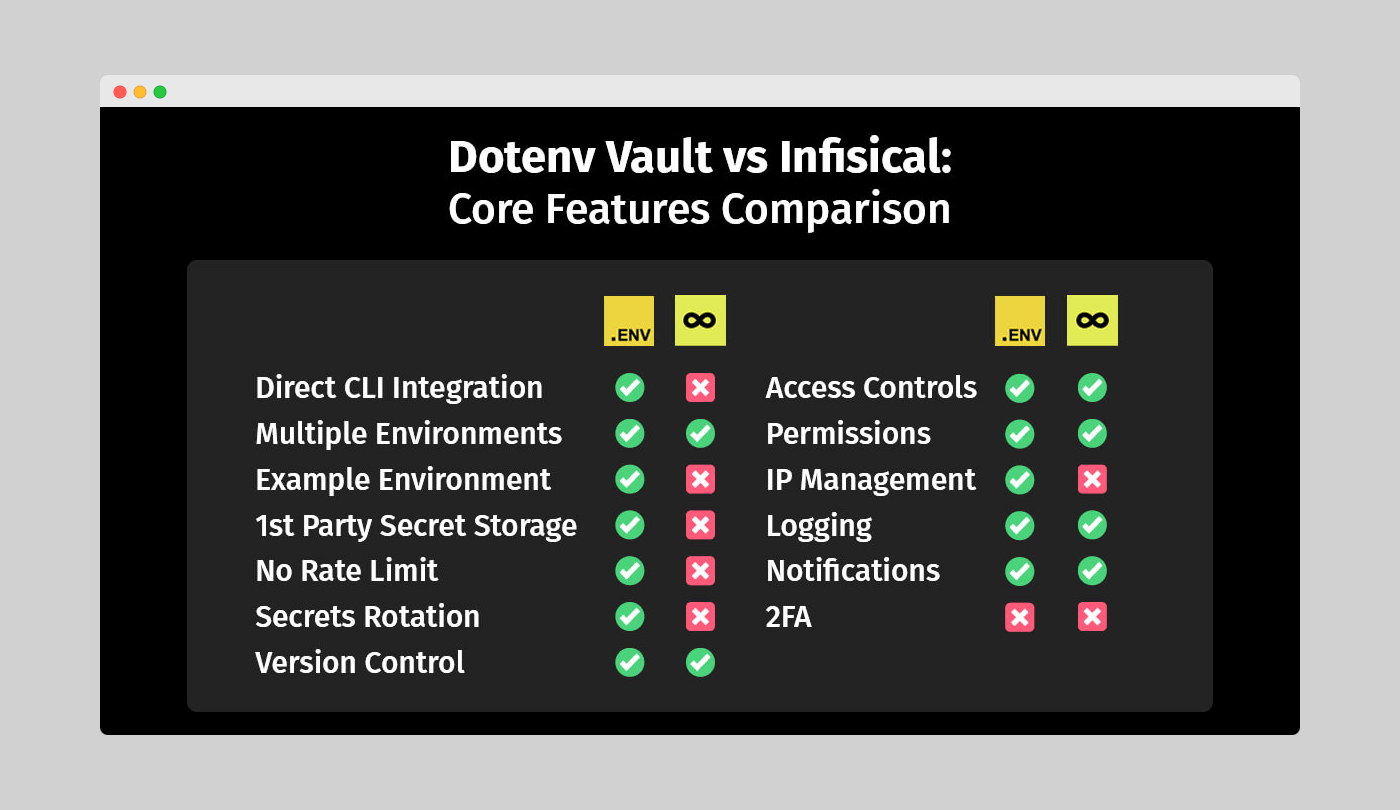
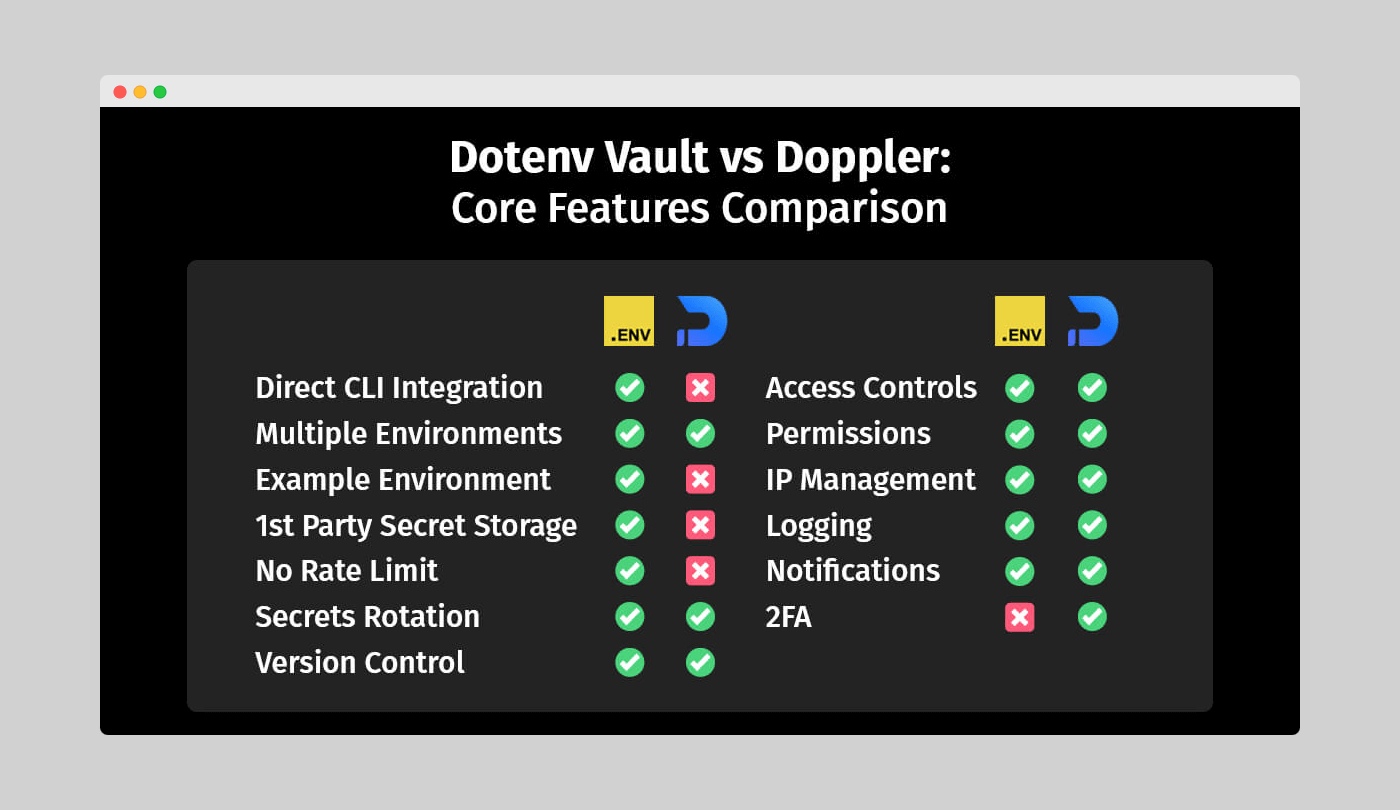
<p>First, let’s look at the core features of Dotenv Vault and Infisical. There’s a significant overlap in their capabilities, which makes sense as they both aim to provide secret management solutions.</p>

<p>You’ll find multiple environments, version and access controls, logging, notifications, permissions, and IP management features in both tools, each with its own unique approach. However, that’s where the similarities end.</p>

<p><img src="/assets/img/blog/vault-vs-infisical/dotenv-vault-vs-infisical-core-features-comparison.png" /></p>

<p><em>Figure 1: Dotenv Vault vs Infisical - Core features comparison</em></p>

<h3 id="differences-in-multiple-environments">Differences in multiple environments</h3>
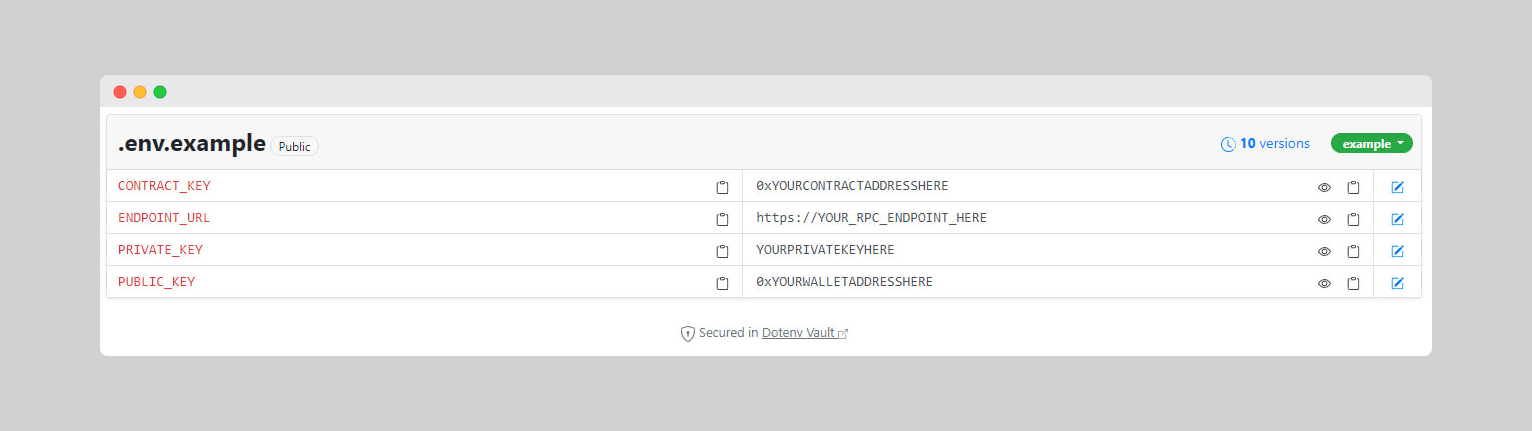
<p>Both Dotenv Vault and Infisical allow users to create multiple environments, such as <code>Development</code>, <code>Staging</code>, <code>Production</code>, and more. However, we’ve designed Dotenv Vault to stand out by offering an <code>Example</code> environment.</p>

<p>This environment is particularly useful for creating tutorials or leaving well-documented guidance for new developers. Secrets in the <code>Example</code> environment can remain public, allowing you to share information about the format of each value. While this might sound similar to Infisical’s <code>Test</code> environment, it’s not public-facing like ours.</p>

<p><img src="/assets/img/blog/common/dotenv_vault_example_environment.png" /></p>

<p><em>Figure 2: Dotenv Vault example environment in a Web3 setting</em></p>

<p>Moreover, your actual app values remain private when placed in environments like <code>Development</code> or <code>Production</code>. This eliminates the need to add any <code>.env</code> files to <code>.gitignore</code>, saving you from the headache of GitGuardian notifications if you happen to forget.</p>

<h3 id="direct-cli-integration">Direct CLI integration</h3>
<p>We’re also proud of the simplicity of Dotenv Vault’s <code>CLI</code> interactions. Unlike Infisical, which requires setting up its <code>CLI</code> package and dependencies, Vault has no such demands. To start using it, just run its code via <code>npx</code>, leaving no lasting hard drive presence apart from the <code>.env.vault</code> file that stores your secrets for local use.</p>

<p>This makes Vault operations incredibly smooth, allowing you to quickly sync your <code>.env</code> files on any device without worrying about admin access or spending more time in another tool.</p>

<p>Additionally, Infisical’s <code>CLI</code> tool works with limited sets of languages and frameworks, requiring you to use the <code>SDK</code> for <code>development</code> and <code>production</code> environments. In contrast, Dotenv Vault works via <code>CLI</code> across the board.</p>

<h3 id="from-zero-to-hero">From zero to hero</h3>

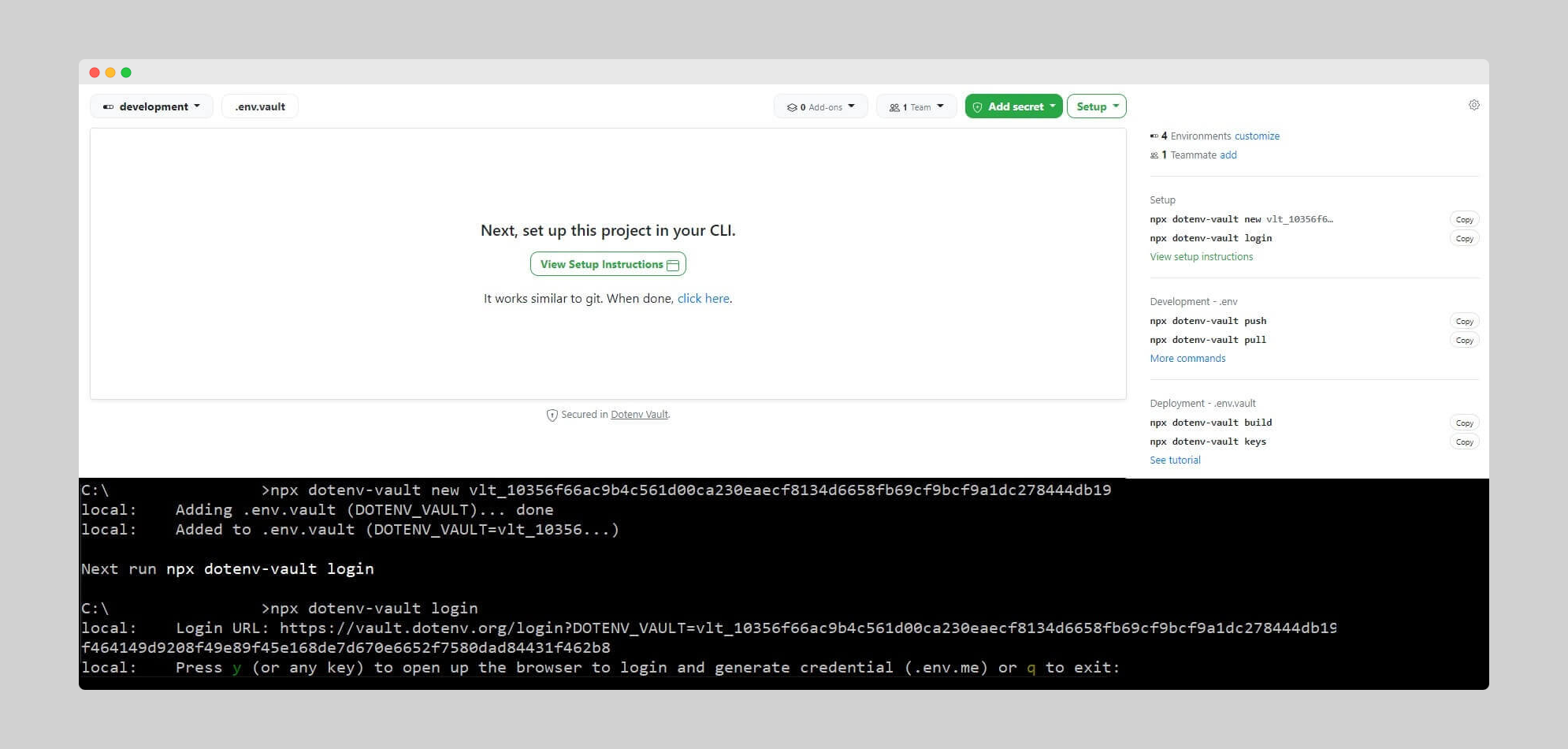
<p>Dotenv Vault takes simplicity to the next level, making the setup process incredibly straightforward. In just two lines of <code>CLI</code> input, you can have Dotenv Vault ready for your project:</p>

<pre><code class="language-shell"># Dotenv Vault CLI initialization
npx dotenv-vault new
npx dotenv-vault login
</code></pre>

<p>By condensing the setup to only two commands, Dotenv Vault emphasizes a fast and effortless experience. It’s an excellent choice for developers seeking a streamlined setup that gets them up and running with minimal effort.</p>

<p>On the other hand, Infisical also offers a simplified setup process, designed to make getting started quick and easy. Even so, it does require an additional line in your <code>CLI</code>, or a total of three, before you can get a fresh project start:</p>

<pre><code class="language-shell"># Infisical CLI initialization
brew install infisical/get-cli/infisical
infisical login
infisical init
</code></pre>

<p>The three-step setup of Infisical is just as straightforward as that of our own Dotenv Vault. The key difference between the two and what makes Vault stand out, however, is that there is no need to install anything before running - you can just execute the package remotely via <code>npx</code>. This ensures an even swifter start, making it an attractive option for developers who value time and code efficiency.</p>

<h3 id="dynamic-secrets-and-rotation">Dynamic secrets and rotation</h3>
<p>When it comes to an extra layer of security – via secrets rotation, none stands out above the other. This feature promotes healthy credential management by forcing automatic rotation within a preset timeframe. It keeps your services closed to the public internet while using Infisical for rotation management, effectively preventing long-term leaks since secrets change periodically.</p>

<h3 id="first-party-secret-storage">First party secret storage</h3>
<p>However, Infisical relies on a 3rd party service to store user secrets, creating a single point of failure for the entire platform. This is generally a bad practice, as numerous data breaches have shown.</p>

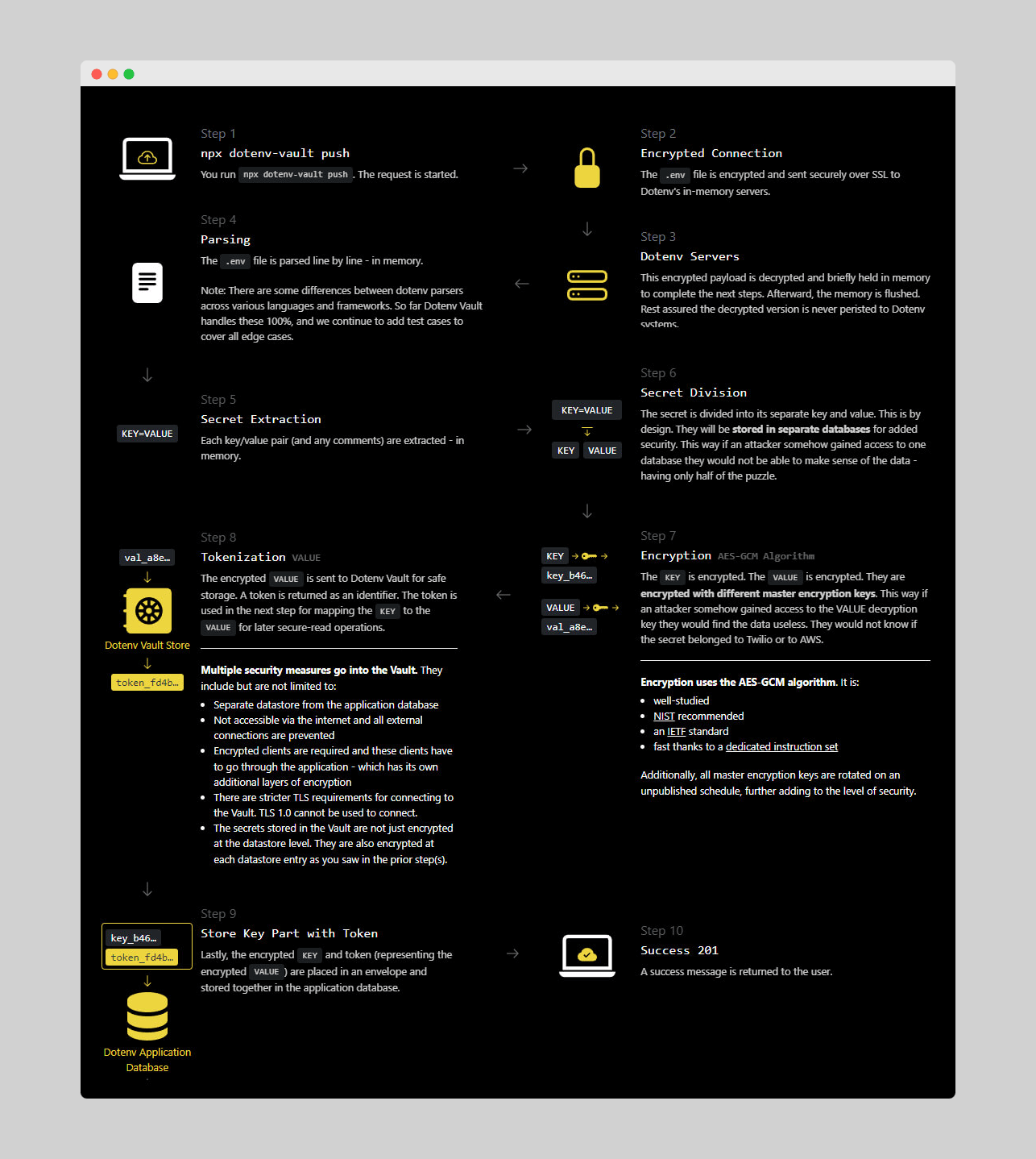
<p>That’s why we’ve designed Dotenv Vault’s in-house secret handling workflow without storage. Instead, the payload and decryption process happen in-memory, after which the memory is flushed, leaving no unsecured traces on our servers.</p>

<p>This approach means that even if Vault servers are breached, there would be nothing for attackers to steal. You can find a visual overview of the entire process here:</p>

<p><img src="/assets/img/blog/common/dotenv_vault_security_overview.png" /></p>

<p><em>Figure 3: Dotenv Vault security overview</em></p>

<h3 id="rate-limits-and-2fa">Rate limits and 2FA</h3>
<p>Lastly, two core features set Dotenv Vault and Infisical apart: rate limits and two-factor authentication (2FA). Not having 2FA like Infisical is admittedly a drawback for Dotenv Vault, as this extra security layer is valuable for accessing sensitive app data. Even so, Infisical’s 2FA is only via email, which doesn’t offer it a great lead over our solution.</p>

<p>However, Infisical’s strict request limit can hurt the user experience by forcing users to upgrade their plans to maintain platform API responsiveness. This means you won’t be able to test your application without upgrading your plan if you exceed the request limit.</p>

<h2 id="dotenv-vault-vs-infisical-developer-experience">Dotenv Vault vs Infisical: Developer experience</h2>
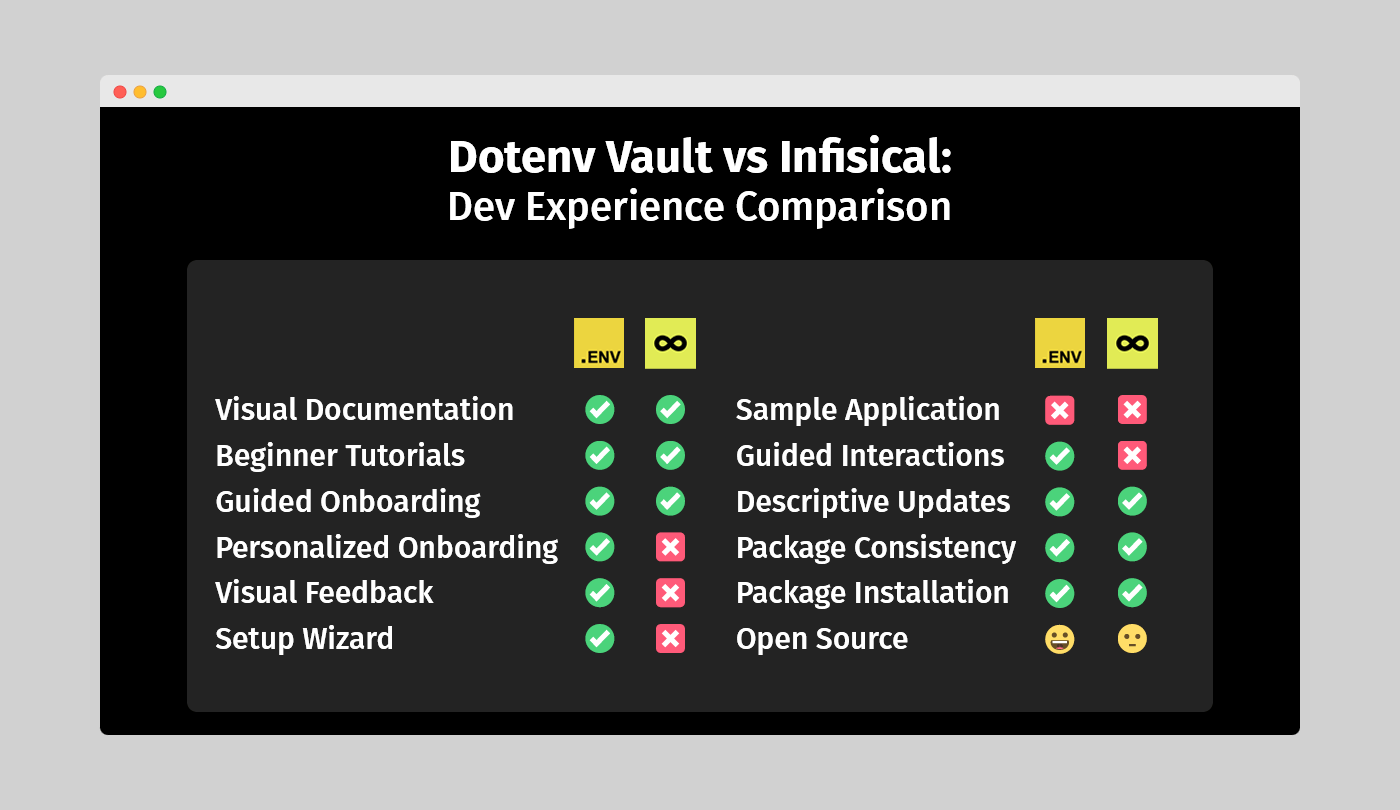
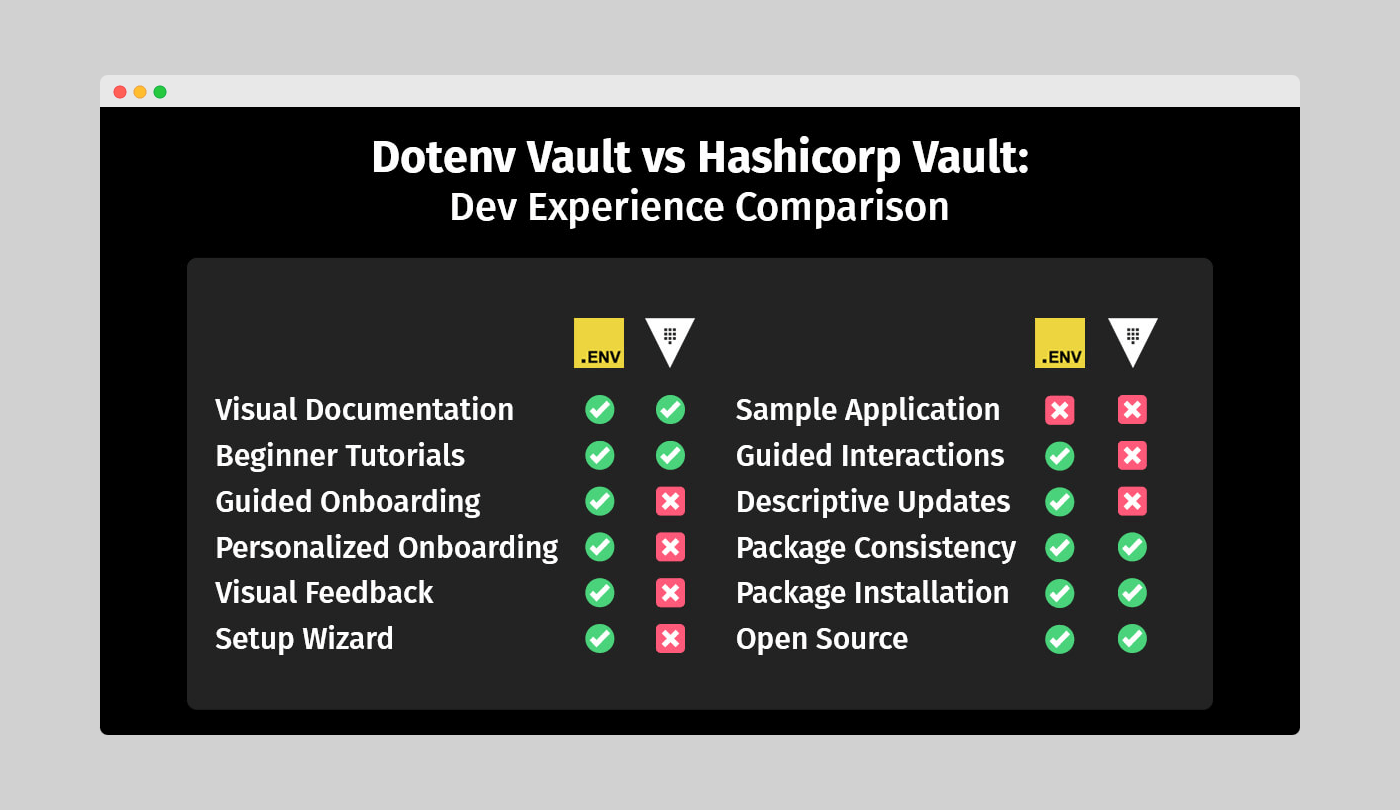
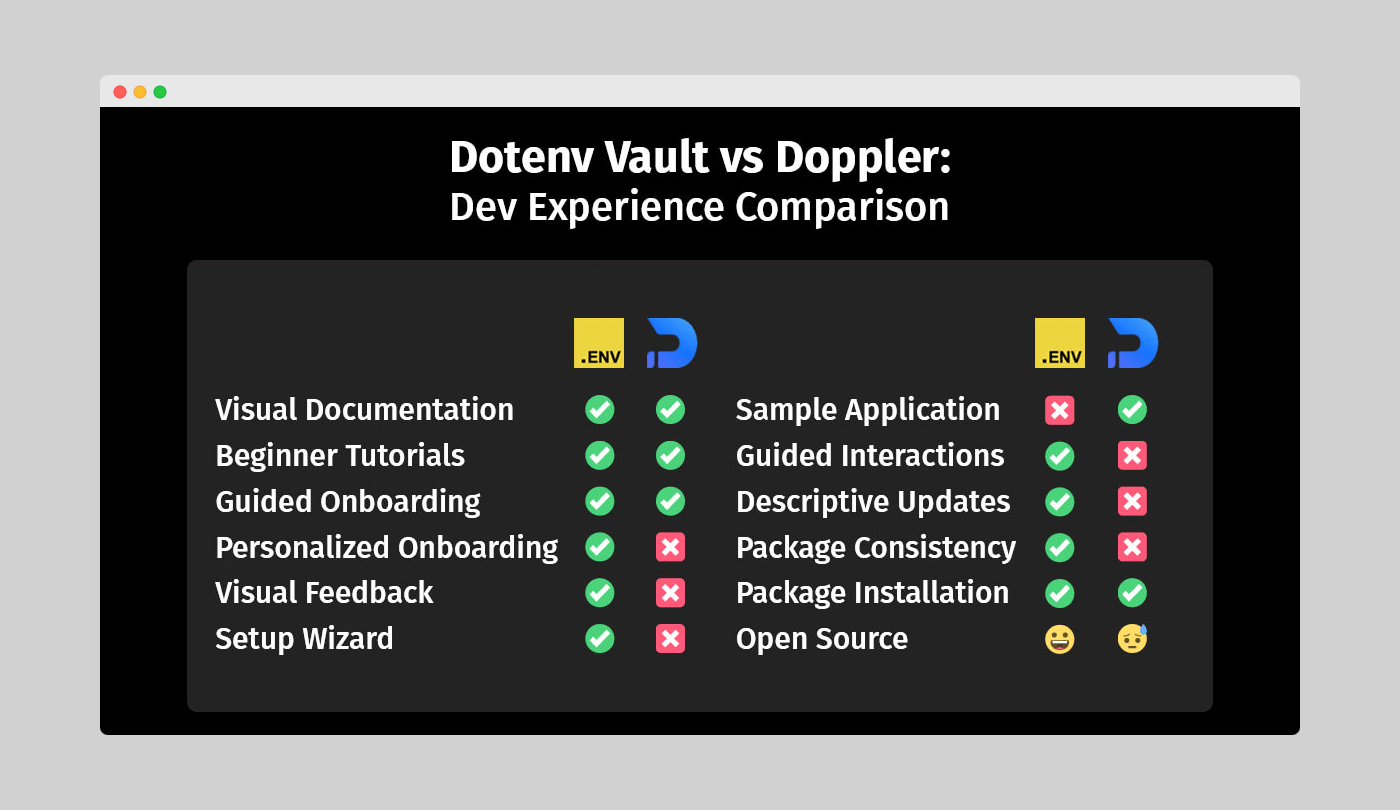
<p>While core features are crucial when choosing between two comparable tools, the overall developer experience (DX) each delivers is equally important. In fact, some may argue that DX is even more significant. That’s why we’ll examine this aspect closely.</p>

<p>To clarify, a good developer experience evaluates how accessible a solution is for both newcomers and experienced users. Elements such as visual documentation, beginner tutorials, guided onboarding, sample applications, and descriptive changelogs or readme files contribute to a positive DX. Now let’s explore how Dotenv Vault and Infisical fare in this category.</p>

<p><img src="/assets/img/blog/vault-vs-infisical/dotenv-vault-vs-infisical-developer-experience-comparison.png" /></p>

<p><em>Figure 4: Dotenv Vault vs Infisical - Developer experience comparison</em></p>

<h3 id="onboarding">Onboarding</h3>
<p>A good DX begins with the first interaction. Having a well-organized and guided onboarding process is essential for early success. Recognizing that not everyone starts at the same level is crucial.</p>

<p>Often, this means guiding new users through the onboarding process to ensure they become comfortable with the workflow. Ultimately, they should be able to manage everything themselves.</p>

<p>Both Dotenv Vault and Infisical cater to new developers by offering guided onboarding from the signup. However, Vault goes the extra mile by avoiding Infisical’s template approach, allowing users to set up their own project as a practical example instead.</p>

<h3 id="setup-and-interactions">Setup and interactions</h3>
<p>Extending the onboarding support to the setup process ensures a positive developer experience. Users still learning the ropes won’t have to consult the documentation for every forgotten interaction.</p>

<p>In this regard, Dotenv Vault holds a significant advantage over Infisical, which leaves users to figure things out after the interactive setup guide. Vault, on the other hand, provides descriptive visual feedback and relevant recommendations for completing the setup process.</p>

<p><img src="/assets/img/blog/common/dotenv_vault_guided_setup.png" /></p>

<p><em>Figure 5: Dotenv Vault guided setup process</em></p>

<p>Vault’s approach applies to every interaction with the tool, offering invaluable advice in both CLI and WebUI workflow stages. Furthermore, it seamlessly connects the two, reminiscent of the familiar “Next-next-next” setup wizard.</p>

<h3 id="tutorials-and-documentation">Tutorials and documentation</h3>
<p>Even with valuable feedback, users may occasionally need to consult your knowledge base. That’s why comprehensive tutorials and documentation are vital.</p>

<p>In this area, Dotenv Vault holds a noticeable edge. While Infisical offers only an initial setup guide, Vault provides descriptive guides for using the platform’s features. In terms of documentation quality, both solutions are on par, but Vault caters to both seasoned developers and newcomers, whereas Infisical leans more toward experienced users.</p>

<h3 id="changelogs-readme-and-source">Changelogs, readme, and source</h3>
<p>Both Dotenv Vault and Infisical are equally strong when it comes to descriptive changelogs and readme files. This is great for developers who want to dive into the code base for a better understanding and eventually contribute when they’re ready. The same applies to security researchers conducting audits to ensure everything runs safely and smoothly.</p>

<p>Infisical’s mostly proprietary solution doesn’t help in this regard. Apart from the open-source <code>CLI</code> package that serves as an interface only, there’s not much for developers to explore. The rest is done via the propriaetary <code>SDK</code>. This hinders security and community engagement in the long run. In reality, open-source is valuable because it allows others to audit code, find potential vulnerabilities for patching, and contribute to the project’s development.</p>

<h3 id="package-installation-and-consistency">Package installation and consistency</h3>
<p>Dotenv Vault’s simplicity shines in this category. As mentioned earlier, you don’t need to keep a Vault installation in local storage; you can run it via npx, similar to git. It will only create two files for authentication – <code>.env.me</code> (do NOT commit) and <code>.env.vault</code> (commit). We also offer Windows executable installations and Homebrew installation for macOS users, catering to different platforms.</p>

<p>Once logged into your vault, a single <code>npx dotenv-vault pull</code> command fetches the <code>.env</code> file needed to process your app secrets, like you’ve done many times before. In contrast, although Infisical offers a similar approach, it still requires installing numerous dependencies to make it all work.</p>

<p>While a more complex installation procedure might be tolerable, using all of Infisical’s features seamlessly under any OS should be a given, right? Sadly, that’s not the case, as you need permission adjustments to install it on Windows via <code>PowerShell</code>. Additionally, the Windows <code>CLI</code> currently only works with VSCode.</p>

<p>For Unix-based systems like Ubuntu, it’s worth noting that Infisical can’t store credentials in the system vault <code>keyctl</code> and requires switching to file-based credentials storage. It allows you to leave a blank password while making it unusable without one, rendering this option redundant.</p>

<h3 id="addon-and-plugin-integration">Addon and plugin integration</h3>
<p>We recognize the importance of seamless integration with popular tools and platforms. That’s why Dotenv Vault offers a GitHub Add-on and a VSCode extension with Rust support. HCP Vault, in comparison, ensures a versatile developer experience with compatibility with GitHub and a VSCode extension.</p>

<p>Our GitHub Add-on automatically builds encrypted <code>.env.vault</code> files when secrets change, keeping projects up-to-date and synchronized. Our VSCode extension with Rust support expands adaptability across different programming languages and development environments.</p>

<p>HCP Vault also emphasizes addon and plugin integration, offering compatibility with GitHub and a VSCode extension for managing secrets within developers’ preferred settings.</p>

<h2 id="dotenv-vault-vs-infisical-supported-integrations">Dotenv Vault vs Infisical: Supported integrations</h2>
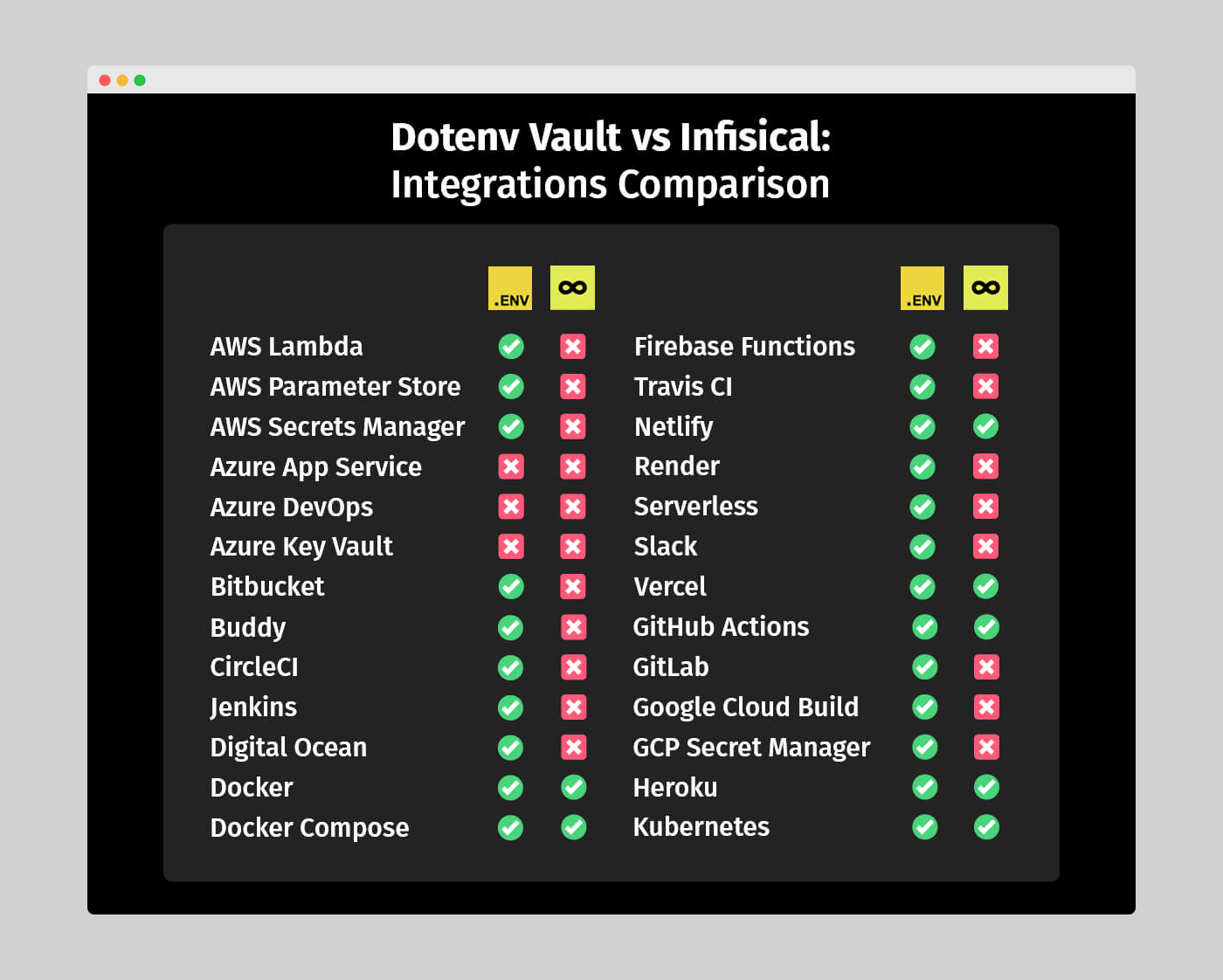
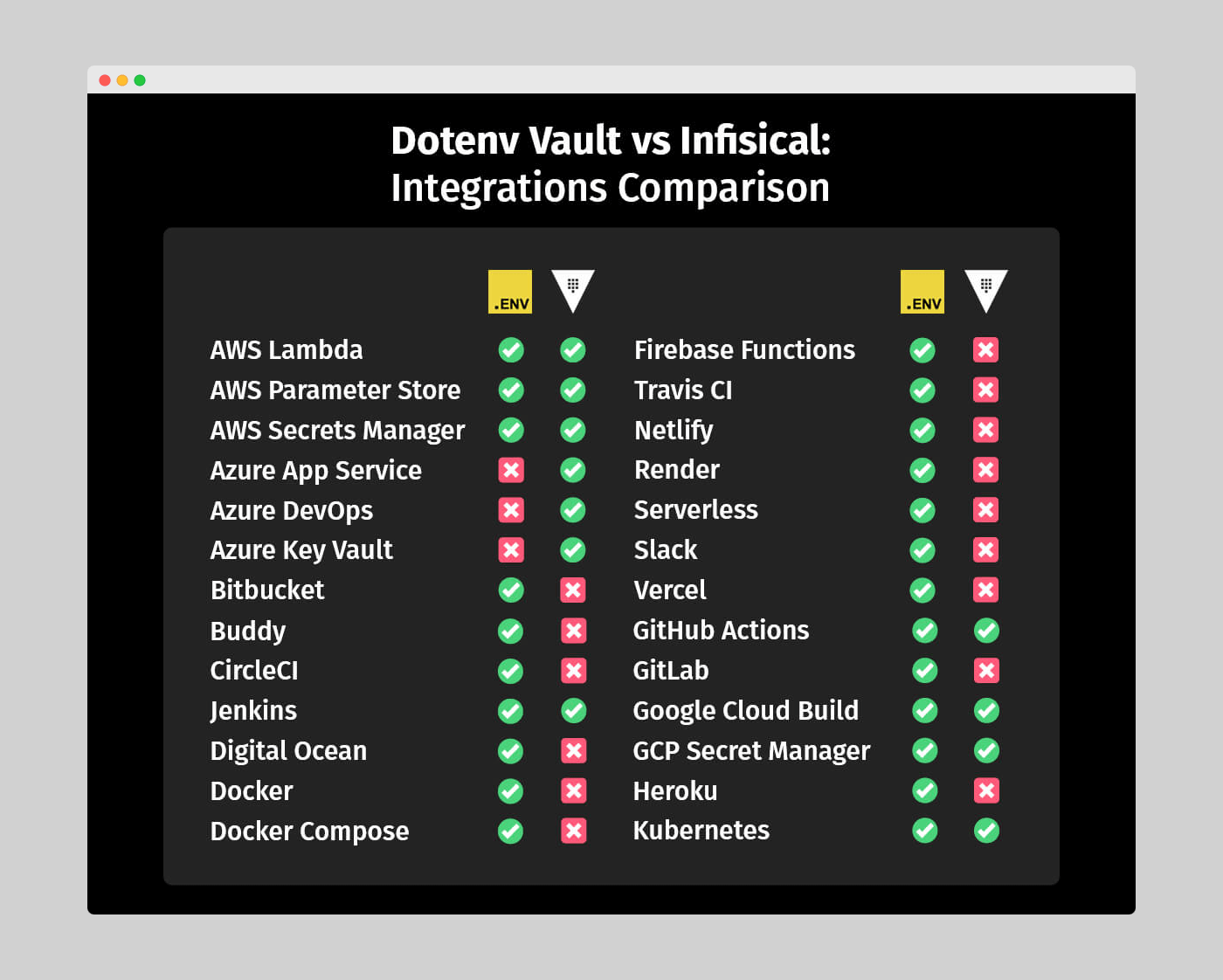
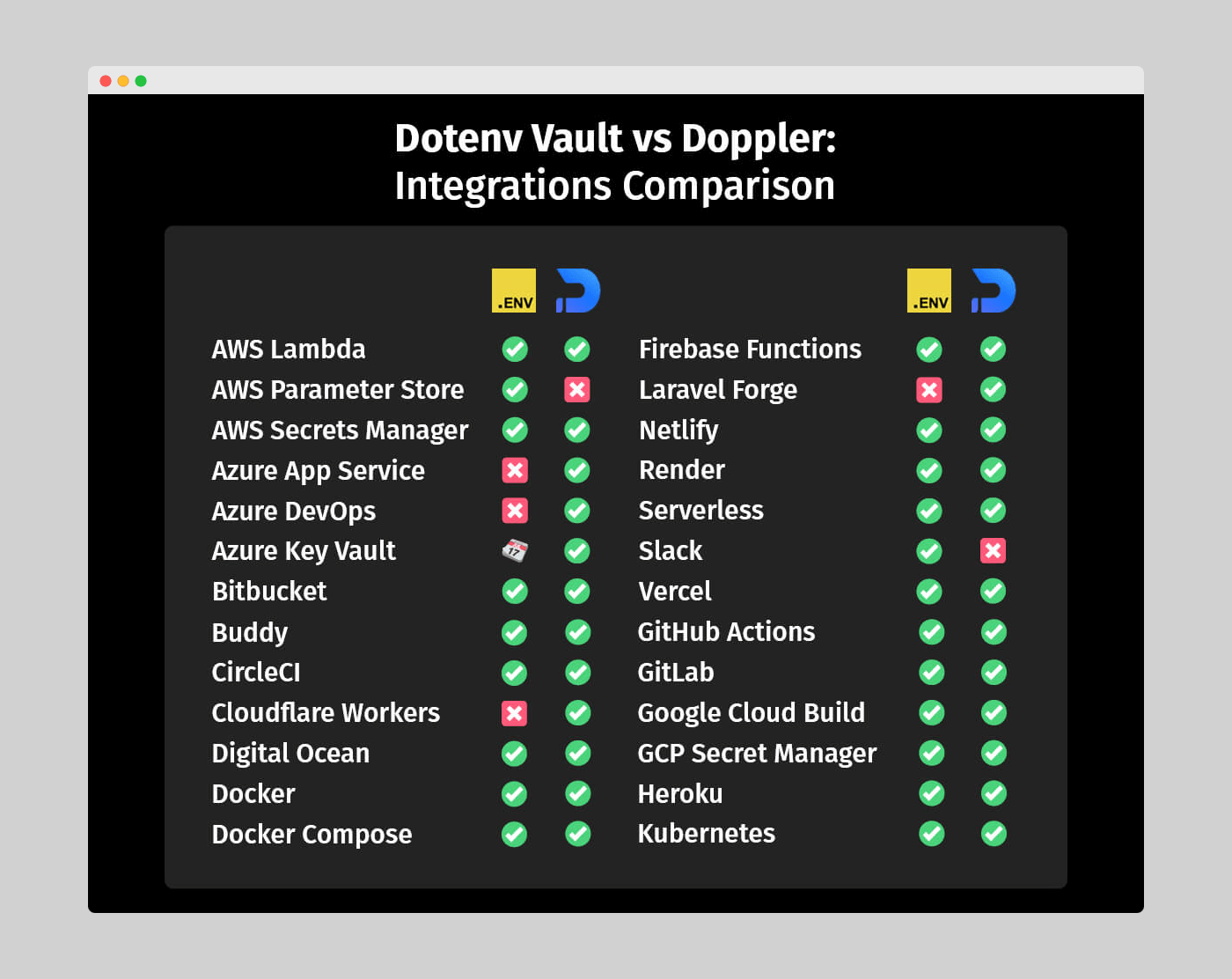
<p>Despite some inconsistencies across OS, Dotenv Vault and Infisical are quite evenly matched in terms of supported integrations.</p>

<p><img src="/assets/img/blog/vault-vs-infisical/dotenv-vault-vs-infisical-integrations-comparison.png" /></p>

<p><em>Figure 6: Dotenv Vault vs Infisical – Supported integrations comparison</em></p>

<p>However, the primary downside of Infisical’s extensive list is that all available options are proprietary technology, meaning new entries can only come from the platform’s development team. In contrast, Dotenv Vault’s open-source approach makes it more flexible and opens the door to countless community-driven integrations.</p>

<p>Considering this, it’s no surprise that most Dotenv libraries, apart from the main one for JavaScript, were created by individual contributors worldwide. Thanks to the community, Dotenv is available for a wide range of programming languages and frameworks, highlighting the value of publishing open-source code.</p>

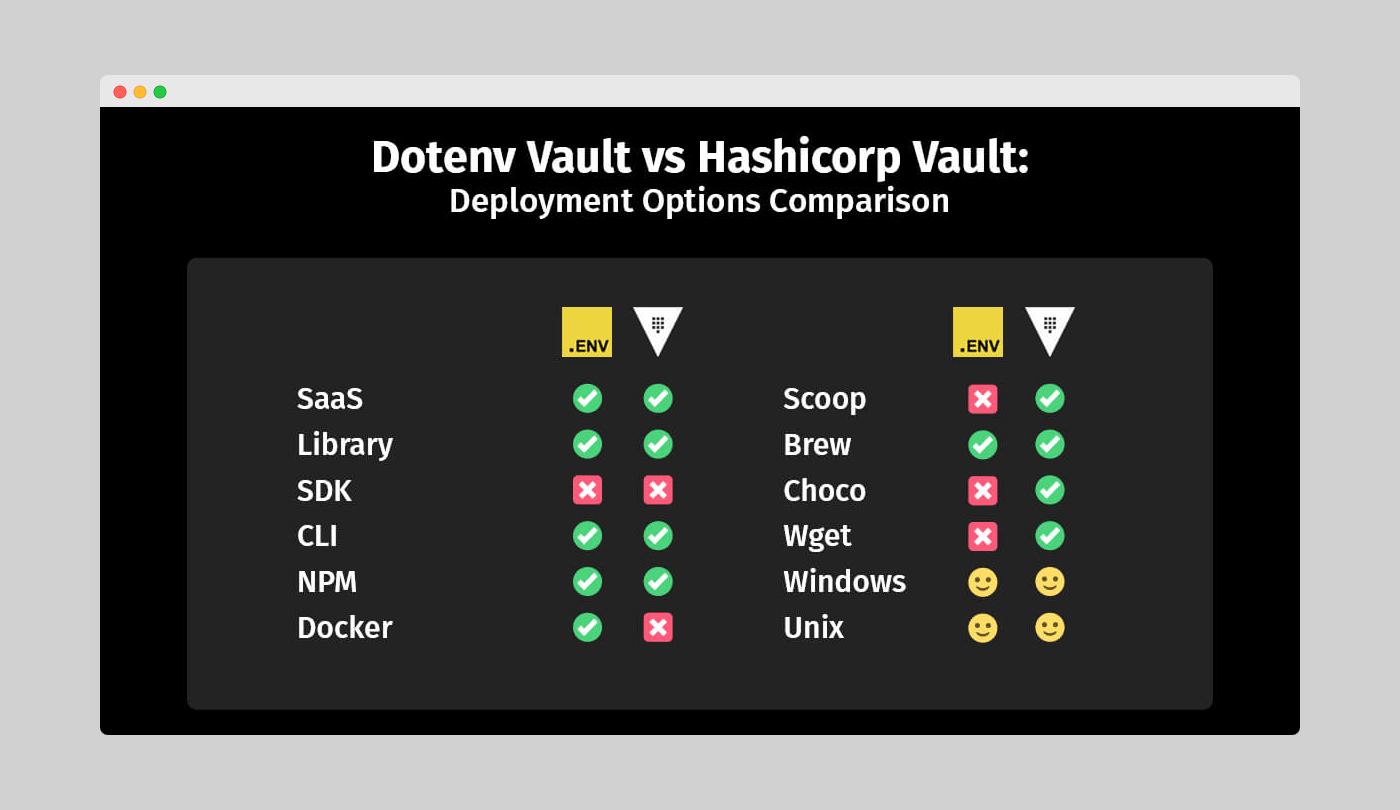
<h2 id="dotenv-vault-vs-infisical-deployment-options">Dotenv Vault vs Infisical: Deployment options</h2>
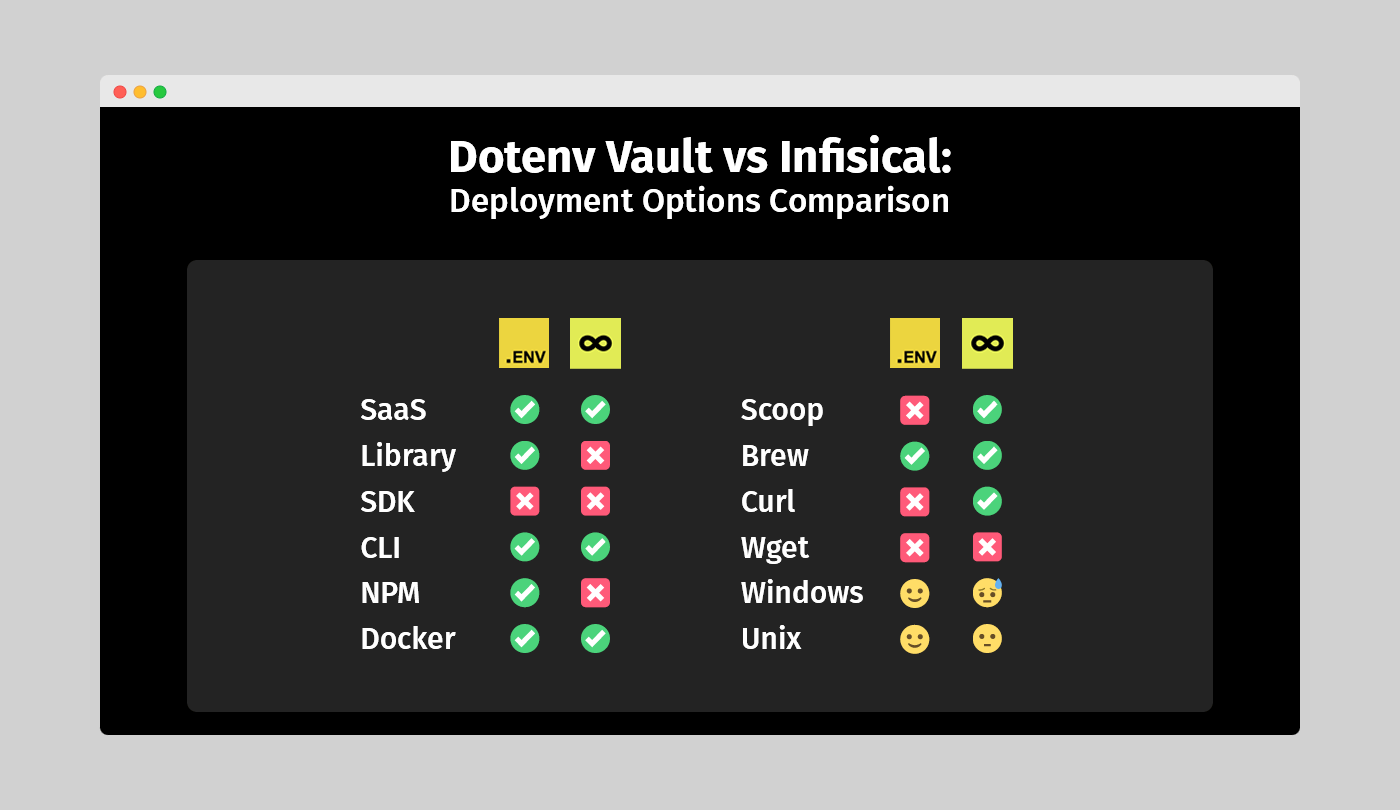
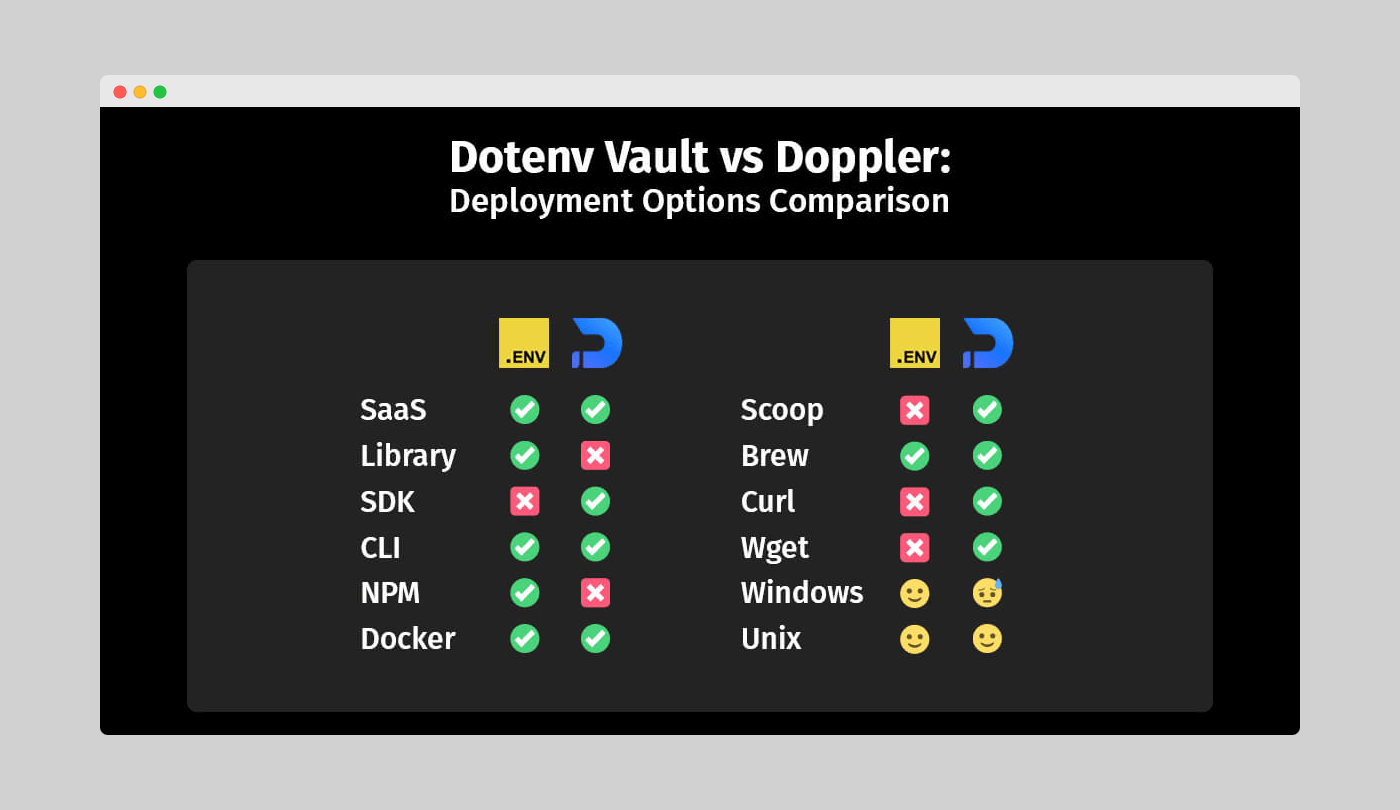
<p>Taking a break from the differences, let’s appreciate a similarity between Dotenv Vault and Infisical regarding deployment options – both are SaaS-based and use a combined approach for their workflow through WebUI interactions paired with CLI ones. However, let’s not get too excited, as that’s where the similarities end.</p>

<p><img src="/assets/img/blog/vault-vs-infisical/dotenv-vault-vs-infisical-deployment-options-comparison.png" /></p>

<p><em>Figure 7: Dotenv Vault vs Infisical – Deployment options comparison</em></p>

<p>Some points from the integrations comparison still apply here, particularly regarding the open-source library versus a proprietary SDK. As an open-source solution, Dotenv Vault enjoys added flexibility in terms of deployment, even if it technically has fewer options than Infisical.</p>

<p>Another relevant aspect is that you can use the Vault CLI almost instantly without much extra input. In contrast, Infisical requires a package installation procedure, which might not be familiar to those used to <code>npm</code>’s seamless workflow. Additionally, as previously mentioned, using Infisical on both Windows and Unix isn’t as straightforward as expected, negatively impacting its score in this category.</p>

<h2 id="dotenv-vault-vs-infisical-github-activity">Dotenv Vault vs Infisical: GitHub activity</h2>
<p>Contrary to popular belief, code isn’t the only factor determining a solution’s performance. The activity of the community using and supporting its development is equally important. Without a stable community behind it, even the most perfect applications will struggle to make an impact in their targeted space.</p>

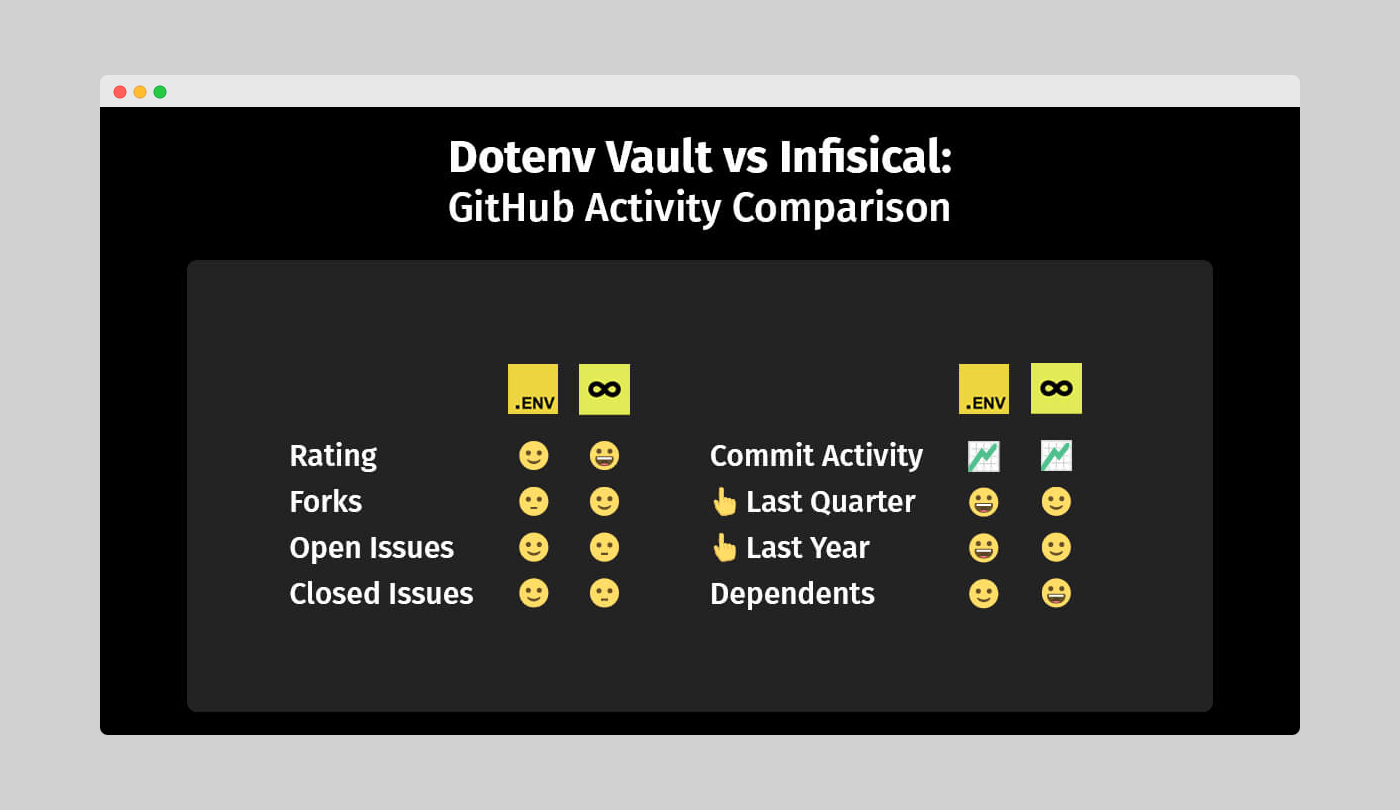
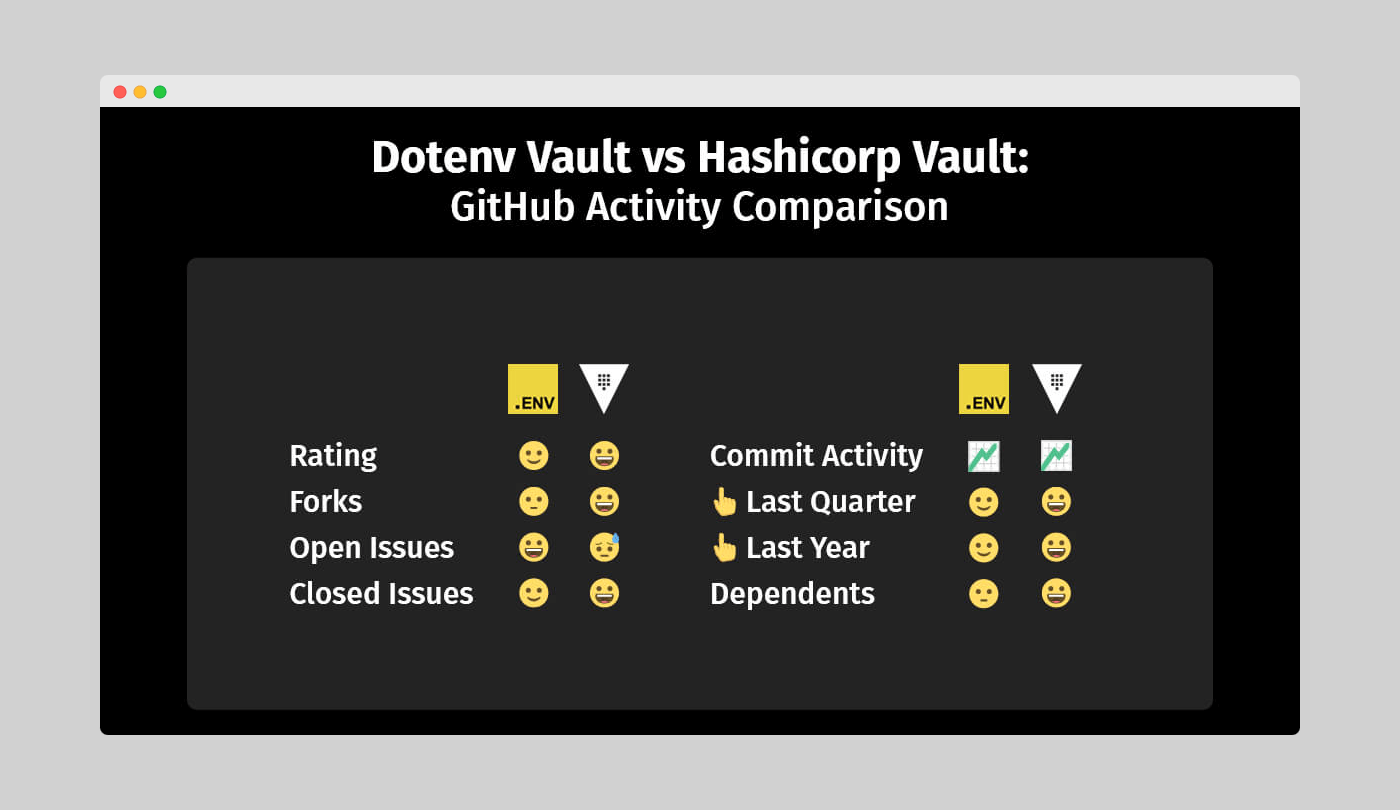
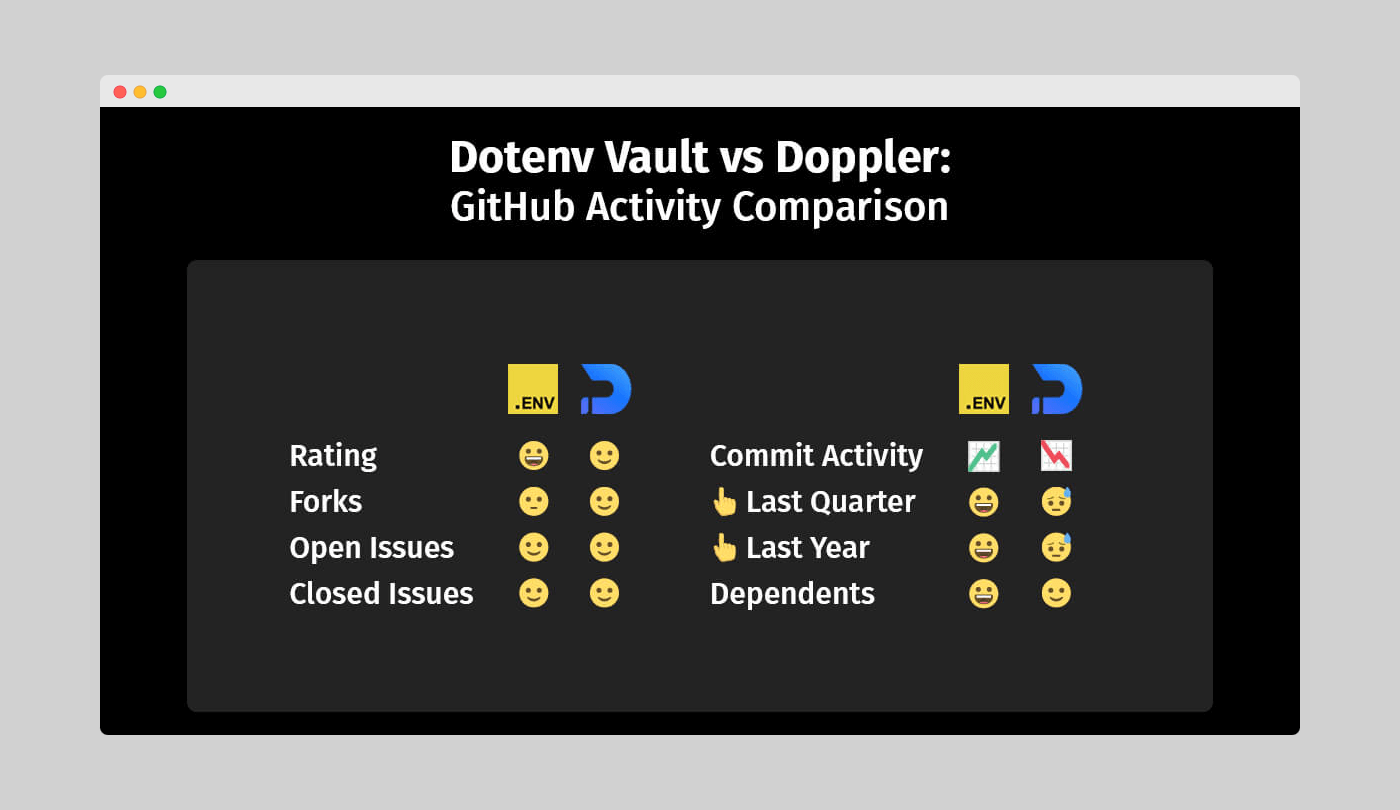
<p>That’s why we’re examining each alternative’s community engagement, focusing on GitHub, as its user base aligns with both use cases better than other platforms. We’ll explore Star Rating, number of Forks, Open and Closed Issues, Commit Activity, and Dependents.</p>

<p><img src="/assets/img/blog/vault-vs-infisical/dotenv-vault-vs-infisical-github-activity-comparison.png" /></p>

<p><em>Figure 8: Dotenv Vault vs Infisical – GitHub activity comparison</em></p>

<p>Infisical leads in both Star Rating and the number of forks when compared to Dotenv Vault. A higher Star Rating might indicate greater popularity, while more forks could suggest a desire to add capabilities not available in the stock release. However, these outcomes don’t provide absolute certainty.</p>

<p>Regarding issues, Dotenv Vault has a noticeable advantage with a lower open-to-closed issues ratio. But since both numbers are relatively small, the result is inconclusive due to the sample size.</p>

<h2 id="dotenv-vault-vs-infisical-pricing-and-support">Dotenv Vault vs Infisical: Pricing and support</h2>
<p>As we wrap up our in-depth review of these two secrets management tools, let’s examine pricing and support, which are crucial factors as well. A well-crafted pricing strategy not only drives sales for an application but also attracts new customers seeking a similar solution.</p>

<p>Exceptional customer service does wonders for word-of-mouth recommendations while preventing a growing number of unhappy users. So, in our final evaluation, we’ll focus on how well-maintained the processes behind the code and its documentation truly are.</p>

<h3 id="commitment-free-access">Commitment-free access</h3>
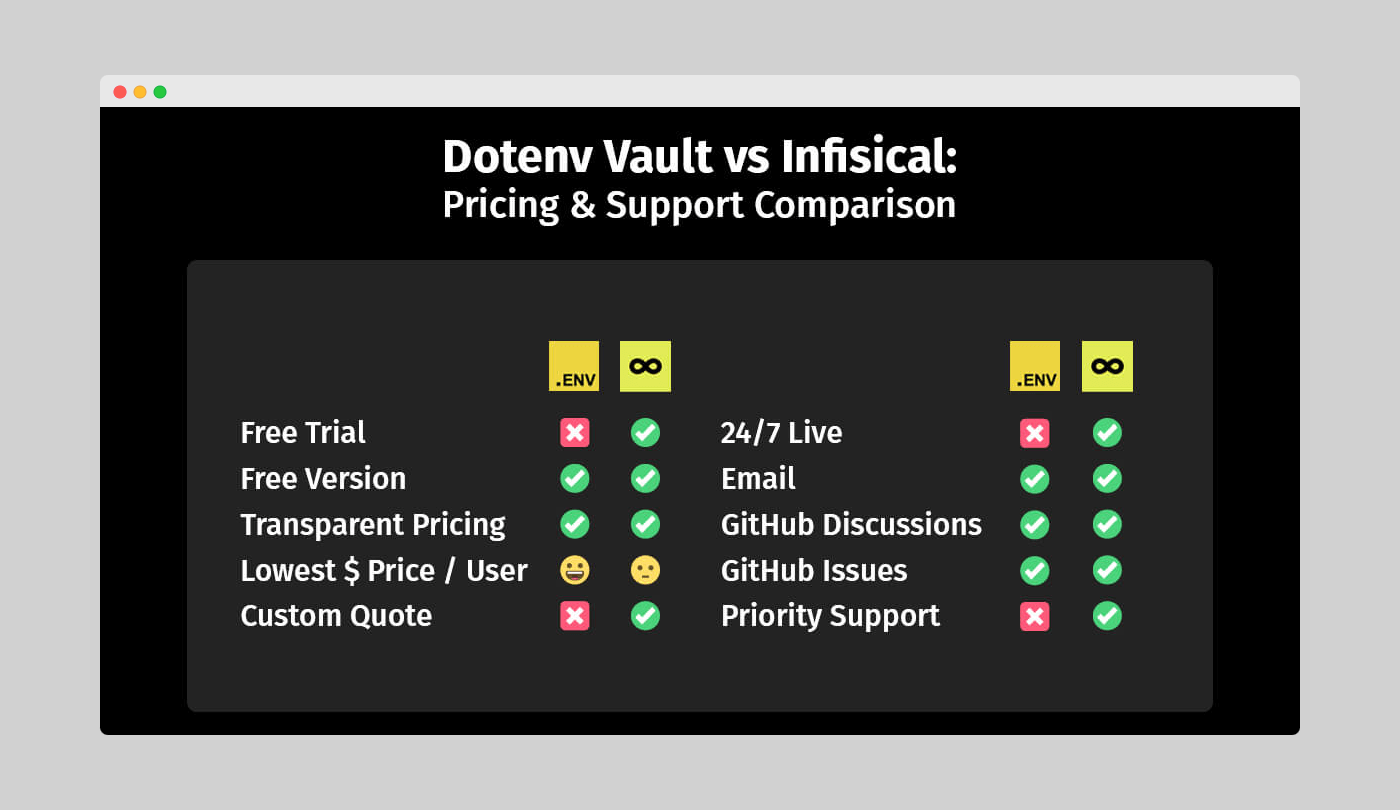
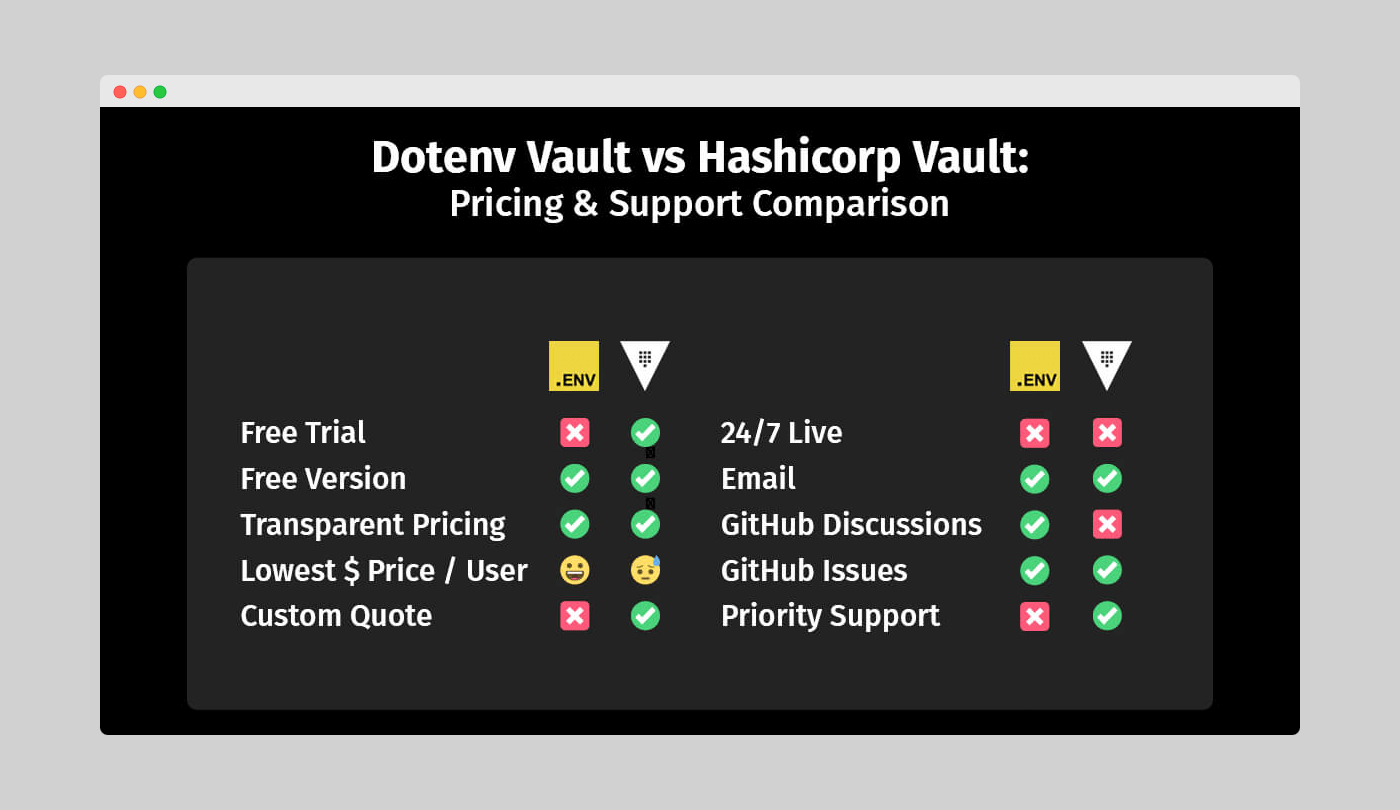
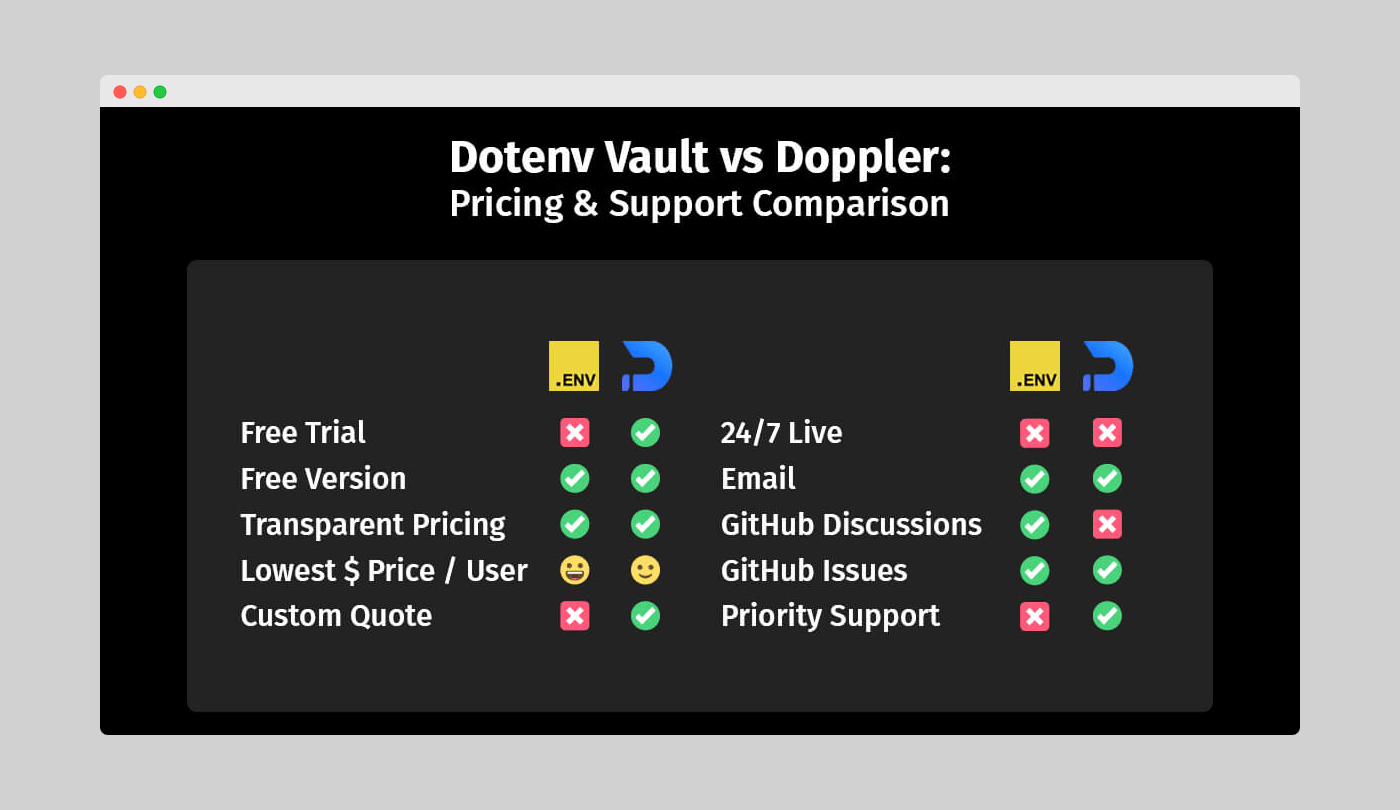
<p>First, let’s look at tool accessibility without commitment. It’s great to see both Dotenv Vault and Infisical offer free versions for users to explore the platforms. The key difference is that Vault doesn’t support product trials. But with a commitment-free version available, why avoid a trial subscription? The answer may lie in the fine print of both business models.</p>

<p><img src="/assets/img/blog/vault-vs-infisical/dotenv-vault-vs-infisical-pricing-support-comparison.png" /></p>

<p><em>Figure 9: Dotenv Vault vs Infisical – Pricing and support comparison</em></p>

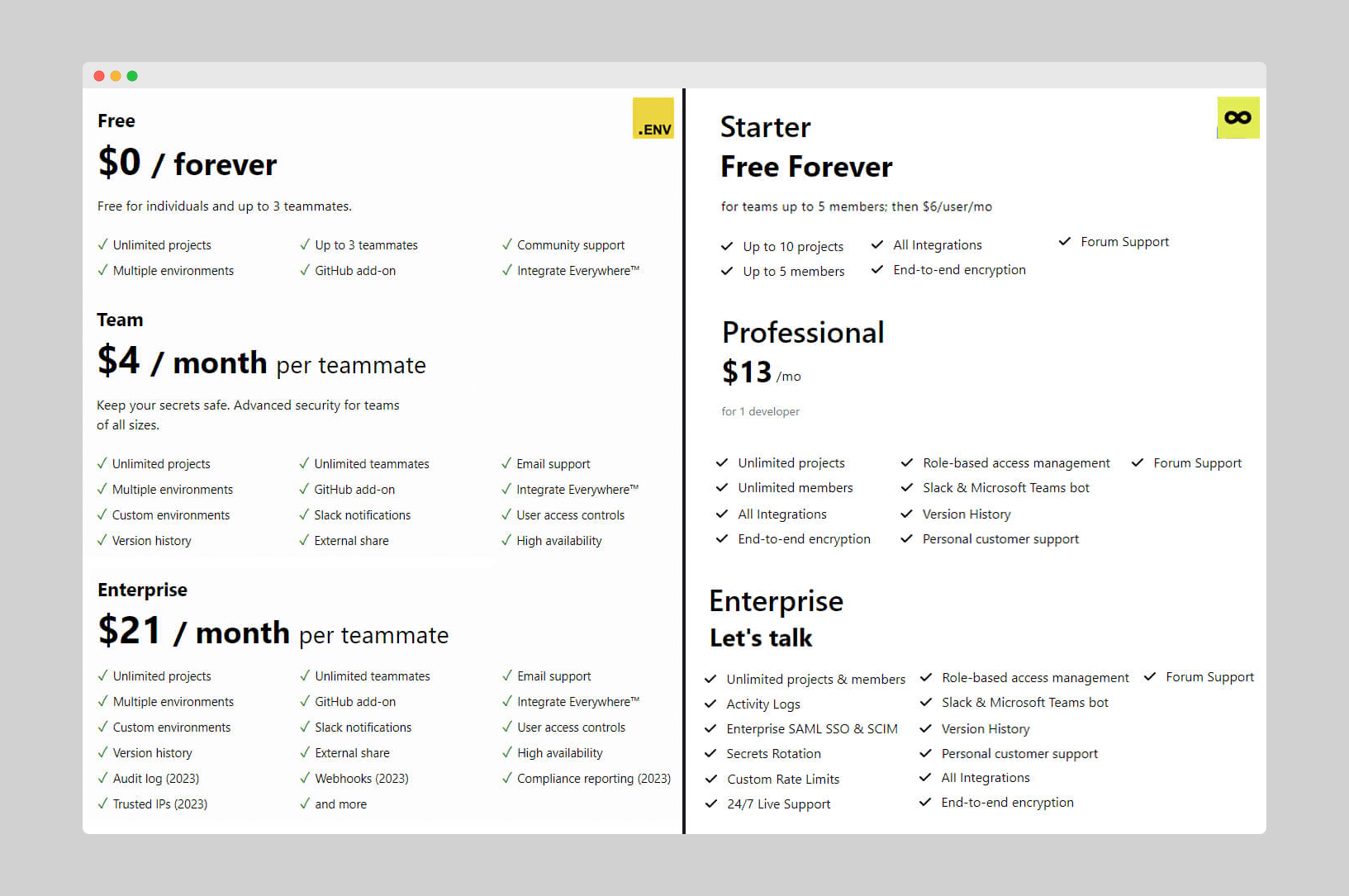
<p>Dotenv Vault’s free version is feature-complete without strict limits like Infisical’s request limits. This makes a trial offer unnecessary, as the only reasons to consider it would be to try features like Custom environments, User access controls, Version history, Audit log, Compliance reporting, Trusted IPs, and Webhooks. Although these are advanced capabilities, they are quite common for many developers.</p>

<p>On the other hand, Infisical offers a limited set of features in its commitment-free plan, highlighting the option for higher rate limits. That’s why it makes sense for curious developers to try the paid plans, to see how well the platform performs without some restrictions.</p>

<h3 id="transparent-and-personalized-pricing">Transparent and personalized pricing</h3>
<p>Another way to win users’ trust and financial commitment is by offering transparent and customized pricing options. Transparency alleviates concerns about unexpected charges, making costs and potential spending predictable while ensuring customers know what they’re getting in return, fostering trust.</p>

<p>But what if a user has needs beyond standard plans? That’s where customized pricing comes in. By offering a tailored subscription plan, you not only earn their trust but also their long-term business. Examining our two secrets management tools, it’s clear that both have taken steps to address these needs.</p>

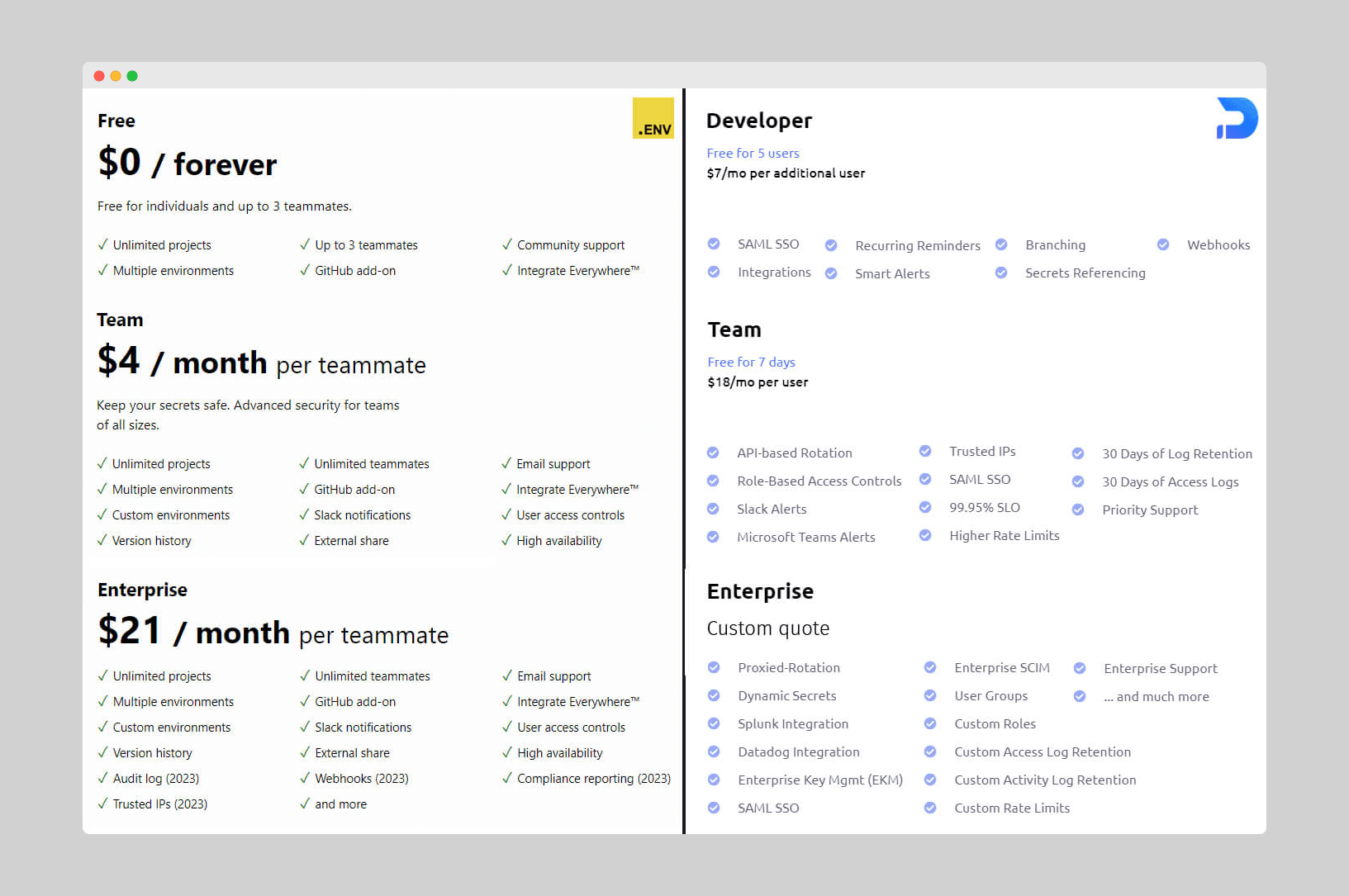
<p>The main difference lies in the lowest plan price floor. Infisical has a higher minimum starting fee of $6 per user, compared to Dotenv Vault’s $4. This is likely because Infisical’s free version is less feature-complete, offering a chance to lift some restrictions and lower barriers to fully utilize its capabilities.</p>

<p><img src="/assets/img/blog/vault-vs-infisical/dotenv-vault-vs-infisical-pricing-plans-comparison.png" /></p>

<p><em>Figure 10: Dotenv Vault vs Infisical - Pricing plans comparison</em></p>

<h3 id="community-support-options">Community support options</h3>
<p>Community support is common among developer communities and their tools. Developers are generally eager to share their expertise on a topic to help others, benefiting their personal development and potentially opening future opportunities.</p>

<p>It’s no surprise that both Dotenv Vault and Infisical offer community support options. These options are not only viable but also the primary means of handling customer queries for commitment-free plans like Vault. While GitHub Issues is an excellent way to achieve this, additional channels like GitHub Discussions can streamline the process and free up time for the core team.</p>

<h3 id="direct-and-priority-support-options">Direct and priority support options</h3>
<p>However, community support alone isn’t enough to address customer queries, as it can be slow or unreliable. That’s where more direct communication comes in. While live support is resource-intensive and mostly suitable for large enterprises, email isn’t.</p>

<p>Consequently, both Dotenv Vault and Infisical use email as their core approach for handling queries from paying customers. This also serves as an incentive for professional users seeking faster and more adequate resolutions than community support can offer.</p>

<p>Infisical stands out by offering a broader range of direct and priority support options, including 24/7 live support.</p>

<h2 id="dotenv-vault-vs-infisical-verdict">Dotenv Vault vs Infisical: Verdict</h2>
<p>Now that we’ve thoroughly reviewed all the key differences between Dotenv Vault and Infisical, it’s time for our final verdict. However, the reality is that this decision is not as black and white as many would have hoped. Both tools excel at managing environment variables, but their distinct features make them better suited for different tasks.</p>

<p>If you’re a developer or a team looking for a flexible and easy-to-use tool to manage environment variables, Dotenv Vault is an excellent choice. On the other hand, if you need a more sophisticated tool catering to a cybersecurity team and its complex workflows, Infisical might be the better alternative. Unsurprisingly, the target audiences for both solutions align perfectly with these strengths.</p>

<p>In conclusion, there is no clear winner between Dotenv Vault and Infisical. Each has its own set of benefits and tradeoffs to consider. Ultimately, your specific needs will determine your choice. With this detailed comparison, we hope you now have a better understanding of which tool is best suited for you and your team.</p>]]></content><author><name>mot</name></author><category term="blog" /><summary type="html"><![CDATA[Discover the ultimate matchup between Dotenv Vault and Infisical as we compare features, experience, integrations, and other key factors face-to-face.]]></summary><media:thumbnail xmlns:media="http://search.yahoo.com/mrss/" url="https://www.dotenv.org/assets/img/blog/vault-vs-infisical/dotenv-vault-vs-infisical-cover.png" /><media:content medium="image" url="https://www.dotenv.org/assets/img/blog/vault-vs-infisical/dotenv-vault-vs-infisical-cover.png" xmlns:media="http://search.yahoo.com/mrss/" /></entry><entry><title type="html">Dotenv Vault vs HCP Vault</title><link href="https://www.dotenv.org/blog/2023/05/23/dotenv-vault-vs-hcp-vault.html" rel="alternate" type="text/html" title="Dotenv Vault vs HCP Vault" /><published>2023-05-23T00:00:00+00:00</published><updated>2023-05-23T00:00:00+00:00</updated><id>https://www.dotenv.org/blog/2023/05/23/dotenv-vault-vs-hcp-vault</id><content type="html" xml:base="https://www.dotenv.org/blog/2023/05/23/dotenv-vault-vs-hcp-vault.html"><![CDATA[<p>Dive into the features, experience, and other key factors to find your best fit in our comprehensive comparison of Dotenv Vault and HCP Vault.</p>

<p>As developers dealing with various kinds of data and information, we understand the importance of security in keeping our systems safe. With many things that can go wrong during data breaches (both for our business and our customers), it’s vital to prevent them from happening in the first place.</p>

<p>This makes choosing the right method for protecting our data essential, and it’s likely at the top of our list of concerns. It’s something we want to invest in, but the challenge lies in not knowing which tool is the perfect fit for us.</p>

<p>There are two popular options when it comes to selecting a secrets management tool - our very own Dotenv Vault and Hashicorp Vault. Both tools have their own advantages and disadvantages, making it difficult to decide which one is best for our needs. In this blog post, we’ll compare the two tools and help you make the ultimate choice:</p>

<h2 id="dotenv-vault-vs-hcp-vault-overview">Dotenv Vault vs HCP Vault: Overview</h2>
<p>Starting with our own offering – Dotenv Vault, it’s a lightweight, user-friendly, yet powerful solution. As a relatively recent entry as a SaaS platform, it builds upon the best-in-class predecessor, setting the standard for handling environment variables. It’s a unified platform with no external dependencies, designed to extend the talents and capabilities of all developers.</p>

<p>On the other hand, Hashicorp Vault presents a more enterprise-focused solution that, while not as feature-rich, offers deeper integration with services across cloud providers. However, setting it up and getting started is comparatively more complex, making it better suited for vault brokers and professional cyber security teams.</p>

<p>So, which one stands out as the top alternative? To provide a better answer to this question, we will examine seven core factors that significantly influence the success of each tool:</p>

<ol>
  <li><a href="#dotenv-vault-vs-hcp-vault-core-features">Core features</a></li>
  <li><a href="#dotenv-vault-vs-hcp-vault-developer-experience">Developer experience</a></li>
  <li><a href="#dotenv-vault-vs-hcp-vault-supported-integrations">Supported integrations</a></li>
  <li><a href="#dotenv-vault-vs-hcp-vault-deployment-options">Deployment options</a></li>
  <li><a href="#dotenv-vault-vs-hcp-vault-github-activity">GitHub activity</a></li>
  <li><a href="#dotenv-vault-vs-hcp-vault-pricing-and-support">Pricing and support</a></li>
  <li><a href="#dotenv-vault-vs-hcp-vault-verdict">Verdict</a></li>
</ol>

<h2 id="dotenv-vault-vs-hcp-vault-core-features">Dotenv Vault vs HCP Vault: Core features</h2>
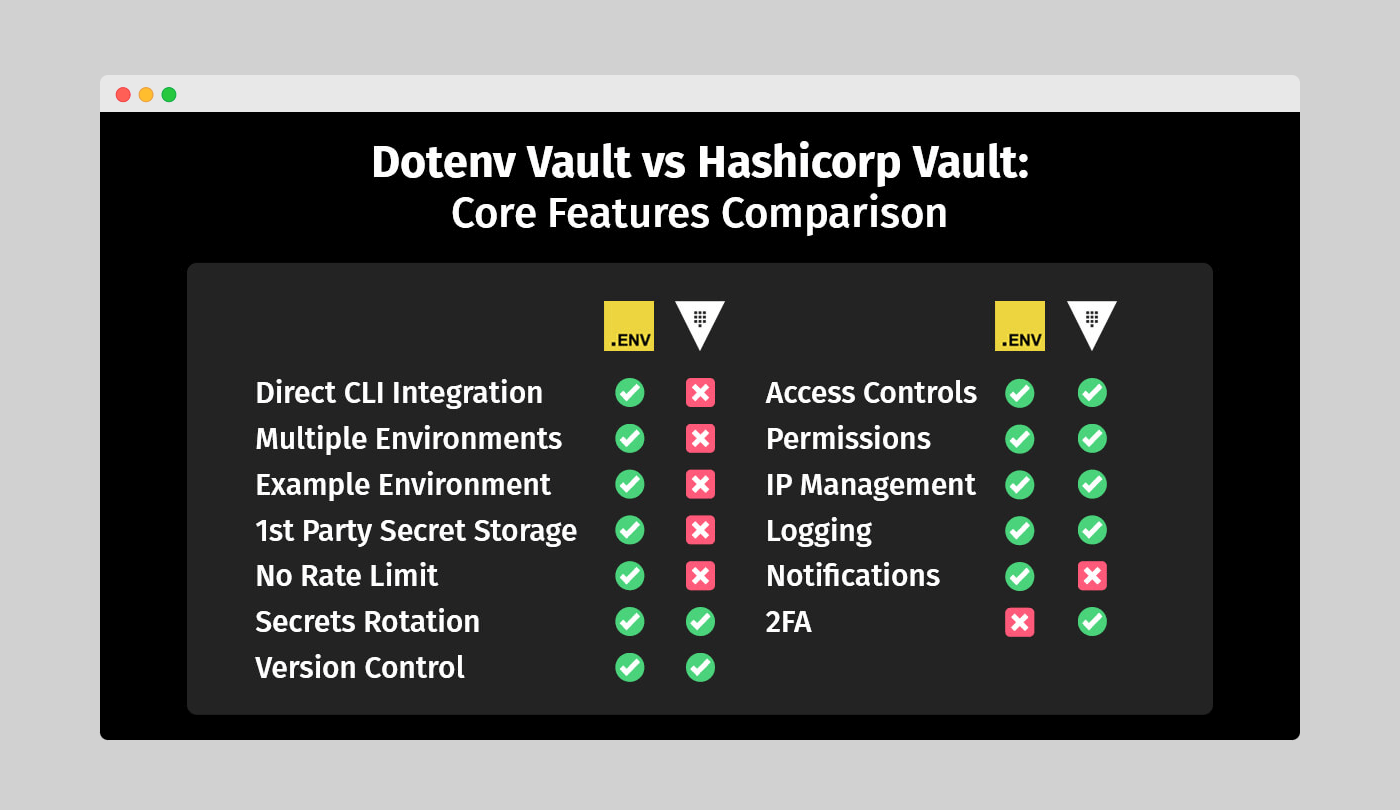
<p>As the team behind Dotenv Vault, we’re excited to compare the core features of our solution with those of Hashicorp Vault. While there are similarities between the two, such as Versioning, Access Controls, Permissions, IP Management, and Logging, there are also key differences in each solution’s approach to structuring secrets, storage of secrets, and the presence of API limits.</p>

<p>In terms of security features, Hashicorp Vault offers some extras, like dynamic secrets and rotation, which are helpful for cloud provider integrations at scale. However, Dotenv Vault shines in its quality-of-life implementations, such as notifications for various secret interactions.</p>

<div class="screenshot mb-4">
  <a href="/assets/img/blog/vault-vs-hcp/dotenv-vault-vs-hashicorp-vault-core-features-comparison.png" target="_blank">
    
    <img src="/assets/img/blog/vault-vs-hcp/dotenv-vault-vs-hashicorp-vault-core-features-comparison.png" width="500" class="shadow rounded w-100" />
    
  </a>
</div>

<p><em>Figure 1: Dotenv Vault vs Hashicorp Vault - Core features comparison</em></p>

<h3 id="structural-differences">Structural differences</h3>
<p>If you’ve used other secret management solutions, you’re likely familiar with having multiple environments available. Our Dotenv Vault offers a familiar developer experience with secrets bound to environments like <code>development</code>, <code>staging</code>, and <code>production</code>, tying them into projects. In contrast, Hashicorp Vault uses clusters, which can lead to a long, difficult-to-manage list of clusters when working with multiple projects.</p>

<p>Our Dotenv Vault also offers an <code>example</code> environment, which is handy for creating tutorials or well-documented trails for other developers to follow. This public <code>example</code> environment allows you to set the format while keeping your actual secrets secure.</p>

<div class="screenshot mb-4">
  <a href="/assets/img/blog/common/dotenv_vault_example_environment.png" target="_blank">
    
    <img src="/assets/img/blog/common/dotenv_vault_example_environment.png" width="500" class="shadow rounded w-100" />
    
  </a>
</div>

<p><em>Figure 2: Dotenv Vault example environment in a Web3 setting</em></p>

<h3 id="direct-cli-integration">Direct CLI integration</h3>
<p>We’re proud of how simple our Dotenv Vault CLI interactions are. With our package, you can run it without installation using <code>npx</code>, whereas the Hashicorp Vault CLI requires a download and setup before use. This results in better productivity and a smooth experience for dev teams.</p>

<p>Our recent <code>dotenv-vault@1.19.0</code> update introduced local <code>build</code>, <code>decrypt</code>, and <code>keys</code> commands, enabling developers to manage secrets independently of dotenv.org. This update also refined the <code>build</code> command, reducing nonce collisions and improving the overall developer experience.</p>

<h3 id="from-zero-to-hero">From zero to hero</h3>
<p>Dotenv Vault redefines simplicity, offering an incredibly straightforward setup process. With just two command-line inputs, configuring Dotenv Vault for your project is a breeze:</p>

<pre><code class="language-shell"># Dotenv Vault CLI initialization
npx dotenv-vault new
npx dotenv-vault login
</code></pre>
<p>The streamlined setup of Dotenv Vault, condensed into two commands, prioritizes a fast and hassle-free experience. It is an excellent choice for developers seeking a seamless setup that enables them to quickly dive into their projects.</p>

<p>While HCP Vault also aims to provide a streamlined setup process for a smooth and efficient start, it does require two extra lines in your CLI to install required packages. This results in a total of four steps before initiating a fresh project:</p>

<pre><code class="language-shell"># HCP Vault CLI initialization
brew tap hashicorp/tap
brew install hashicorp/tap/vault
vault login
vault operator init
</code></pre>

<p>When comparing the four-step setup of HCP Vault to Dotenv Vault, the process is generally just as unambiguous. However, Dotenv Vault holds a distinct advantage that sets it apart. Unlike HCP Vault, Dotenv Vault doesn’t necessitate any installation beforehand. Instead, you can effortlessly execute the package remotely using <code>npx</code>. This unique approach ensures a turbo-charged fresh start, making Dotenv Vault an enticing alternative for developers that have time and code efficiency as top priority.</p>

<h3 id="dynamic-secrets-and-rotation">Dynamic secrets and rotation</h3>
<p>Both HCP Vault and Dotenv Vault offer valuable security features. HCP Vault provides dynamic secrets and proxied rotation capabilities, while Dotenv Vault enables rotation of the <code>DOTENV_KEY</code> for secure access. HCP Vault’s dynamic secrets generate secret values on-demand, preventing human errors related to app secrets. Its proxied rotation enforces automatic rotation within a specified timeframe, keeping services hidden from the public internet.</p>

<p>In comparison, our Dotenv Vault focuses on rotating the <code>DOTENV_KEY</code> to secure access to environment variables. Regularly updating this key reduces unauthorized access risk and helps maintain secret security. While not all languages and frameworks are supported, the list of compatible options is growing.</p>

<h3 id="first-party-secret-storage">First party secret storage</h3>
<p>Unlike Dotenv Vault, Hashicorp Vault lacks first-party secret storage, offering only untrusted backend storage or alternative third-party options for enterprise customers. Our Dotenv Vault uses an in-house approach to handle users’ secrets, requiring no storage as the payload and decryption process are entirely in-memory. Once complete, the memory is flushed, eliminating any lasting unsecured presence on the servers.</p>

<p>This approach significantly hinders potential hackers, as there’s nothing left for them to steal in case of a breach. And to put things into even better perspective, here’s how Dotenv Vault’s workflow can be mapped out:</p>

<div class="screenshot mb-4">
  <a href="/assets/img/blog/common/dotenv_vault_security_overview.png" target="_blank">
    
    <img src="/assets/img/blog/common/dotenv_vault_security_overview.png" width="500" class="shadow rounded w-100" />
    
  </a>
</div>

<p><em>Figure 3: Dotenv Vault security overview</em></p>

<h3 id="rate-limits--2fa">Rate limits &amp; 2FA</h3>
<p>Dotenv Vault offers unlimited API access, which is helpful for request-heavy implementations. Hashicorp Vault doesn’t provide this option, potentially requiring a plan upgrade for such applications.</p>

<p>However, Hashicorp Vault has an advantage when it comes to 2FA, which is essential for added security. We acknowledge this aspect and are continuously working to improve our offering to provide the best experience and security for our users.</p>

<h2 id="dotenv-vault-vs-hcp-vault-developer-experience">Dotenv Vault vs HCP Vault: Developer experience</h2>
<p>As the fellow developers like yourself, we understand that a great developer experience (DX) is just as crucial as the core feature sets of our tool. In this comparison, we’ll take a closer look at how Dotenv Vault and Hashicorp Vault stack up in terms of user-friendliness and accessibility for both newcomers and experienced developers.</p>

<p>Here’s a quick overview of how well each tool fares in terms of developer experience according to some of the core aspects that comprise it:</p>

<div class="screenshot mb-4">
  <a href="/assets/img/blog/vault-vs-hcp/dotenv-vault-vs-hashicorp-vault-developer-experience-comparison.png" target="_blank">
    
    <img src="/assets/img/blog/vault-vs-hcp/dotenv-vault-vs-hashicorp-vault-developer-experience-comparison.png" width="500" class="shadow rounded w-100" />
    
  </a>
</div>

<p><em>Figure 4: Dotenv Vault vs Hashicorp Vault - Developer experience comparison</em></p>

<h3 id="onboarding-setup-and-interactions">Onboarding, setup, and interactions</h3>
<p>An excellent DX begins with the first interaction, which is why a well-structured onboarding process is essential. We’re proud that Dotenv Vault offers a guided and personalized onboarding experience that’s easy to pick up, while Hashicorp Vault falls short in this aspect.</p>

<div class="screenshot mb-4">
  <a href="/assets/img/blog/common/dotenv_vault_guided_setup.png" target="_blank">
    
    <img src="/assets/img/blog/common/dotenv_vault_guided_setup.png" width="500" class="shadow rounded w-100" />
    
  </a>
</div>

<p><em>Figure 5: Dotenv Vault guided setup process</em></p>

<p>Hashicorp Vault’s lack of visual feedback and guided interactions can make it challenging for new developers. In contrast, our Dotenv Vault provides relevant feedback in both the CLI and WebUI, making the workflow smoother. Our handy “Next-next-next” type of setup wizard also helps you initialize your app’s environment quickly and easily.</p>

<h3 id="tutorials-and-documentation">Tutorials and documentation</h3>
<p>As a relatively new entry in the market, we admit that Dotenv Vault’s tutorials and documentation are still catching up with Hashicorp Vault’s extensive resources, including getting started guides, detailed tutorials, and a certification track. We’re working hard to improve our documentation and offer more resources for our users.</p>

<p>However, when it comes to changelogs and readme updates, we believe that our detailed and accessible overviews of each commit make it easier for developers to understand how our solution works. This approach also improves the overall security of Dotenv Vault by making it easier for auditors to evaluate safety and identify areas for improvement.</p>

<h3 id="changelogs-and-readme-files">Changelogs and readme files</h3>
<p>When it comes to the comprehensiveness of each changelog and readme update, our approach offers a much more accessible entry for developers looking to better understand how it functions. In contrast to Hashicorp’s solution, Dotenv Vault includes detailed overviews of each commit, which are both accessible and straightforward, and effectively eliminate unnecessary obstacles before potential contributors.</p>

<p>Looking at the commit history, it is easy to notice this fundamental difference. Every changelog features nothing more than a version update, leaving you entirely on your own, while comparing the differences in the code segments. Even if Hashicorp Vault is open source like our very own Dotenv Vault, the real winner in this vertical and the tool that follows in the footsteps of this approach more closely is by far the latter. And as a side benefit, this also improves the overall security of the solution by making it much easier for auditors to evaluate the safety and identify weak points for further improvement.</p>

<h3 id="package-installation-and-consistency">Package installation and consistency</h3>
<p>In terms of package consistency, both solutions perform similarly. However, Dotenv Vault has the advantage of not requiring installation, unlike Hashicorp Vault. The installation process for both tools is consistent across different operating systems, which is beneficial for cross-platform administrators.</p>

<p>Our Dotenv Vault’s familiar workflow for developers accustomed to working with git and GitHub simplifies the learning curve. We also cater to various platforms by offering Windows executable installation through 32-bit and 64-bit installers and Homebrew installation for macOS users. This versatility makes Dotenv Vault even more appealing to developers working on different systems.</p>

<h2 id="dotenv-vault-vs-hcp-vault-supported-integrations">Dotenv Vault vs HCP Vault: Supported integrations</h2>
<p>At Dotenv, we know that integrations play a crucial role in a tool’s usefulness. While Hashicorp Vault’s list of integrations initially appears extensive, most of them are designed for their other tools, such as Terraform. Only a small portion applies to their Vault implementation.</p>

<p>Hashicorp Vault aims to capture a larger share of the cloud provider market, which is why it supports not just AWS, Azure, and Google, but also Alibaba, Tencent, and OVH clouds. Meanwhile, we’ve focused on integrations most helpful to the majority of developers, such as CircleCI, Digital Ocean, Heroku, and Vercel. However, Hashicorp Vault does offer some interesting alternatives like MongoDB and Kubernetes, broadening its reach.</p>

<div class="screenshot mb-4">
  <a href="/assets/img/blog/vault-vs-hcp/dotenv-vault-vs-hashicorp-vault-integrations-comparison.png" target="_blank">
    
    <img src="/assets/img/blog/vault-vs-hcp/dotenv-vault-vs-hashicorp-vault-integrations-comparison.png" width="500" class="shadow rounded w-100" />
    
  </a>
</div>

<p><em>Figure 6: Dotenv Vault vs Hashicorp Vault – Supported integrations comparison</em></p>

<h3 id="addon-and-plugin-integration">Addon and plugin integration</h3>
<p>We understand the importance of seamless integration with popular tools and platforms. That’s why Dotenv Vault offers a GitHub Add-on and a VSCode extension with Rust support. In comparison, HCP Vault ensures a versatile developer experience with its compatibility with GitHub and a VSCode extension.</p>

<p>Our GitHub Add-on automatically builds encrypted <code>.env.vault</code> files when secrets change, keeping your projects up-to-date and synchronized. Our VSCode extension with Rust support also expands our adaptability across different programming languages and development environments.</p>

<p>HCP Vault, too, focuses on addon and plugin integration, offering compatibility with GitHub and a VSCode extension for managing secrets within developers’ preferred settings.</p>

<h2 id="dotenv-vault-vs-hcp-vault-deployment-options">Dotenv Vault vs HCP Vault: Deployment options</h2>
<p>Both Dotenv Vault and Hashicorp Vault have similarities in deployment options, thanks to their open-source nature. As SaaS platforms, they offer official libraries and community-led initiatives to support various languages. Hashicorp stands out with its Powershell implementation, while we cater to Docker and .net users.</p>

<p>The significant degree of interoperability between both tools ensures a pleasant experience across programming languages.</p>

<div class="screenshot mb-4">
  <a href="/assets/img/blog/vault-vs-hcp/dotenv-vault-vs-hashicorp-vault-deployment-options-comparison.png" target="_blank">
    
    <img src="/assets/img/blog/vault-vs-hcp/dotenv-vault-vs-hashicorp-vault-deployment-options-comparison.png" width="500" class="shadow rounded w-100" />
    
  </a>
</div>

<p><em>Figure 7: Dotenv Vault vs Hashicorp Vault – Deployment options comparison</em></p>

<h2 id="dotenv-vault-vs-hcp-vault-github-activity">Dotenv Vault vs HCP Vault: GitHub activity</h2>
<p>Hashicorp Vault’s longer market presence is evident in its GitHub activity. While we’ve made a noticeable impact despite our shorter tenure, Hashicorp Vault has more pronounced community participation.</p>

<p>Hashicorp’s repo boasts a higher star rating, a larger number of forks, and more issues listed on the platform. However, when comparing the ratio of open to closed issues, we seem to have an edge. This could be due to sample sizes or faster issue resolution for Dotenv Vault.</p>

<p>In terms of commit activity, our commitment appears to increase over time, while Hashicorp’s remains stable. This suggests that Hashicorp Vault has a healthy and consistent development cycle, while our increasing contributions may benefit Dotenv Vault in the long run.</p>

<div class="screenshot mb-4">
  <a href="/assets/img/blog/vault-vs-hcp/dotenv-vault-vs-hashicorp-vault-github-activity-comparison.png" target="_blank">
    
    <img src="/assets/img/blog/vault-vs-hcp/dotenv-vault-vs-hashicorp-vault-github-activity-comparison.png" width="500" class="shadow rounded w-100" />
    
  </a>
</div>

<p><em>Figure 8: Dotenv Vault vs Hashicorp Vault – GitHub activity comparison</em></p>

<h2 id="dotenv-vault-vs-hcp-vault-pricing-and-support">Dotenv Vault vs HCP Vault: Pricing and support</h2>
<p>In this crucial category of pricing and support, we, the Dotenv Vault team, want to highlight some significant differences between our solution and Hashicorp Vault. Each tool takes a different approach to pricing, and while neither is inherently better, they cater to specific use cases.</p>

<div class="screenshot mb-4">
  <a href="/assets/img/blog/vault-vs-hcp/dotenv-vault-vs-hashicorp-vault-pricing-suppport-comparison.png" target="_blank">
    
    <img src="/assets/img/blog/vault-vs-hcp/dotenv-vault-vs-hashicorp-vault-pricing-suppport-comparison.png" width="500" class="shadow rounded w-100" />
    
  </a>
</div>

<p><em>Figure 9: Dotenv Vault vs Hashicorp Vault – Pricing and support comparison</em></p>

<p>We’ve chosen a traditional SaaS-based pricing model for Dotenv Vault, with tiers on a per-user basis. Hashicorp Vault, on the other hand, uses a per-hour quote similar to cloud providers like Digital Ocean. This pricing model aligns with their focus on cloud provider integrations, while our per-user pricing approach better suits developers and teams.</p>

<h3 id="beyond-the-pricing-models">Beyond the pricing models</h3>
<p>Besides the distinct pricing models, both solutions share some similarities. We’re proud that both Dotenv Vault and Hashicorp Vault offer free versions, transparent plan tier breakdowns, and custom quotes for non-standard implementations.</p>

<p>Hashicorp Vault provides a free trial, but our free version is feature-complete, making a trial unnecessary. Interestingly, the non-SaaS version of Hashicorp’s tool is entirely free but lacks the assistance offered by the paid Web-based alternative, making it most useful for experienced Hashicorp users.</p>

<div class="screenshot mb-4">
  <a href="/assets/img/blog/vault-vs-hcp/dotenv-vault-vs-hashicorp-vault-pricing-plans-comparison.png" target="_blank">
    
    <img src="/assets/img/blog/vault-vs-hcp/dotenv-vault-vs-hashicorp-vault-pricing-plans-comparison.png" width="500" class="shadow rounded w-100" />
    
  </a>
</div>

<p><em>Figure 10: Dotenv Vault vs Doppler - Pricing plans comparison</em></p>

<h3 id="support-options-overview">Support options overview</h3>
<p>As popular developer SaaS solutions, both tools benefit from community support, boosting their GitHub activity. One difference is that we offer an additional channel for community support – GitHub Discussions, which may lead to better interactions between contributors and those seeking help.</p>

<p>In terms of other support channels, Hashicorp Vault has a ticketing system run by a dedicated support team, offering more security than our email support option. Hashicorp’s remote assistance sessions also stand out in priority support.</p>

<h2 id="dotenv-vault-vs-hcp-vault-verdict">Dotenv Vault vs HCP Vault: Verdict</h2>
<p>We hope that this comparison helps you understand the similarities and differences between Dotenv Vault and Hashicorp Vault. The best choice depends on your specific needs and the systems you plan to use in your development process.</p>

<p>If you’re looking for an effective and user-friendly way to manage environment variables for your development team, Dotenv Vault is an excellent choice. However, if you’re an experienced developer seeking deeper integrations with various cloud providers beyond the common ones, Hashicorp Vault may be more suitable, provided you can accommodate the per-hour pricing model and a less intuitive interface. Ultimately, your needs will guide your final decision.</p>]]></content><author><name>mot</name></author><category term="blog" /><summary type="html"><![CDATA[Dive into the features, experience, and other key factors to find your best fit in our comprehensive comparison of Dotenv Vault and HCP Vault.]]></summary><media:thumbnail xmlns:media="http://search.yahoo.com/mrss/" url="https://www.dotenv.org/assets/img/blog/vault-vs-hcp/dotenv-vault-vs-hcp-cover.png" /><media:content medium="image" url="https://www.dotenv.org/assets/img/blog/vault-vs-hcp/dotenv-vault-vs-hcp-cover.png" xmlns:media="http://search.yahoo.com/mrss/" /></entry><entry><title type="html">Dotenv Vault vs Doppler</title><link href="https://www.dotenv.org/blog/2023/05/16/dotenv-vault-vs-doppler.html" rel="alternate" type="text/html" title="Dotenv Vault vs Doppler" /><published>2023-05-16T00:00:00+00:00</published><updated>2023-05-16T00:00:00+00:00</updated><id>https://www.dotenv.org/blog/2023/05/16/dotenv-vault-vs-doppler</id><content type="html" xml:base="https://www.dotenv.org/blog/2023/05/16/dotenv-vault-vs-doppler.html"><![CDATA[<p>Make an informed choice by examining the core aspects of Dotenv Vault and Doppler in our in-depth review of how they fare against each other.</p>

<p>As a developer, you are probably aware of the importance of keeping your confidential information safe. After all, if your solution is hacked, not only could your business be at risk, but your customers’ information could be compromised just as well.</p>

<p>This makes it vital to choose the right means of protecting your data. And chances are, if you have ever wanted to keep your environment variables safe and sound, you’ve likely considered using a tool to manage your app secrets. But with so many options on the market, it can be hard to know which one is right for you.</p>

<p>That is why, we are going to compare two of the most popular options in this article: Dotenv Vault and Doppler. Both allow you to securely store sensitive information, such as API keys and passwords, so that your application can use them. But even so each of the two comes with its own set of quirks, all of which we will review as we dig deeper into the details of Dotenv Vault and Doppler:</p>

<h2 id="dotenv-vault-vs-doppler-overview">Dotenv Vault vs Doppler: Overview</h2>
<p>As fellow developers like yourself, at Dotenv we understand that comparing our product to others on the market is essential in order to help developers make an informed decision. On one hand, we have Dotenv Vault, a simple and lightweight solution with a predecessor, Dotenv, that has become the standard for managing environment variables. It’s easy to use and doesn’t require any additional dependencies.</p>

<p>Doppler, on the other hand, is a more enterprise-oriented solution that focuses on security teams. While it offers a few extra features such as proxied rotation for environment variables, it’s more complex to set up compared to Dotenv Vault. Although it might be suitable for enterprise developers seeking a secret manager with an SLO promise, we believe that our solution is superior.</p>

<p>To help you see why we’re so confident in Dotenv Vault, we’ll compare both tools in seven key areas:</p>

<ol>
  <li><a href="#dotenv-vault-vs-doppler-core-features">Core features</a></li>
  <li><a href="#dotenv-vault-vs-doppler-developer-experience">Developer experience</a></li>
  <li><a href="#dotenv-vault-vs-doppler-supported-integrations">Supported integrations</a></li>
  <li><a href="#dotenv-vault-vs-doppler-deployment-options">Deployment options</a></li>
  <li><a href="#dotenv-vault-vs-doppler-github-activity">GitHub activity</a></li>
  <li><a href="#dotenv-vault-vs-doppler-pricing-and-support">Pricing and support</a></li>
  <li><a href="#dotenv-vault-vs-doppler-verdict">Verdict</a></li>
</ol>

<h2 id="dotenv-vault-vs-doppler-core-features">Dotenv Vault vs Doppler: Core features</h2>
<p>We’re excited to dive into the core features and showcase how our solution compares to Doppler. It’s no surprise that both tools share common ground in core offerings since they typically define a secret manager tool.</p>

<p>You’ll find multiple environments, version and access controls, logging, notifications, permissions, and IP management features in both Dotenv Vault and Doppler, each with their unique spin. However, we believe our solution outshines Doppler in several ways.</p>

<div class="screenshot mb-4">
  <a href="/assets/img/blog/vault-vs-doppler/dotenv-vault-vs-doppler-core-features-comparison.png" target="_blank">
    
    <img src="/assets/img/blog/vault-vs-doppler/dotenv-vault-vs-doppler-core-features-comparison.png" width="500" class="shadow rounded w-100" />
    
  </a>
</div>

<p><em>Figure 1: Dotenv Vault vs Doppler - Core features comparison</em></p>

<h3 id="differences-in-multiple-evironments">Differences in multiple evironments</h3>
<p>Both Dotenv Vault and Doppler allow users to create multiple environments like <code>Development</code>, <code>Staging</code>, <code>Production</code>, and more. But Dotenv Vault goes the extra mile with an innovative <code>Example</code> environment.</p>

<p>This environment is a Godsend when writing tutorials or providing clear guidance for new developers. Secrets in the <code>Example</code> environment are public, allowing you to share the format of each value. Meanwhile, actual values in <code>Development</code> or <code>Production</code> remain private. Say goodbye to adding <code>.env</code> files to <code>.gitignore</code> and the stress of GitGuardian notifications if you forget to do so!</p>

<div class="screenshot mb-4">
  <a href="/assets/img/blog/common/dotenv_vault_example_environment.png" target="_blank">
    
    <img src="/assets/img/blog/common/dotenv_vault_example_environment.png" width="500" class="shadow rounded w-100" />
    
  </a>
</div>

<p><em>Figure 2: Dotenv Vault example environment in a Web3 setting</em></p>

<h3 id="direct-cli-integration">Direct CLI integration</h3>
<p>We take pride in Dotenv Vault’s simplicity when it comes to <code>CLI</code> interactions. Unlike Doppler, which demands setting up its <code>CLI</code> package and dependencies, our solution requires no such hassle. Running Dotenv Vault is as simple as using <code>npx</code>, leaving only the <code>.env.vault</code> file to store your secrets for local use.</p>

<p>Our seamless and intuitive approach to Vault operation ensures syncing your <code>.env</code> files on any device is a breeze. The <code>dotenv-vault@1.19.0</code> update further streamlined secret management without relying on dotenv.org. Plus, improvements to the <code>build</code> command minimize nonce collisions and enhance the overall developer experience.</p>

<h3 id="from-zero-to-hero">From zero to hero</h3>
<p>Dotenv Vault sets a new standard for simplicity, providing an incredibly straightforward setup process. With just two lines of <code>CLI</code> input, you can effortlessly configure Dotenv Vault for your project:</p>

<pre><code class="language-shell"># Dotenv Vault CLI initialization
npx dotenv-vault new
npx dotenv-vault login
</code></pre>

<p>The streamlined setup of Dotenv Vault, condensed into two commands, prioritizes a fast and hassle-free experience. It is an excellent choice for developers seeking a seamless setup that enables them to quickly get started with their projects.</p>

<p>On the flip side, Doppler too offers a streamlined setup process that aims to facilitate a smooth and efficient start. Still, it does require an additional step in the <code>CLI</code>, resulting in a total of three steps before initiating a fresh project:</p>

<pre><code class="language-shell"># Doppler CLI initialization
brew install dopplerhq/cli/doppler
doppler login
doppler setup
</code></pre>

<p>When compared to Dotenv Vault, the three-step setup of Doppler is just as clear-cut. However, Vault does has a distinct advantage that sets it apart. Unlike Doppler, Vault doesn’t require any installation beforehand. Instead, you can effortlessly execute the package remotely using <code>npx</code>. This unique approach ensures a lightning-fast fresh start, making it a tempting alternative for developers who prioritize both time efficiency and streamlined code implementation.</p>

<h3 id="dynamic-secrets-and-rotation">Dynamic secrets and rotation</h3>
<p>Both Doppler and Dotenv Vault cater to developers’ security needs. Doppler offers dynamic secrets and proxied rotation, while our own take in Dotenv Vault lets you rotate the <code>DOTENV_KEY</code> for secure access.</p>

<p>Doppler’s dynamic secrets generate secret values on demand, which can be helpful to avoid human errors. Proxied rotation enforces automatic rotation within a pre-set timeframe, keeping your services secure while using Doppler for rotation management.</p>

<p>On the other hand, the rotation of the <code>DOTENV_KEY</code> in our Vault solution serves as a practical approach to securing your environment variables. Regularly updating the key minimizes unauthorized access and keeps your secrets safe. While not available for all languages and frameworks yet, our ever-growing list includes Golang, Ruby, and Python as the latest additions.</p>

<h3 id="first-party-secret-storage">First party secret storage</h3>
<p>Doppler may have some impressive security features, but one significant drawback is that it relies on a <a href="https://www.verygoodsecurity.com/">3rd party service to store the secrets</a>. This creates a single point of failure, on which the entirety of the platform’s operations relies on and is generally a bad practice, as we have witnessed <a href="https://www.csoonline.com/article/2130877/the-biggest-data-breaches-of-the-21st-century.html">time</a> and <a href="https://cointelegraph.com/news/ledger-data-leak-a-simple-mistake-exposed-270k-crypto-wallet-buyers">time again</a>.</p>

<p>That’s why we’re proud of Dotenv Vault’s in-house secret handling workflow, which doesn’t involve storage at all. Instead, we handle the entire payload and decryption process in-memory before flushing it, leaving no trace of unsecured data on our servers. So even if our Vault servers were breached, the attackers would find nothing but empty bits.Here’s how the entire process works:</p>

<div class="screenshot mb-4">
  <a href="/assets/img/blog/common/dotenv_vault_security_overview.png" target="_blank">
    
    <img src="/assets/img/blog/common/dotenv_vault_security_overview.png" width="500" class="shadow rounded w-100" />
    
  </a>
</div>

<p><em>Figure 3: Dotenv Vault security overview</em></p>

<h3 id="rate-limits-and-2fa">Rate limits and 2FA</h3>
<p>Two core features set Dotenv Vault and Doppler apart: rate limits and two-factor authentication (2FA). While we admit that Dotenv Vault’s lack of 2FA is a drawback compared to Doppler, our solution’s unique strengths shouldn’t be overlooked.</p>

<p>Doppler enforces a strict request limit of 240 per minute or 4 per second, which can degrade the user experience in exchange for ensuring platform responsiveness or promoting higher-tier plans. This means testing your application without a plan upgrade is impossible if it exceeds the request limit.</p>

<h2 id="dotenv-vault-vs-doppler-developer-experience">Dotenv Vault vs Doppler: Developer experience</h2>
<p>While core features are crucial when choosing between two comparable tools, the overall developer experience (DX) is just as important, if not more so. To better understand this concept, let’s examine what makes a DX exceptional.</p>

<p>A good developer experience is essentially an evaluation of a solution’s accessibility to both beginners and experienced users. It incorporates best practices such as visual documentation, beginner tutorials, guided onboarding, sample applications, descriptive changelogs, or readme files.</p>

<div class="screenshot mb-4">
  <a href="/assets/img/blog/vault-vs-doppler/dotenv_vault_vs_doppler_developer_experience_comparison.png" target="_blank">
    
    <img src="/assets/img/blog/vault-vs-doppler/dotenv_vault_vs_doppler_developer_experience_comparison.png" width="500" class="shadow rounded w-100" />
    
  </a>
</div>

<p><em>Figure 4: Dotenv Vault vs Doppler - Developer experience comparison</em></p>

<h3 id="onboarding">Onboarding</h3>
<p>A great DX starts with the first interaction, so having a well-organized and guided onboarding process is essential. Both Dotenv Vault and Doppler cater to novice developers with a guided onboarding process starting from signup. However, Vault goes the extra mile by allowing users to set up their own project as a practical example instead of following a template like Doppler.</p>

<h3 id="setup-and-interactions">Setup and interactions</h3>
<p>Extending the onboarding training wheels to the setup process is a good practice to ensure a positive developer experience. In this regard, Dotenv Vault has a significant advantage over Doppler, which leaves users to fend for themselves after an interactive video introduction.</p>

<p>In contrast, Vault offers descriptive visual feedback and helpful recommendations for each step of the setup process. The same goes for every interaction with our tool, providing invaluable advice in both <code>CLI</code> and <code>WebUI</code> workflows. Plus, our seamless connection between the two delivers an easy-to-follow setup experience that developers love.</p>

<div class="screenshot mb-4">
  <a href="/assets/img/blog/common/dotenv_vault_guided_setup.png" target="_blank">
    
    <img src="/assets/img/blog/common/dotenv_vault_guided_setup.png" width="500" class="shadow rounded w-100" />
    
  </a>
</div>

<p><em>Figure 5: Dotenv Vault guided setup process</em></p>

<h3 id="tutorials-and-documentation">Tutorials and documentation</h3>
<p>Even though we strive to provide valuable feedback to our users, there may be times when you need to consult our knowledge base. That’s why we take tutorials and documentation very seriously.</p>

<p>Comparing Dotenv Vault and Doppler, both solutions perform well in this aspect. When it comes to tutorials, you’ll find descriptive guides for using each platform’s features, with Doppler slightly ahead due to its walkthrough articles for specific use cases. However, our documentation is more accessible to both seasoned developers and rookies alike, giving us an edge in this area.</p>

<h3 id="changelogs-readme-and-source">Changelogs, readme, and source</h3>
<p>Doppler’s focus on experienced users is apparent in its approach to changelogs and readme files. While we at Dotenv Vault believe in providing descriptive, easy-to-understand breakdowns, Doppler tends to use more technical language.</p>

<p>This can be a barrier for developers looking to examine the code base for better understanding or for security researchers conducting audits. Doppler’s mostly proprietary solution doesn’t help either, as it limits the potential for community engagement and security audits. In contrast, our open-source approach at Dotenv Vault encourages collaboration, vulnerability discovery, and contributions from the wider community.</p>

<h3 id="package-installation-and-consistency">Package installation and consistency</h3>
<p>Dotenv Vault’s simplicity greatly benefits its installation process. As mentioned earlier, you won’t need to keep a Vault installation in local storage. Instead, you can run it via <code>npx</code>, similar to how you’d use <code>git</code>. We also offer Windows executable installations and a Homebrew installation for macOS users, catering to different platforms.</p>

<p>Once you’ve logged into your Vault, all it takes is a single <code>npx dotenv-vault pull</code> input to fetch the <code>.env</code> file needed to process your app secrets. In contrast, Doppler requires a more complex installation process with numerous dependencies.</p>

<p>Moreover, while a complicated installation process can be tolerated, Doppler’s lack of seamless cross-OS compatibility is disappointing. For example, Windows users may encounter <code>path not found</code> issues due to the 260 <code>MAX_PATH</code> limit that Doppler can exceed during regular operations. This is undoubtedly a negative mark in any developer’s eyes.</p>

<h2 id="dotenv-vault-vs-doppler-supported-integrations">Dotenv Vault vs Doppler: Supported integrations</h2>
<p>Despite its cross-OS inconsistencies, Doppler does have an advantage in terms of supported integrations. Dotenv Vault currently has still some work to do to reach Doppler’s 28 live integrations. However, we are continuously working to expand our list, as evidenced by the three upcoming additions on our roadmap.</p>

<div class="screenshot mb-4">
  <a href="/assets/img/blog/vault-vs-doppler/dotenv_vault_vs_doppler_integrations_comparison.png" target="_blank">
    
    <img src="/assets/img/blog/vault-vs-doppler/dotenv_vault_vs_doppler_integrations_comparison.png" width="500" class="shadow rounded w-100" />
    
  </a>
</div>

<p><em>Figure 6: Dotenv Vault vs Doppler – Supported integrations comparison</em></p>

<p>The main downside of Doppler’s extensive list is its reliance on proprietary technology, meaning that new entries can only come from the platform’s development team. In contrast, Dotenv Vault’s open-source approach allows for a more flexible and collaborative integration process, driven by the community.</p>

<p>In fact, most Dotenv libraries, apart from the main JavaScript one, were created by individual contributors worldwide. Thanks to the community’s support, Dotenv is available for a broader range of programming languages and frameworks, further emphasizing the value of open-source code.</p>

<h3 id="addon-and-plugin-integration">Addon and plugin integration</h3>
<p>Both Dotenv Vault and Doppler understand the importance of seamless integration with popular tools and platforms for a comprehensive developer experience. Our GitHub Add-on and VSCode extension with Rust support are just a few examples of our commitment to enhancing your workflow.</p>

<p>Dotenv Vault’s GitHub Add-on enables auto-building of encrypted .env.vault files whenever secret changes occur, ensuring that your secrets stay updated and synchronized across projects without manual intervention. Our VSCode extension with Rust support also broadens compatibility with different programming languages and development environments.</p>

<p>Doppler, on the other hand, also supports addon and plugin integration, allowing for easy integration with existing workflows. This includes compatibility with various popular tools and platforms, such as GitHub, GitLab, Bitbucket, and other CI/CD pipelines, as well as extensions for popular IDEs like Visual Studio Code and JetBrains. While Doppler’s broad ecosystem support does ensure that developers can access and manage their secrets within their preferred environment, we believe our open-source approach and commitment to simplicity provide a more versatile and accessible experience for developers at all skill levels.</p>

<h2 id="dotenv-vault-vs-doppler-deployment-options">Dotenv Vault vs Doppler: Deployment options</h2>
<p>Time for a breather from all the differences and a moment to appreciate a shared aspect between Dotenv Vault and Doppler—when it comes to deployment options, both are SaaS-based and use a combined approach for their workflow through <code>WebUI</code> interactions paired with <code>CLI</code> ones. However, let’s not get too excited, as that’s where the similarities end.</p>

<div class="screenshot mb-4">
  <a href="/assets/img/blog/vault-vs-doppler/dotenv_vault_vs_doppler_deployment_options_comparison.png" target="_blank">
    
    <img src="/assets/img/blog/vault-vs-doppler/dotenv_vault_vs_doppler_deployment_options_comparison.png" width="500" class="shadow rounded w-100" />
    
  </a>
</div>

<p><em>Figure 7: Dotenv Vault vs Doppler – Deployment options comparison</em></p>

<p>Some points from the integrations comparison above still hold true in this category, particularly those about the open-source library versus a proprietary SDK. As an open-source solution, Dotenv Vault enjoys extra flexibility in deployment, despite technically having fewer options than its counterpart. Plus, as mentioned earlier, we offer Windows executable installations with 32-bit and 64-bit installers, as well as Homebrew installation for macOS users, next to the npx method, catering to different user preferences and system requirements.</p>

<p>Another key point is that you can use the Vault CLI pretty much straight out of the box without much extra input. In contrast, Doppler requires a package installation procedure that might not be as familiar to those accustomed to <code>npm</code>’s seamless workflow. As previously highlighted, using Doppler on Windows isn’t as straightforward as expected, which hurts its standing in this area.</p>

<h2 id="dotenv-vault-vs-doppler-github-activity">Dotenv Vault vs Doppler: GitHub activity</h2>
<p>Contrary to popular belief, code isn’t the sole determinant of a solution’s performance. The activity of the community using and supporting its development plays an equally vital role. Without a stable community behind it, even the most flawless applications will struggle to make an impact in their target space.</p>

<p>That’s why we’re taking a closer look at the numbers generated by each alternative’s community. To keep things relevant, we’ll only examine engagement on one platform—GitHub, as its user base better suits both use cases than any other social media. We’ll explore the Star Rating, number of Forks, Open and Closed Issues, Commit Activity, and Dependents to gain the most comprehensive perspective.</p>

<div class="screenshot mb-4">
  <a href="/assets/img/blog/vault-vs-doppler/dotenv_vault_vs_doppler_github_activity_comparison.png" target="_blank">
    
    <img src="/assets/img/blog/vault-vs-doppler/dotenv_vault_vs_doppler_github_activity_comparison.png" width="500" class="shadow rounded w-100" />
    
  </a>
</div>

<p><em>Figure 8: Dotenv Vault vs Doppler – GitHub activity comparison</em></p>

<p>In terms of rating, there isn’t a massive difference between Dotenv Vault and Doppler, but we do have a slight edge. The same goes for the number of forks, just in Doppler’s favor. The star rating results may indicate higher customer satisfaction, while forks may suggest a desire to introduce capabilities not typically available with a stock release. However, neither offers absolute certainty in their outcomes.</p>

<p>Both solutions are evenly matched when it comes to issues, but that changes when examining commit activity. Vault has a significant lead over Doppler, which could be partly attributed to its shorter time on the market. Despite its briefer history, Dotenv Vault managed to accumulate roughly twice as many dependents as Doppler. While both numbers are relatively small, the result is inconclusive due to the sample size.</p>

<h2 id="dotenv-vault-vs-doppler-pricing-and-support">Dotenv Vault vs Doppler: Pricing and support</h2>
<p>As we wrap up our in-depth review of these two secrets management tools, let’s take a closer look at pricing and support. These factors are crucial, as a well-designed pricing strategy can not only help generate sales for an application but also serve as an invitation to new customers looking for similar solutions.</p>

<p>Exceptional customer service can work wonders for word-of-mouth recommendations between peers and help you avoid a growing number of dissatisfied users. So, for our final evaluation, we’ll focus on how well-maintained the processes beyond the code and documentation really are.</p>

<h3 id="commitment-free-access">Commitment-free access</h3>
<p>The first aspect we’ll examine is tool accessibility without commitment. We’re delighted that both Dotenv Vault and Doppler offer free versions for users to experience the platforms. The main difference here is that, unlike Doppler, Vault doesn’t support product trials. But with a commitment-free version available, why not offer a trial subscription? The answer might lie in the fine print of both business models.</p>

<div class="screenshot mb-4">
  <a href="/assets/img/blog/vault-vs-doppler/dotenv-vault-vs-doppler-pricing-support-comparison.png" target="_blank">
    
    <img src="/assets/img/blog/vault-vs-doppler/dotenv-vault-vs-doppler-pricing-support-comparison.png" width="500" class="shadow rounded w-100" />
    
  </a>
</div>

<p><em>Figure 9: Dotenv Vault vs Doppler – Pricing and support comparison</em></p>

<p>On one hand, Dotenv Vault’s free version is feature-complete with no rigid limits imposed, as is the case with Doppler’s request limits. This makes a trial offer unnecessary since the only reasons to use it would be to try features like Custom environments, User access controls, Version history, Audit log, Compliance reporting, Trusted IPs, and Webhooks. Even so, these advanced capabilities are quite common for many developers.</p>

<p>On the other hand, Doppler offers a limited set of features under its commitment-free plan, with the option for higher rate limits taking center stage. So, it makes sense for curious developers to try the paid plans to see how well the platform performs with some limitations lifted. Additionally, not having Project and Environment Permissions available by default may be tempting, but hardly as much as a 99.95% SLO guarantee.</p>

<h3 id="transparent-and-personalized-pricing">Transparent and personalized pricing</h3>
<p>Another surefire way to win your users’ trust and financial commitment is through transparent and personalized pricing options. Transparency helps alleviate concerns about unexpected charges, making costs and potential spending predictable while ensuring your customers know what they’re getting in return, fostering trust.</p>

<p>But what if a user has needs that go beyond the standard plans available to the general public? That’s where personalized pricing comes in. By going the extra mile to offer a custom subscription plan, you can earn their trust and long-term business. While examining our two secrets management tools, it’s evident that both have taken the necessary steps to address these needs.</p>

<p>The main difference, however, lies in the lowest plan price floor offered by each of them. For example, Doppler has a higher minimum starting fee of $7 per user compared to Dotenv Vault’s $4. This is likely because Doppler’s free version is not as feature-complete as Vault’s, and offers a chance to lift some restrictions, making it easier for users to fully utilize all its capabilities.</p>

<div class="screenshot mb-4">
  <a href="/assets/img/blog/vault-vs-doppler/dotenv-vault-vs-doppler-pricing_plans-comparison.png" target="_blank">
    
    <img src="/assets/img/blog/vault-vs-doppler/dotenv-vault-vs-doppler-pricing_plans-comparison.png" width="500" class="shadow rounded w-100" />
    
  </a>
</div>

<p><em>Figure 10: Dotenv Vault vs Doppler - Pricing plans comparison</em></p>

<h3 id="community-support-options">Community support options</h3>
<p>Community support is an essential aspect of developer communities and the tools they rely on to bring their ideas to life. Developers are generally eager to share their expertise and help others on their journey, which contributes to their personal growth and can open more doors for them in the future.</p>

<p>That’s why we’re happy to see that both Dotenv Vault and Doppler offer community support options. Such options not only serve as a viable alternative but are the primary means of handling customer queries from commitment-free plans, as is the case with Vault. While GitHub Issues is a fantastic way to address support needs, having additional channels like GitHub Discussions undoubtedly facilitates the process and frees up valuable time for the core team.</p>

<h3 id="direct-and-priority-support-options">Direct and priority support options</h3>
<p>However, community support can’t be the only means of resolving customer queries, as it’s often unreliable or slow. That’s where more direct lines of communication come in. While live support is mostly limited to large enterprises due to the resources and time it requires, email is a more accessible option.</p>

<p>As a result, you’ll find email as the primary approach for handling queries from paying customers for both Dotenv Vault and Doppler. It also serves as an appealing paid plan option for more professional users who seek faster and more adequate issue resolution than community support can provide.</p>

<h2 id="dotenv-vault-vs-doppler-verdict">Dotenv Vault vs Doppler: Verdict</h2>
<p>Now that we’ve thoroughly reviewed the key differences between Dotenv Vault and Doppler, it’s time to draw our conclusions. However, the final verdict isn’t as clear-cut as many might hope. Both tools excel at managing environment variables, but they have distinct features that make them better suited for different tasks.</p>

<p>If you need a flexible and easy-to-use tool to manage your environment variables as a developer or a team, then Dotenv Vault is an excellent choice. But, if you require a more sophisticated tool that can cater to a cybersecurity team and its complex workflows, Doppler might be a better fit. It’s no coincidence that the target audiences of both solutions align with these preferences.</p>

<p>With that said, you now have a better understanding of why there isn’t a clear winner between the two. Dotenv Vault and Doppler each come with their own set of benefits and trade-offs to consider. Ultimately, your needs will define your final choice.</p>]]></content><author><name>mot</name></author><category term="blog" /><summary type="html"><![CDATA[Make an informed choice by examining the core aspects of Dotenv Vault and Doppler in our in-depth review of how they fare against each other.]]></summary><media:thumbnail xmlns:media="http://search.yahoo.com/mrss/" url="https://www.dotenv.org/assets/img/blog/vault-vs-doppler/dotenv-vault-vs-doppler-cover.png" /><media:content medium="image" url="https://www.dotenv.org/assets/img/blog/vault-vs-doppler/dotenv-vault-vs-doppler-cover.png" xmlns:media="http://search.yahoo.com/mrss/" /></entry><entry><title type="html">How to use dotenv</title><link href="https://www.dotenv.org/blog/2023/03/13/how-to-use-dotenv.html" rel="alternate" type="text/html" title="How to use dotenv" /><published>2023-03-13T00:00:00+00:00</published><updated>2023-03-13T00:00:00+00:00</updated><id>https://www.dotenv.org/blog/2023/03/13/how-to-use-dotenv</id><content type="html" xml:base="https://www.dotenv.org/blog/2023/03/13/how-to-use-dotenv.html"><![CDATA[<h2 id="create-your-project">Create your project</h2>

<p>Begin by creating a project. Let’s call it <code>hello-world</code>.</p>

<pre><code>$ mkdir hello-world
$ cd hello-world
$ touch index.js
</code></pre>

<p>Edit the index.js file and place the following in it.</p>

<pre><code>// index.js
console.log('Hello World')
</code></pre>

<p>Test that it runs correctly.</p>

<pre><code>$ node index.js
</code></pre>

<p>It should output “Hello World”.</p>

<h2 id="create-your-env-file">Create your .env file</h2>

<p>A <strong>.env</strong> file is where you put all your secrets - your app configuration, api keys, and encryption keys.</p>

<p>Create a very simple one.</p>

<pre><code>$ touch .env
</code></pre>

<p>Edit it.</p>

<pre><code># .env
HELLO="Universe"
</code></pre>

<p>Save those changes.</p>

<h2 id="install-dotenv-and-require-it">Install dotenv and require it</h2>

<p>Run npm install dotenv to install the dotenv library.</p>

<pre><code>$ npm install dotenv --save
</code></pre>

<p>Then edit your <strong>index.js</strong> file and require dotenv at the top of the file.</p>

<pre><code>// index.js
require('dotenv').config()
console.log(`Hello ${process.env.HELLO}`)
</code></pre>

<p>When you run this it is going to first run require dotenv, run the config command which will pull in your values from your .env file, and then load those into your process.env environment variables.</p>

<p>Try it out. Run <strong>node index.js</strong>.</p>

<pre><code>$ node index.js
Hello Universe
</code></pre>

<p>Great! You just used dotenv at its foundational layer!</p>

<hr />

<iframe class="w-full aspect-video rounded-lg" src="https://www.youtube.com/embed/YtkZR0NFd1g" title="How to use dotenv" frameborder="0" allow="accelerometer; autoplay; clipboard-write; encrypted-media; gyroscope; picture-in-picture; web-share" allowfullscreen=""></iframe>

<hr />

<h3 id="using-env-files">Using <code>.env</code> files?</h3>

<p><a href="https://github.com/dotenv-org/dotenv-vault">dotenv-vault</a> is a secrets manager for securely managing them. <a href="https://dotenv.org">Create your Dotenv Account</a> and try it today.</p>

<p><img src="/assets/img/blog/dotenv-vault-screenshot2.png" /></p>

<p><a href="https://dotenv.org/signup">https://dotenv.org/signup</a></p>]]></content><author><name>mot</name></author><category term="blog" /><summary type="html"><![CDATA[Learn the basics of dotenv in 2 minutes.]]></summary><media:thumbnail xmlns:media="http://search.yahoo.com/mrss/" url="https://www.dotenv.org/assets/img/blog/blog-1.png" /><media:content medium="image" url="https://www.dotenv.org/assets/img/blog/blog-1.png" xmlns:media="http://search.yahoo.com/mrss/" /></entry></feed>